A free to-do list template that fills itself in
Type a task and a checkbox appears. Tick it and today's date goes in. A to-do list in Google Sheets, with no formatting to keep up.
Free with a free account.
1 of 3 done. Try it: this is what the sheet does when you type in the TASK column.
Most to-do list templates are just boxes
A printable list is done the day you fill it. A blank spreadsheet means inserting checkboxes, copying them down, and typing the date when you finish something. A to-do app wants a login and a subscription.
This sheet does the boring parts. You type the task. It adds the checkbox and the date.
How the to-do list works
-
1
Type a task
Write it in the TASK column. A checkbox shows up in DONE on the same row.
-
2
Tick it when it's done
The date goes in the DATE column, so you can see when you finished it.
-
3
Delete what you don't need
Clear a task and its checkbox goes with it. No empty boxes left behind.
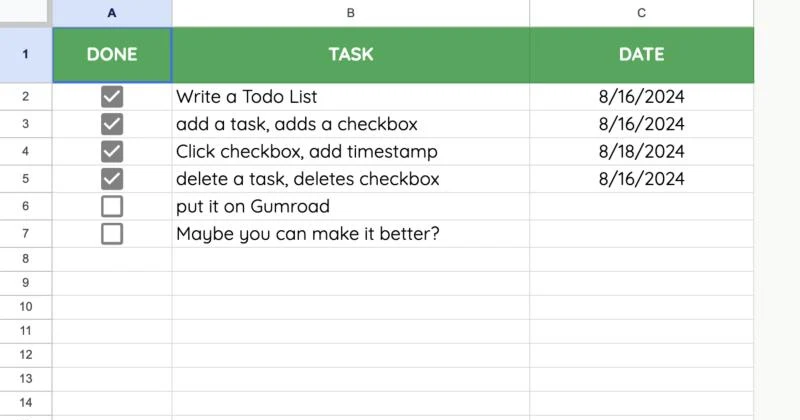
The template as it comes. Its own to-do list is the list of what it does.
One list, however you plan
Daily to-do list
Add today's tasks in the morning. Filter by today's date at night to see what got done.
Weekly to-do list
One list for the week. The dates show which day each task actually happened.
Chores and errands
Groceries, laundry, bills. Share it with the house so everyone ticks the same list.
Work tasks
Add a column for priority or a due date. It's a spreadsheet, so any column you want.
Checklists
Packing, moving, launch day. Tick down the list and see when each step was done.
A done list
Keep everything you ticked. The DATE column turns it into a record of what you finished.
A to-do list spreadsheet, an app, or paper?
| This sheet | To-do apps | Printables | |
|---|---|---|---|
| Price | Free | Often a subscription | Free or a few dollars |
| Where your list lives | Your Google Drive | Their servers | Paper |
| Adds checkboxes for you | Yes | Yes | No |
| Date you finished each task | Yes, filled in for you | Sometimes | If you write it |
| Add your own columns | Any column you want | What the app allows | Start a new page |
Want to know how it fills itself in?
The checkboxes and dates come from a few lines of Apps Script that run every time you edit the sheet. Spreadsheet Automation 101 teaches that, from your first script.
40 lessons. Once you can write an edit trigger, you can make any sheet do the boring parts for you.
See Spreadsheet Automation 101Included with Better Sheets membership, $9 a month.
-
onEdit() trigger
The function that runs every time someone types in the sheet. It's what adds the checkbox.
-
If ( ) { } and checkboxes
Check whether a box is ticked, then do something about it, like writing the date.
-
Send emails from your sheet
The same trigger idea, pointed at your inbox.
Planning past today's list?
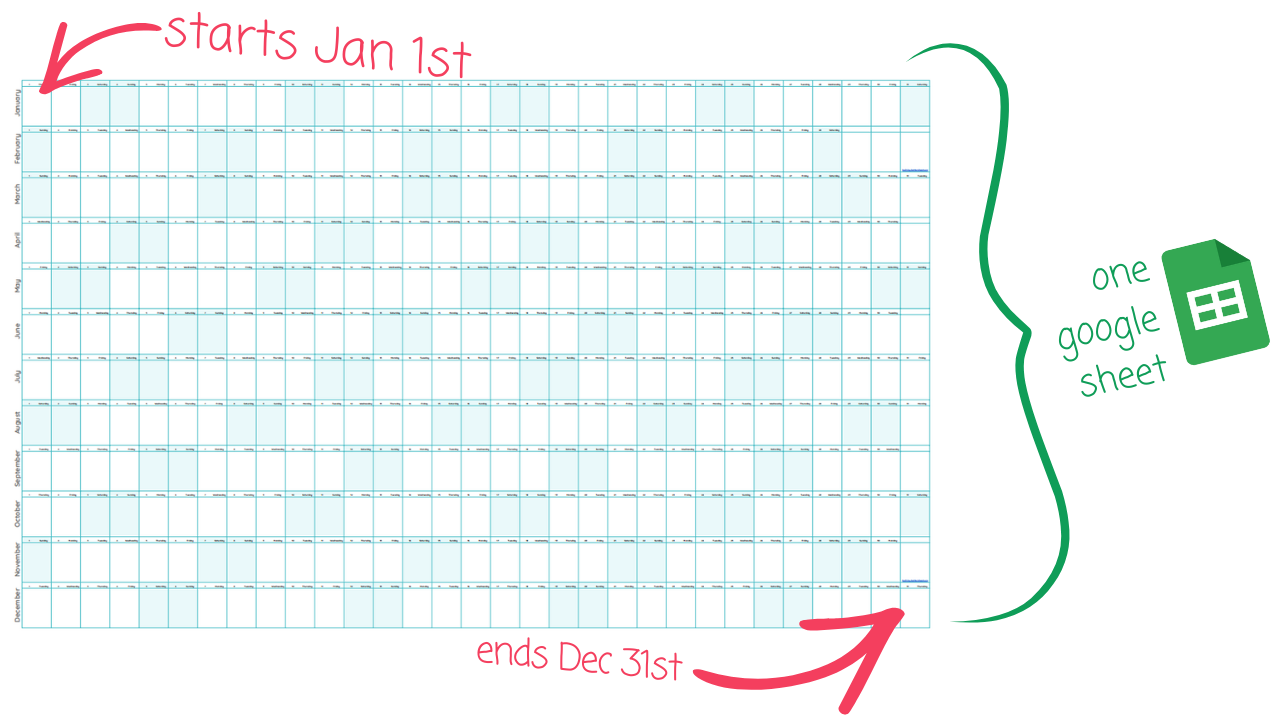
A to-do list is for this week. Big Year is for the rest of it: my free yearly calendar for Google Sheets, January 1 to December 31 on one page, weekends highlighted, every cell yours to fill in.
Also free with a free account. More about Big Year
Want a day list for every day of the month?
Big Year Premium adds Pillar month grids with a column of notes for each day, desk-size MINI, CHECK habits and a school-year layout.
Get Big Year Premium for $10Free for lifetime members.
Make your to-do list do more
66 tutorials for people who make lists: checklists, task lists, planners, reminders, progress bars. Members get every one, and the sheets that go with them. Start with these six.
Interactive to-do list
Tick a chore and its text changes from "Drop off laundry" to "Laundry dropped off". One IF formula. Free to watch.
The ultimate checklist
Checkboxes, colors and a rule that darkens every row you finish. Built from a blank sheet.
Add a timestamp to task lists
Stamp the time a task was done, without the NOW formula.
Uncheck a daily checklist automatically
Start every morning with a clean list.
Checklists that archive done items
Move finished tasks out of the way on their own.
Create an automated task list
Let a script do the busywork on your task list.
Every list tutorial in the library
Checklists and checkboxes
- Laziest Checklist Ever
- Everything I Know About Checkboxes (Cool Hacks)
- 6 Ways to Make Your Checkboxes Better Free
- Magical Things You Can Do with Checkboxes
- Uncheck Every Checkbox in Google Sheets
- Idea Graveyard: A Decaying Checklist
- A Random Motivational Quote Checklist
- Make a Radio Button From Checkboxes
- One Million Checkboxes
To-do and task lists
- Timestamp When Done (With Code)
- FILTER Can Save You From Task Overload
- Use AI to Categorize Your Tasks
- Add Tasks to Google Tasks From Google Sheets
- Build a Kanban Board (Trello Board)
- Project Based Task Management
- Automated Project Management
- A Sheet of Sheets for Project Management
- 5 Ways to Use Sheets for Project Management
- SheetOps: A Business Task Manager
Plan and prioritize
Reminders and automations
- Send Daily Email Updates
- MicroManager: Hourly Email Reminders
- How to Trigger Macros Daily
- Automatic Birthday Reminders and Emails
- Email Yourself a Daily Motivational Quote
- Automatic Weekly Backup of Google Sheets
- Spreadsheet Automation 101: onEdit() Trigger
- Spreadsheet Automation 101: If and Checkboxes
Progress bars and rewards
Tidier lists
- Better Numbers and Bullet Points
- Number and Dot to Rank or Order Lists Free
- Magical Numbering Free
- Create a Self-Adding Dropdown Menu
- Dropdown Chips: Naughty or Nice? Free
- Filter a Multi-Select Dropdown
- Filter by Dates, Checkboxes and Dropdowns Free
- Turn a List Vertical with SPLIT and JOIN
- Clean Up Names in a List
Questions
Is the to-do list template free?
Yes. Make a free Better Sheets account and copy the Automated To-Do List to your Google Drive. No card.
What does "automated" mean here?
A small script in the sheet watches what you type. Type a task and a checkbox appears next to it. Tick the checkbox and the date goes in the DATE column. Delete the task and its checkbox goes too.
Can I use it as a daily or weekly to-do list?
Yes. It's one running list, and the DATE column shows the day you finished each task. Sort or filter by date to see what you did today or this week. To plan the weeks ahead, add Big Year, which is also free.
Does it work in Excel?
No. It's a Google Sheet, and the automatic part is Apps Script, which Excel doesn't run. You can download a copy as Excel, but the checkboxes and dates won't fill in by themselves.
Can I print it?
Yes. File, then Print in Google Sheets. It prints as a plain list with checkboxes, so it doubles as a printable to-do list.
Can I share it with my team?
Yes. It's your copy in your Drive, so share it like any Google Sheet. Everyone sees the same list and the same dates.
Why a spreadsheet and not a to-do app?
The list is yours, with no subscription. Add a column for priority, a due date, a dropdown for who owns the task. An app decides all that for you.
Write the first task
One sheet, your own copy in Google Drive. It adds the checkboxes and dates for you.
Free with a free account.