A Google Sheet that finds local leads for you.
I built this to stop copy-pasting leads from Google Maps.
It pulls real data with Google's Places API, free for up to 1,000 searches a month.
My wife still uses it for her business, and lifetime members have had it for months.
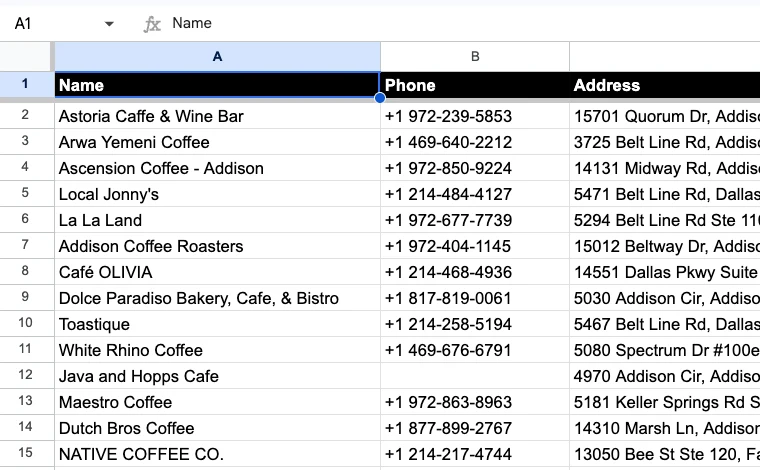
| Name | Phone | Address | Rating | Reviews | Outreached |
|---|---|---|---|---|---|
| Astoria Caffe & Wine Bar | +1 972-239-5853 | 15701 Quorum Dr, Addison, TX 75001 | 4.2 | 1,319 | ✓ |
| Arwa Yemeni Coffee | +1 469-640-2212 | 3725 Belt Line Rd, Addison, TX 75001 | 4.9 | 165 | ✓ |
| Ascension Coffee - Addison | +1 972-850-9224 | 14131 Midway Rd, Addison, TX 75001 | 4.3 | 821 | |
| Local Jonny's | +1 214-484-4127 | 5471 Belt Line Rd, Dallas, TX 75254 | 4.7 | 243 | |
| La La Land | +1 972-677-7739 | 5294 Belt Line Rd Ste 110, Dallas, TX 75254 | 4.4 | 1,336 | |
| Addison Coffee Roasters | +1 972-404-1145 | 15012 Beltway Dr, Addison, TX 75001 | 4.7 | 136 | |
| Café OLIVIA | +1 214-468-4936 | 14551 Dallas Pkwy Suite 100, Dallas, TX 75254 | 4.3 | 242 | |
| White Rhino Coffee | +1 469-676-6791 | 5080 Spectrum Dr #100e, Addison, TX 75001 | 4.1 | 47 |
| Name | Phone | Address | Rating | Reviews | Outreached |
|---|---|---|---|---|---|
| Tedeschi Plumbing Service, LLC | +1 412-486-1299 | 3812 William Flinn Hwy, Allison Park, PA 15101 | 5 | 128 | ✓ |
| Cornwell Plumbing | +1 412-980-1038 | 199 Kleber Rd, Glenshaw, PA 15116 | 5 | 68 | ✓ |
| Taggart Plumbing, LLC | +1 412-207-3496 | 1409 Duncan Ave Ste 205, Pittsburgh, PA 15237 | 4.7 | 720 | |
| Chris Driscoll Plumbing | +1 412-335-0408 | 358 Wagon Wheel Trail, Wexford, PA 15090 | 5 | 762 | |
| East End Plumbing & Mechanical, Inc. | +1 412-782-1944 | 1028 Executive Dr, Gibsonia, PA 15044 | 5 | 227 | |
| Pine Creek Plumbing | +1 412-213-6961 | 545 Pine Creek Rd, Wexford, PA 15090 | 4.9 | 487 | |
| Revelation Plumbing | +1 412-618-1165 | 120 Seville Ave, Pittsburgh, PA 15214 | 4.9 | 601 | |
| Greater Pittsburgh Plumbing | +1 412-223-2560 | 10263 Perry Hwy, Wexford, PA 15090 | 4.7 | 1,270 |
| Name | Phone | Address | Rating | Reviews | Outreached |
|---|---|---|---|---|---|
| Alpine Dentistry | +1 619-445-8896 | 1620 Alpine Blvd Unit 121, Alpine, CA 91901 | 4.9 | 279 | ✓ |
| Alpine Pediatric Dentistry | +1 619-445-8881 | 1620 Alpine Blvd Ste 210, Alpine, CA 91901 | 5 | 97 | ✓ |
| Bonita Dental Center | +1 619-267-2115 | 5050 Bonita Rd, Bonita, CA 91902 | 4.9 | 661 | |
| Bonita Family Dental | +1 619-479-8703 | 4424 Bonita Rd, Bonita, CA 91902 | 4.6 | 552 | |
| Bonita Point Dental Arts, Family Dentistry | +1 619-482-9700 | 145 Willow St #100, Bonita, CA 91902 | 4.9 | 966 | |
| Bonita Del Rey Dental Care | +1 619-482-3264 | 690 Otay Lakes Rd #260, Chula Vista, CA 91910 | 4.8 | 240 | |
| Francisco Mondragon DDS, Inc. | +1 619-475-8222 | 180 Otay Lakes Rd Unit 206, Bonita, CA 91902 | 5 | 193 | |
| Dr. Jacob Berger D.D.S | +1 619-479-2111 | 180 Otay Lakes Rd Unit 204, Bonita, CA 91902 | 5 | 12 |
Three searches we did. Click a tab to see each list.
$10 one time. Free for Better Sheets lifetime members.
57 people are already using it.
-
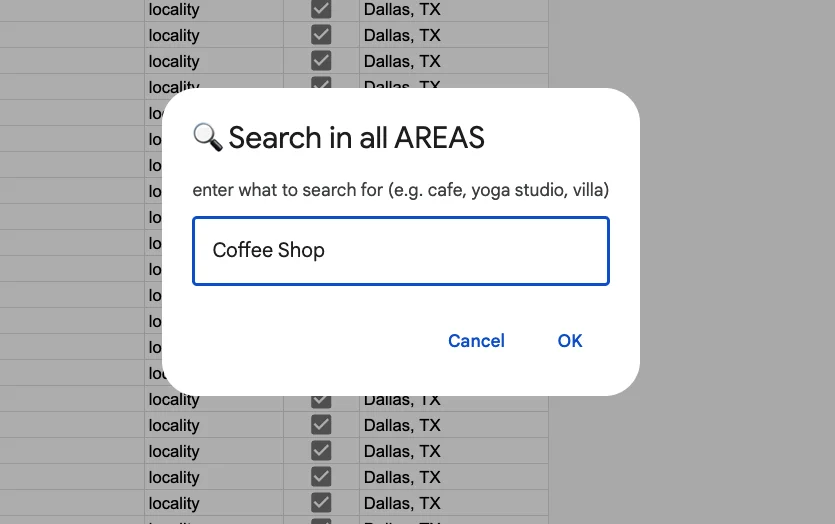
coffee shop in Dallas
Find
Search every part of a city on Google Maps.
-
Outreach
Reach out to each lead in one click.
-
Track
Click Outreached and the lead goes onto one shared tab, your simple CRM. New searches highlight anyone you've already contacted.
Sheet First
Lead apps like Outscraper and Apify find businesses on Google Maps, then export them to CSV, Excel or Google Sheets. You pay for the app, and then you work in a spreadsheet anyway.
This is a Google Sheet first. It finds the leads inside the sheet, using Google's own Places API, so the data comes straight from Google Maps.
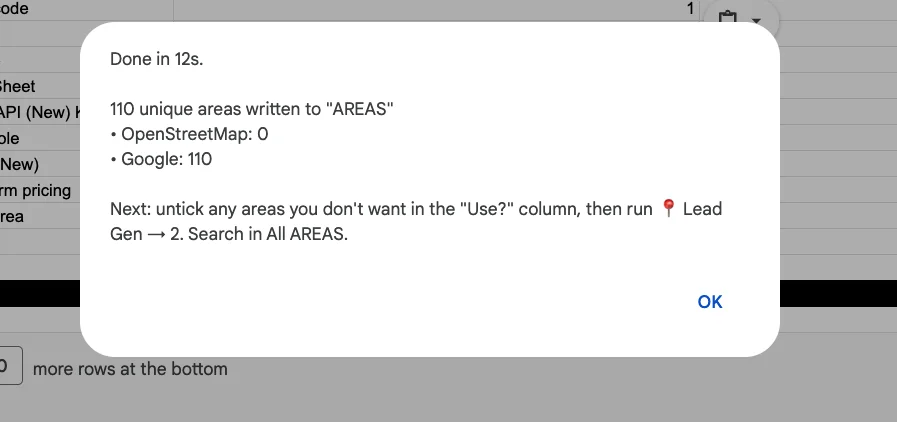
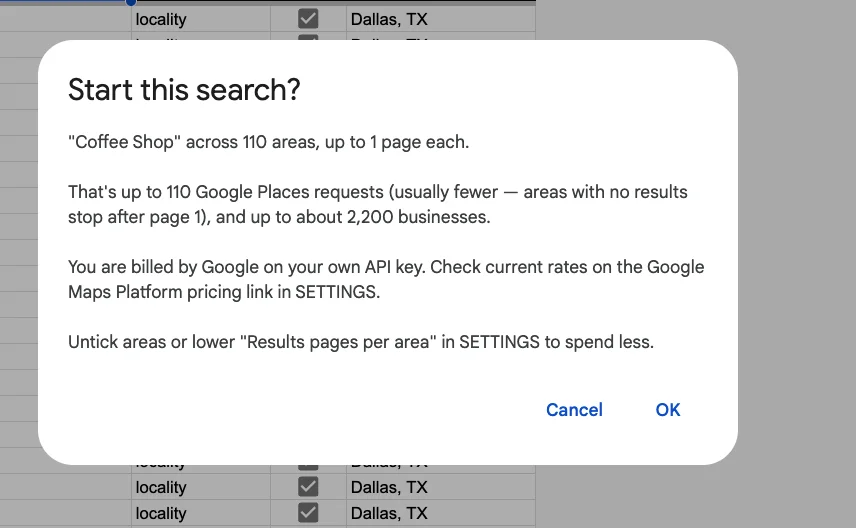
Get a free API key from Google, paste it into the sheet, and search. Google gives you 1,000 free searches a month, and each area is one search. Dallas took 110.
Why I made this
For my wife's business, we needed to message about a thousand stores. Not to sell to them on the spot. Just to find out which ones were interested in stocking a new product.
What we did by hand
- Search Google Maps for the kind of store in our city. Get about 20 results.
- Look up every neighbourhood in the city. OpenStreetMap listed 112.
- Search Google Maps again in each neighbourhood. 112 searches.
- Copy each store's name, phone number and address into a Google Sheet, 20 at a time.
- Delete the stores we already had.
- Start over for the next kind of store: cafés, brunch spots, tea shops. 112 more searches each.
One kind of store took a whole day. All of them took days and days. The other option was paying $200 to $300 for a lead list.
What we do now
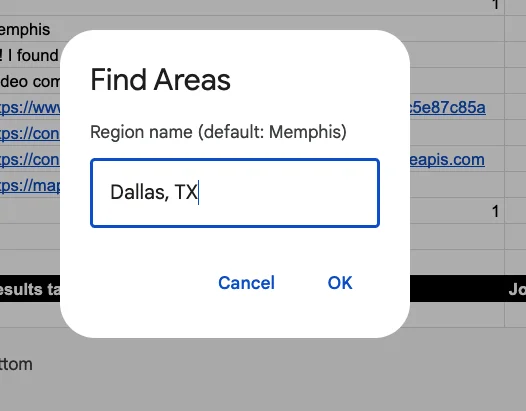
- Type the city. The sheet finds every neighbourhood in seconds.
- Type the kind of store. The sheet searches every neighbourhood, removes duplicates, and puts each store in a new tab with its phone number.
- Message each store. Tick the row when you're done, and it turns green.
One search takes two to three minutes. It uses Google's Places API: free for most searches, then cents.
We messaged 110 stores in a few days, got tons of replies, and made 5 deals directly from this outreach. It turned into about $200 a month of revenue for us. Not life changing, yet. Now we're working toward a thousand.
Stop copy/pasting Google Maps results
Search Google Maps for leads in a big city and you only see the top of the list. But a city is really dozens of suburbs, neighbourhoods and areas, each with its own shops. The sheet breaks your city into all of them and searches each one. More areas to search, more businesses found.
-
1. Break up the city
Type a city. The sheet uses OpenStreetMap and Google's Places API to list every suburb, neighbourhood and area in it. Dallas has 110.
-
2. Pick your areas
Untick any areas you don't want leads from. You decide where to search.
-
3. Search every area
The sheet searches each area, removes duplicates, and puts every lead in one tab.
Data Includes
- Business name
- Phone number
- Website
- Full address
- Star rating
- Review count
- Google Maps link
- Message link
And it's a spreadsheet
- No duplicates. A business found in three neighbourhoods appears once.
- No repeats. Contacted rows stay green on every tab, next month and next year.
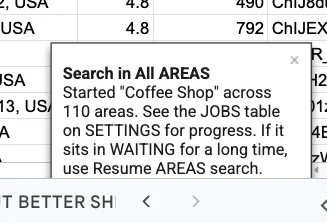
- Runs while you're gone. Close the sheet, come back to a finished list.
- Change it how you like. Sort, filter, add columns, hand it to a VA, push it to your CRM.
Takes less than 5 minutes to set up
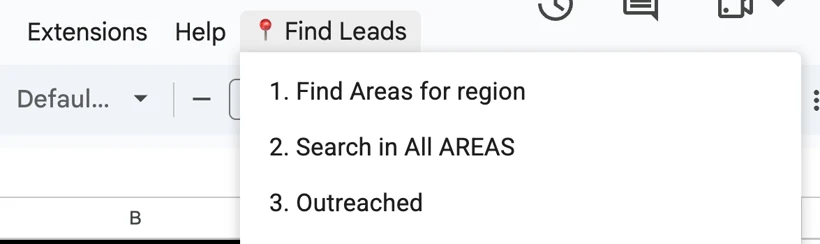
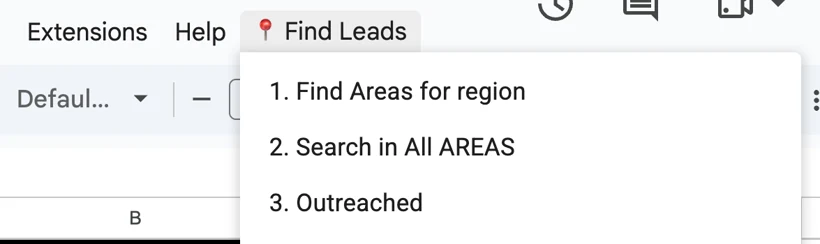
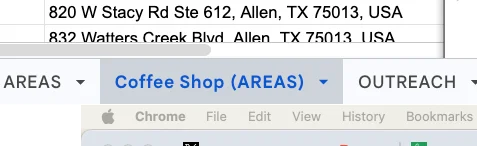
Once you have your free Google Maps Places API key and a copy of the sheet, you're two menu clicks away. Here is how we found every coffee shop in Dallas.
- 1. Find Areas for your city.
- 2. Search in All AREAS for what you sell to.
- 3. Open the new tab and start messaging.
Watch the whole thing in 4 minutes. Watch on YouTube
You need leads
If you sell to local businesses, search for the ones you sell to. Pick a new kind of business or a new town, and search again.
Web designers
Sort by the empty Website column. No website? They need you.
SEO and marketing agencies
Low rating with lots of reviews? Offer to help fix it.
Social media managers
Pitch the shops with the least reviews first. They need the help.
Roofers, cleaners and contractors
Sell to businesses that hire you again and again, not one homeowner at a time.
Wholesalers and suppliers
Coffee beans to cafés, flour to bakeries. Find every buyer in your delivery area.
Software and POS sales reps
Put a whole territory in one tab, then split it between reps.
Photographers and videographers
Find every venue, planner and florist that could send you work.
Recruiters and job seekers
Call every clinic in the city, even the ones not hiring yet.
Virtual assistants
Sell lead lists to clients. Make one in minutes.
Opening a new business
Count your competitors, check their ratings, and find the neighbourhood with none.
Real estate and investors
See which businesses are already on a street before you buy or lease there.
Teachers
Find local businesses that might sponsor a class project, a robotics team or a field trip.
Event organisers
Find sponsors for your event: every business in the city that might want its name on the banner.
Nonprofits
Find raffle donors, venues and fundraiser partners across a whole city.
Or make one list, once
- Every estate planning attorney in Baltimore.
- Every dental clinic in San Diego County.
- Every car dealership across New York and New Jersey.
Three searches we did
We searched three cities. These are the tabs the sheet made.
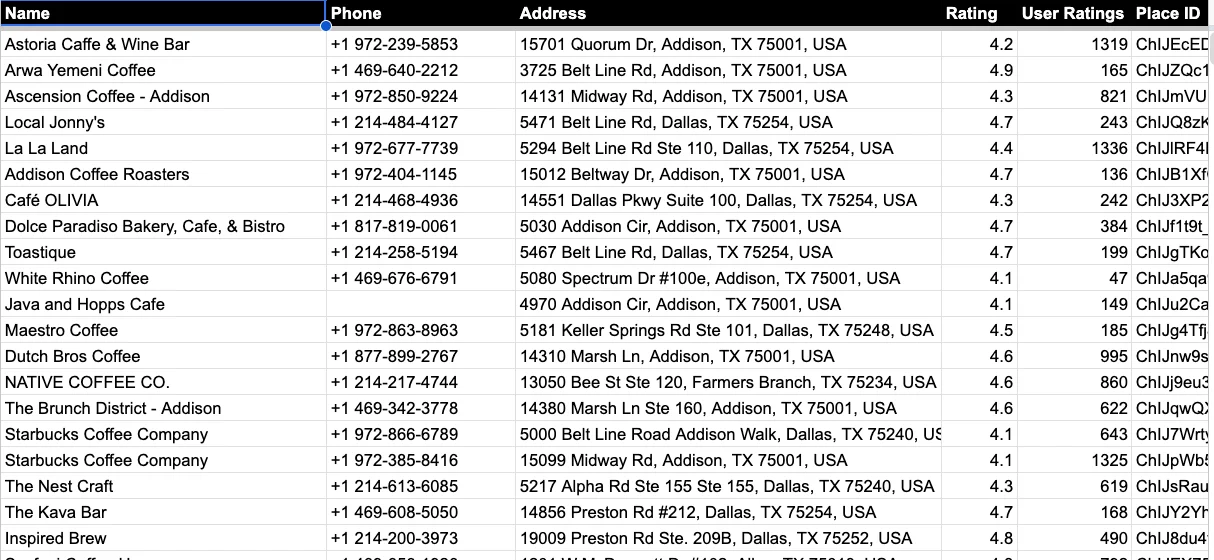
795 coffee shops
Dallas, TX · 110 areas
Frida asked for every coffee shop in Dallas. One search covered 110 neighbourhoods and suburbs, from Addison to Oak Cliff.
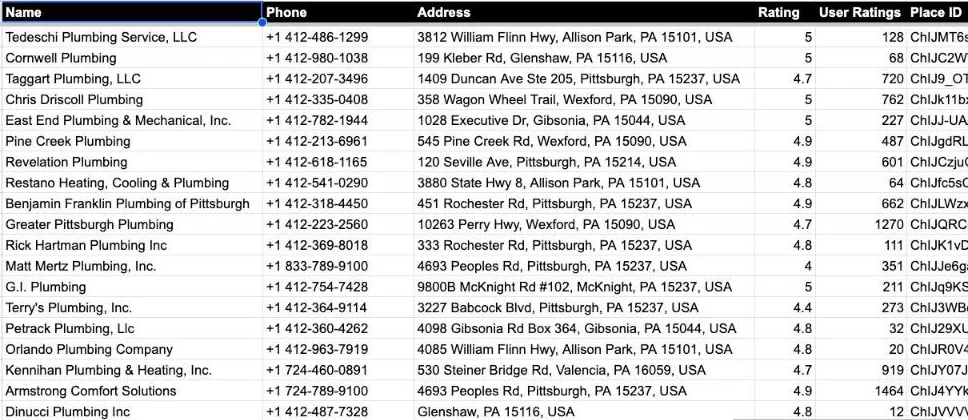
295 plumbers
Pittsburgh, PA · 94 areas
Joseph sells AI automation to plumbers and HVAC businesses. One search found every plumber around Pittsburgh, with phone numbers.
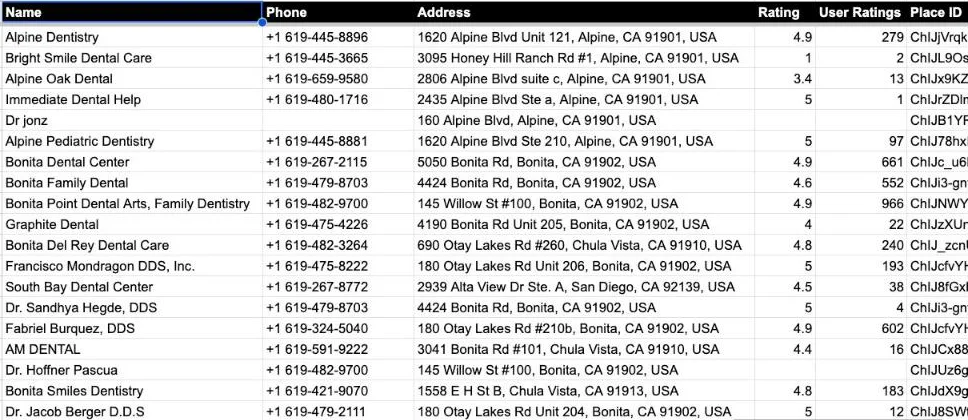
967 dental clinics
San Diego, CA · 100 areas
Selling to dentists? One search found every clinic in San Diego County, from Alpine to Chula Vista.
What would you search for? Get your copy and try it tonight.
See it in use
I ran the sheet for real on 18 ideas and wrote up each one: the list, who to skip, and the first message I'd send.
Bring your own Google Maps key
Free to create, five minutes, video included. Google's free monthly allowance covers most searches. Searching a whole big city can cost a few dollars, paid to Google. We add nothing on top. Work out your own number with the Google Maps API pricing calculator.
What it doesn't do
- It doesn't send messages for you. You click to send each one.
- It doesn't find emails yet.
- It needs a Google Maps API key.
Two ways to get it
Local Lead Finder
$10 one time
- Your own copy of the sheet
- The setup video
- No subscription
Better Sheets lifetime
Free with lifetime
- Local Lead Finder included
- Every other Better Sheets tool
- 600+ tutorials
Already a member? Log in and unlock it.
FAQ
How much does it cost?
$10, one time. Better Sheets lifetime members get it free.
Do I need a Google Maps API key?
Yes. It's free to create and takes about five minutes. A setup video is included. Google gives every account a free monthly allowance that covers most searches. Searching a whole big city can cost a few dollars, paid to Google. We add nothing on top.
Is this a Google Maps scraper?
It does the job people use a Google Maps scraper for, without scraping. It uses Google's official Places API with your own key, so it keeps working. It exports every Google Maps result for your search, in every neighbourhood of a city, straight into Google Sheets.
Is it legal to pull business data from Google Maps?
This sheet doesn't scrape. It gets the data through Google's official Places API, using a key in your own Google account. The outreach is still up to you: the sheet never sends anything, so follow the rules for contacting businesses where you live.
Will Google block me or ban my account?
There's nothing to block. No proxies, no captchas, no bot tricks, because nothing is being scraped. Google sees ordinary API requests from your own key. The only limit is the quota on your key, and you set that in Google Cloud.
Is the Google Maps API still free?
For most people, yes. Google gives up to 1,000 Places searches a month free. Here each area of a city is one search (per page of 20 results), so Gainesville, Florida's 69 areas used up to 69. Past the free amount it's cents per search, billed to you by Google. The sheet shows the most a search could cost before it runs.
How much does a list of every business in a city cost?
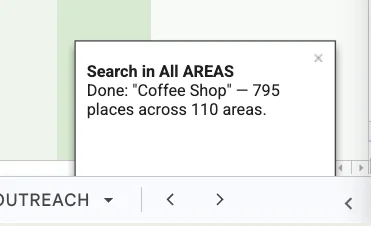
Usually nothing past the $10. Every coffee shop in Dallas took 110 searches and found 795, well inside the 1,000 free a month. Go over and a whole big city is a few dollars, paid to Google. Scraper services charge per record and lead sellers charge per contact. Here you pay once and search as often as you like.
Is my API key safe in the sheet?
It lives on the SETTINGS tab of your own copy, in your own Google Drive, so only people you share that copy with can see it. Treat it like a password: never post the sheet publicly with the key filled in. To lock it down, open the key in Google Cloud, choose Restrict key under API restrictions, and tick Places API (New). Leave Application restrictions on None, because the sheet calls Google from Apps Script, not a website. If the key ever leaks, delete it and make a new one in a minute.
Why do I get more results than Google Maps shows me?
Google Maps shows about twenty results for a search. The sheet searches every neighbourhood of the city one by one, then removes duplicates. When we searched for coffee shops in Dallas, it found 795 in 110 areas.
What's in every row?
Business name, phone, website, address, rating, review count, and a Google Maps link. A message link opens with your message already typed.
Does it send messages for me?
No. You send each message yourself. The sheet opens it for you, already typed.
Does it find email addresses?
Not yet. You get phone numbers and websites. Most local businesses list a contact email on their website.
Will I message the same business twice?
No. Contacted rows turn green and stay green across every tab and every future search, so you never message the same place twice.
Can I start a big search and walk away?
Yes. Big searches keep running after you close the sheet. Come back to a finished list.
Can I use it in any country?
Yes, anywhere Google Maps has listings. Type the place the way you'd type it into Google Maps.
Is buying a lead list better?
A bought list is made once and sold to everyone, so it goes stale and every business on it has already been pitched by the last buyer. This list is made the moment you search, from Google Maps listings the businesses keep up to date themselves, and nobody else has it.
How do I find businesses without a website?
Search, then sort by the Website column. The empty cells are businesses with no website on Google. Out of every salon in Chattanooga, 131 had none. That's a list of people who need a web designer.
Can ChatGPT or Claude find leads for me?
A chatbot can explain how, or write you a scraper you then have to run and fix. It can't hand you every dentist in San Diego with phone numbers and ratings. That needs Google's live data, area by area. This sheet does exactly that, then puts the result where you can sort it, filter it and work through it.
Can I export Google Maps results to a CSV?
Yes. Each search makes its own tab. From there, File → Download → CSV or Excel gives you a file for your CRM or a VA.
Is it a Chrome extension or an app?
Neither. It's a Google Sheet with Apps Script inside. Copy it to your Drive and it runs in your own Google account.
By Andrew Kamphey, Better Sheets