Turn  URLs
URLs
into ACTIONS
Google Sheets links can copy, preview, & download sheets.
Without opening the Google Sheet!
All Your Magic URLs
CSV Export
DownloadDownload your sheet as a comma seperated file. add "?gid=" to download a specific tab.
Excel Export
DownloadDownload your sheet as an Excel file (.xlsx)
Need a dedicated Excel generator page? Use /xlsx.
ODS Export
DownloadDownload your sheet as an OpenDocument Spreadsheet (.ods) for LibreOffice, OpenOffice, and other ODF apps.
TSV Export
DownloadDownload your sheet as a tab seperated file. add "?gid=" to download a specific tab.
gviz CSV Export
DownloadDownload your sheet as a CSV file. Add 'tq=SELECT' to run SQL like queries. Add 'sheet='' or 'gid='' for a tab. add 'range='' to select a range of cells
Copy Sheet
Most UsedCreate a copy of the sheet in your Google Drive. Very shareable link so that others can make copies easily if they have view access.
🔗 Embedded Google Sheet Preview
publically viewable sheets onlyGoogle blocks in-page previews on other sites. Open the embedded view in a new tab, or copy the Embedded URL above for your own site.
Open embedded view in new tab
Google Sheets Can Do More Than Google Tells You
Most people only know how to click Share. But every Google Sheet also has special shareable URLs.
Sheet to CSV
Create lightweight CSV links for imports, automation pipelines, and systems that do not support formulas or styling.
Get a CSV download URL
Sheet to Excel
Share workbooks with teams that use Excel and need a familiar file they can open, edit, and circulate quickly.
Generate XLSX export URL
Sheet to PDF
Export polished, fixed-layout reports for clients, approvals, and archives when formatting consistency matters most.
Build a PDF export URL
Copy URL Generator
Create links that help duplicate or copy Sheets, perfect for templates, onboarding kits, and repeatable client setups.
Create a sheet copy URL
All URL Hacks
Generate CSV, XLSX, PDF, copy links, and more from one sheet URL when you need flexibility and speed.
Open the all-in-one generator
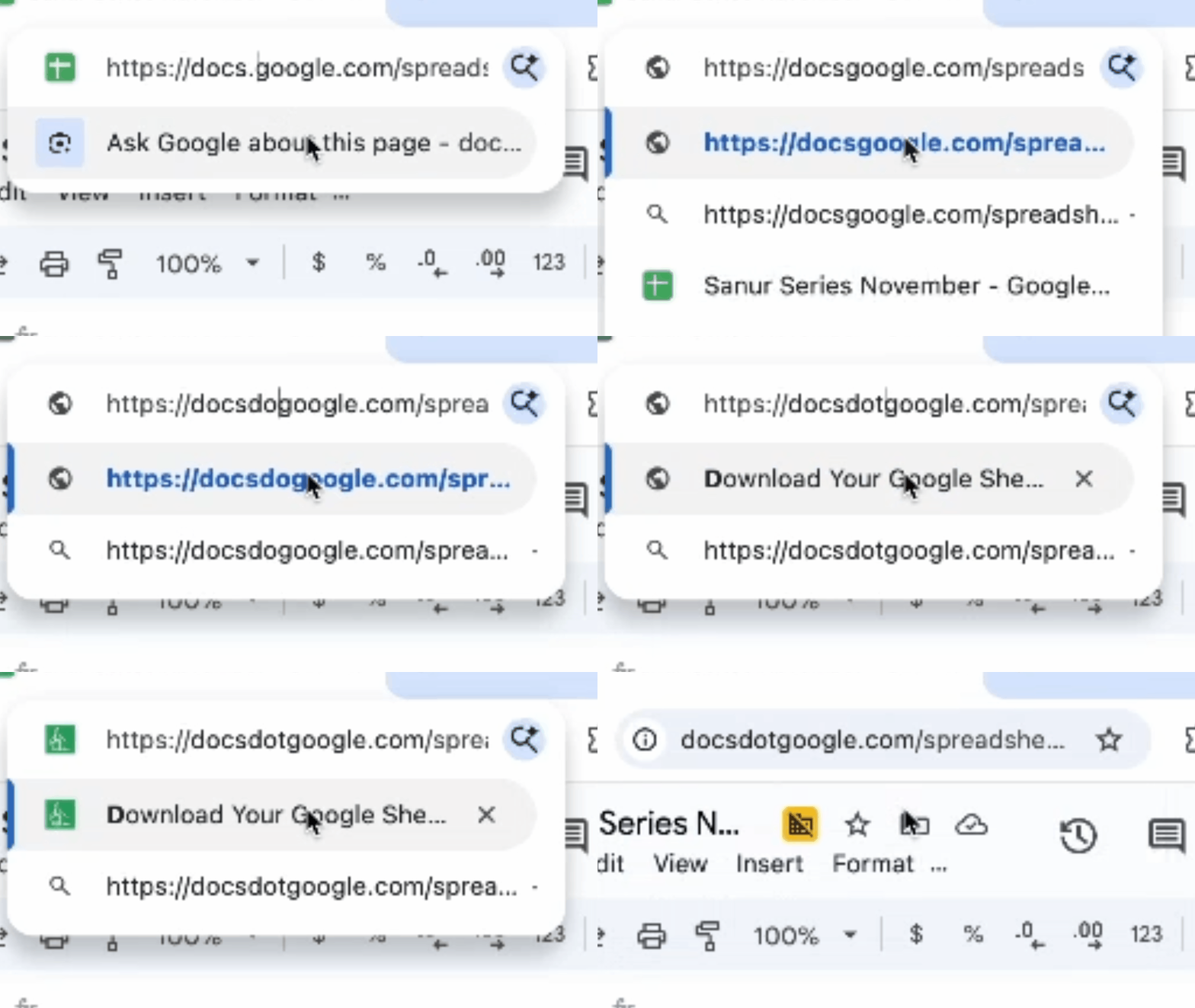
try this trick
Go to any Google Sheets URL
Replace docs.google with docsdotgoogle
This is for power users only! Beware, it's addictive.
💡 New URL Hack
Change docs.google.com → docsdotgoogle.com.
it'll bring you here with your sheet already loaded.
Get Your Sheet URL
How to get your Sheet URL from your Google Sheet so that anyone with the link can download your sheet.

In your sheet, click share

Change link settings to "Anyone with the link"

Copy the link, and paste above.
Use a URL to Create New Sheets Instantly
Use sheet.new to create a new Google Sheet instantly
💡 Pro Tip
You can use sheet.new/2, sheet.new/3, etc.
to create sheets in different Google accounts if you're logged into multiple accounts.
The number corresponds to which account you want to use!
✨ Create a New Google Sheet from Your Mac Touch Bar
Did you know you can launch a brand new Google Sheet in a split second from your Mac’s Touch Bar? If you have a MacBook Pro with a Touch Bar, you can set up a shortcut in under a minute. Just one tap and you’re ready to go!
How To Install
Copy this code
Add this AppleScript to the Automator app.
    tell application "Google Chrome"
        activate
        open location "https://sheet.new/2"
        tell application "Google Chrome" to activate
    end tell
- Works on MacBook Pro models with Touch Bar (2016–2020 and newer “Pro” models with Touch Bar feature)
- Set up in under a minute using Automator ➔ Quick Action
- Open the script from the Touch Bar or assign a global keyboard shortcut!
This is a unique Apple-only trick. Lightning fast, super convenient, and 100% free. The shortest path to a blank Google Sheet!
You built the link. Now learn the systems behind it.
If this the URL generator saved you one step, membership helps you save hours every week with practical Google Sheets workflows, templates, and tutorials.
- Step-by-step tutorials that go beyond basic exports
- Member templates built for real reporting workflows
- Automation lessons for repeatable weekly tasks
- Clear walkthroughs you can apply immediately
Only Geniuses Know These Google Sheets Download Hacks
Pick one answer per question. The right choice and a short explanation show up immediately.
2. What do you add to a Google Sheets URL to download one specific tab?
3. How do you download a Google Sheet as a PDF from the URL alone?
4. You see ?gid=123456 in a Google Sheets link. What is it for?
5. Which export format accepts a query string to filter rows (for example, tq=SELECT)?
Question 1 of 5
0 / 5
Frequently Asked Questions
Do I need to give edit access to download as PDF?
No. You only need to change the sharing settings to "Anyone with the link" and give at least view access. This makes the PDF downloadable, not the sheet editable.
Will this work with multiple tabs?
Yes. The PDF download will include the currently selected sheet tab, and all sheets. The CSV download only includes the selected sheet. Watch this youtube video to find out how download CSV as Zip file.
Can I customize the margins or scale?
Not directly here, but you can adjust scaling and margins in the sheet's print settings before generating the link. These settings will be respected in the export URL. Check out our PDF options page for more advanced options.
Why is my PDF blank or missing content?
Make sure the sheet is publicly viewable and you've selected the correct tab. Also double-check if "fit to width" is unchecked. Sometimes zooming too far out can hide content.
Does this work on mobile?
Yes! You can generate and open the download link on mobile browsers. However, editing the PDF URL options is easier on desktop.
What's the difference between preview and htmlview?
Preview mode shows your sheet without menus but maintains Google Sheets styling. HTML view renders the sheet as a basic HTML table, which is better for embedding or when you need a simpler format.
Google Sheets Tools
Formulas, exports, add-ons, and templates. Pick a tool and finish the job in your sheet.
-
Formula Generator Formula Generator
Describe what you need. Get a working formula to paste into your sheet.
-
Conditional Formatting Generator Conditional Formatting Generator
Describe the highlight rule. Get conditional formatting ready to apply.
-
Regex Replacer Regex Replacer
Clean or reshape text with a REGEXREPLACE formula. No regex expertise required.
-
Apps Script Explainer Apps Script Explainer
Paste Apps Script code. Get a plain-English summary, debug notes, or walkthrough.
-
Make a Copy Link Make a Copy Link
Paste a sheet link. Get a URL that opens a "Make a copy" prompt for anyone.
-
Sheet to PDF Sheet to PDF
Paste a public sheet URL. Download it as a PDF.
-
Sheet to CSV Sheet to CSV
Paste a public sheet URL. Download it as a CSV.
-
Embed Spreadsheets Embed Spreadsheets
Paste a sheet URL. Get iframe code to show a live sheet on your site.
-
Sell Daily Sell Daily
Turn rows in a Google Sheet into daily social posts.
-
OnlySheets OnlySheets
Gate your Google Sheet behind a simple paywall.
-
Daily Tracker Daily Tracker
Track habits, chores, and tasks in one daily sheet.
-
Atomic Sheets Atomic Sheets
100 copy-ready templates for ops, finance, marketing, and more.
-
Google Sheets Add-ons Google Sheets Add-ons
Sheet Styles, Spintax, Quiz Builder, and more. Install from one directory.
-
Tiny Sheets Tiny Sheets
Trim blank rows and columns in one click. Smaller files, faster sheets.
-
Sheet Styles Sheet Styles
Polished cell styles inside Google Sheets. No conditional-formatting workarounds.
-
SheetOps SheetOps
Assign tasks, sync Calendar and Gmail, and manage recurring work from one sheet.
-
Spintax Spintax
Turn {Hello|Hi|Hey} syntax into random text variants in any cell.
-
View All Tools View All Tools
Browse the full catalog of templates, generators, and paid tools.