You want every business from a Google Maps search in a spreadsheet: names, phone numbers, websites, ratings. Not the 20 Maps shows you, all of them. So you search for a free Google Maps scraper, and page 1 is Chrome extensions, hosted scraping tools with a free tier, scrapers on GitHub, Reddit threads from people who built their own, and YouTube videos about scraping “unlimited” leads. The AI answer at the top lists Outscraper, G Maps Extractor, a few Chrome extensions and a GitHub project that runs in Docker. What almost none of them mention is that Google already has an official way to hand you this data: the Places API, with a free monthly allowance.
That’s what this page is about. I built Local Lead Finder, a $10 Google Sheet that does the job people use a Google Maps scraper for, without scraping. It asks Google for the data through the Places API (New), using your own key, and Google gives up to 1,000 searches a month free. Below I compare it plainly with the kinds of tools on page 1: what each one needs and where your data ends up. Then one real run: Google Maps showed me 20 plumbers in Boise, and the sheet found 98.
TL;DR
- Local Lead Finder uses Google’s official Places API, not scraping; it found 98 Boise plumbers where Maps showed 20.
- It needs your own free Places API (New) key; Google gives up to 1,000 searches a month free, one per area.
- The most common mistake is searching one city name once; one search only goes 20 deep, so search every neighborhood.
Who this is for
- Freelance web designer: you want every local business in a category in one sheet so you can sort by the empty Website column.
- Local SEO freelancer: you want ratings and review counts for a whole category of businesses without copying them by hand.
- Virtual assistant: clients ask for lead lists, and this builds one in a Google Sheet you can hand straight over.
- Outside sales rep: you want your whole territory in one tab, with phone numbers, instead of 20 results at a time.
- Small business owner doing your own outreach: you’ve tried copy-pasting from Google Maps and want a way that doesn’t take all day.
Before you start
- A Google Places API (New) key
- Local Lead Finder set up in your Google Drive
- Local Lead Finder itself
- A keyword and a region, like plumber in Boise, Idaho
- A Google account to authorize the sheet the first time it runs
Don’t have a Places API key yet? How to get one free. Haven’t set up the sheet? Setup takes 5 minutes.
What people mean by a free Google Maps scraper
When I looked at what ranks for “free google maps scraper”, the tools fall into four kinds. They all try to solve the same problem: Google Maps shows you a list, and you want that list in a spreadsheet.
Kind of tool What you need Where your data lands Chrome extension The extension installed, and Google Maps open in your browser Depends on the extension, usually a file you export Hosted scraper (Apify, Outscraper and similar) Their website or app Their dashboard, then a file you export (Apify’s page lists JSON, CSV, Excel, XML and HTML) GitHub project (like gosom/google-maps-scraper) Docker, Go, or their prebuilt program, run on your own computer A CSV or JSON file, or a database (per its README) “Scrape with ChatGPT or Claude” videos An AI coding tool, and a scraper it writes that you then run and fix Wherever the script writes it Local Lead Finder A free Places API (New) key and a copy of the sheet A new tab in your Google SheetThe first four are scrapers: they read Google Maps pages, or run code that does. The GitHub project’s own README says the easiest way to use it is with an AI coding agent like Claude Code. That’s a real option if you’re comfortable running code. Most people searching for a free scraper just want the list.
And almost every one of them ends the same way: a file you download and open in a spreadsheet anyway.
The other way: Google’s own Places API
Google has an official way to get Maps data. It’s called the Places API, and the current version is Places API (New). You turn it on in Google Cloud, copy a key, and any tool you give that key to can ask Google for places directly. No reading pages, no browser open, no proxies.
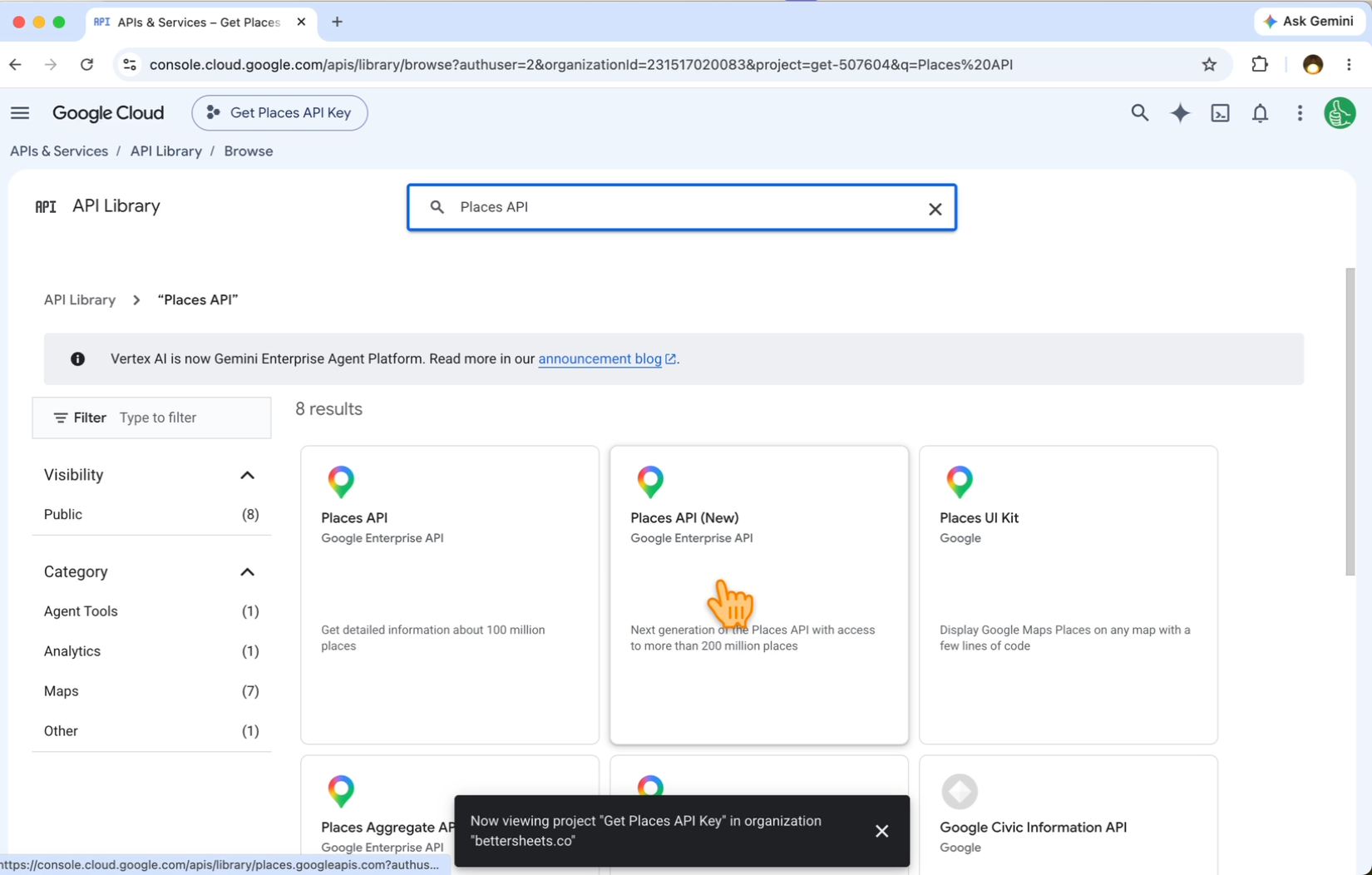
Two things make this the “free” part:
- The key is free to create. Google asks you to connect a billing account, but it gives up to 1,000 searches a month free. Here’s every screen, step by step.
- The key is yours. It lives in your own Google Cloud project, and you can see and limit what it uses there.
How the sheet does a scraper’s job without scraping
Local Lead Finder is a Google Sheet with the Places API wired in. You paste your key into SETTINGS, and everything else runs from one menu.
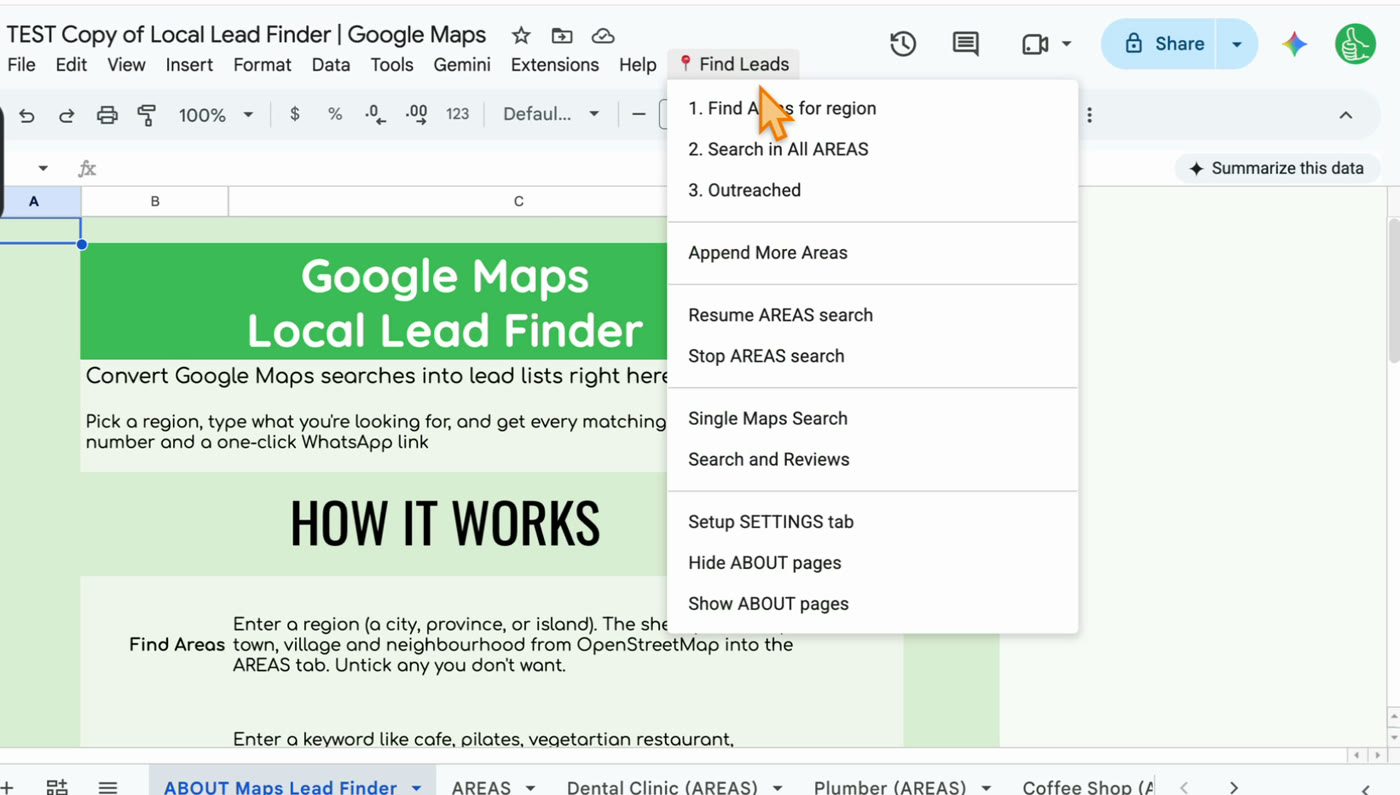
- Find Areas for region. Type a city. The sheet uses OpenStreetMap and your Places API key to list every town and neighborhood in it, in the AREAS tab. Untick any you don’t want.
- Search in All AREAS. Type what you’re looking for. The sheet runs “keyword in area” for every ticked area, removes duplicates, and writes everything to a new tab.
- Outreached. After you contact a business, mark its row. It turns green, copies to the OUTREACH tab, and stays green in every future search.
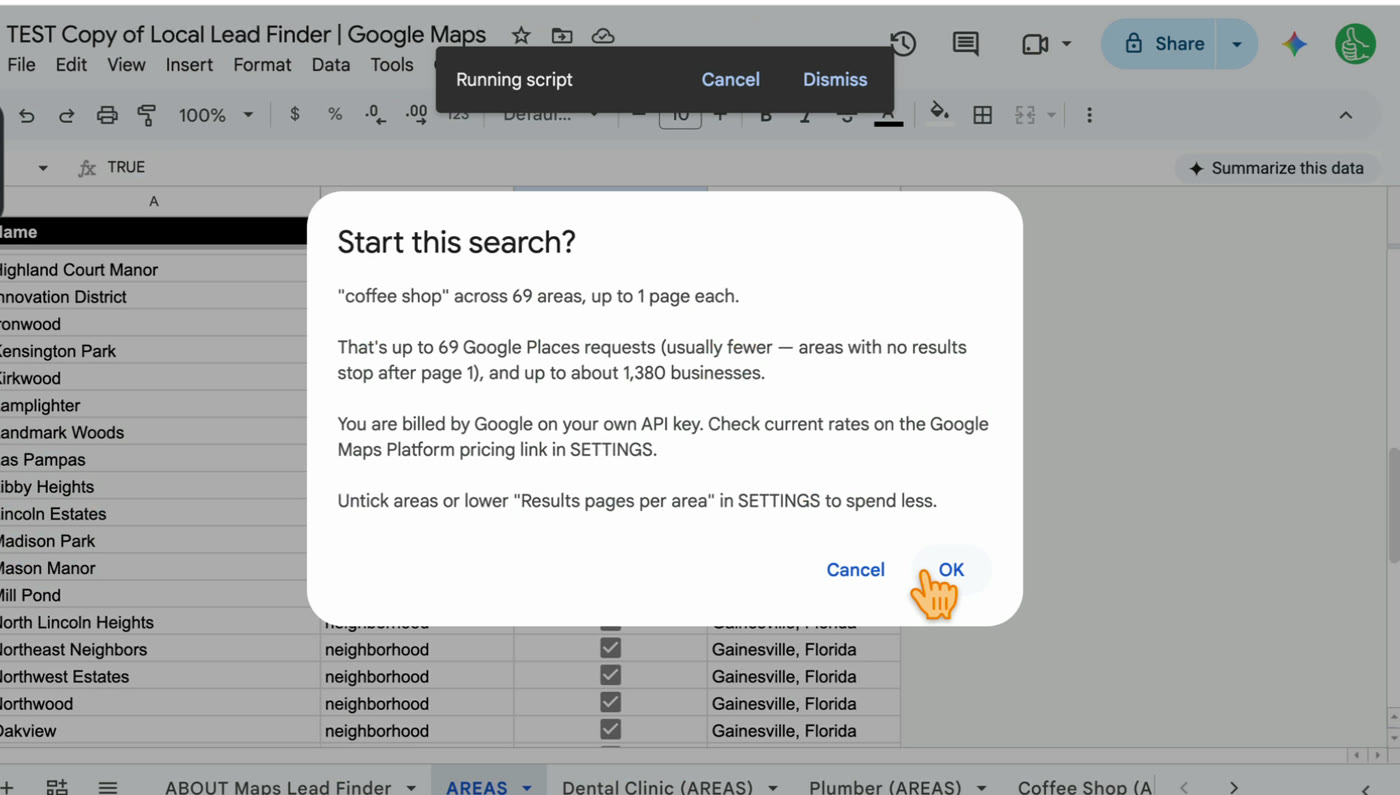
Before a search starts, it tells you the most it could cost. Each area is one Google Places request per results page, so a city with 69 areas is up to 69 requests.
Each row has name, phone, address, rating, number of reviews, Place ID, Google Maps link, WhatsApp link, website, and the area it was searched in.
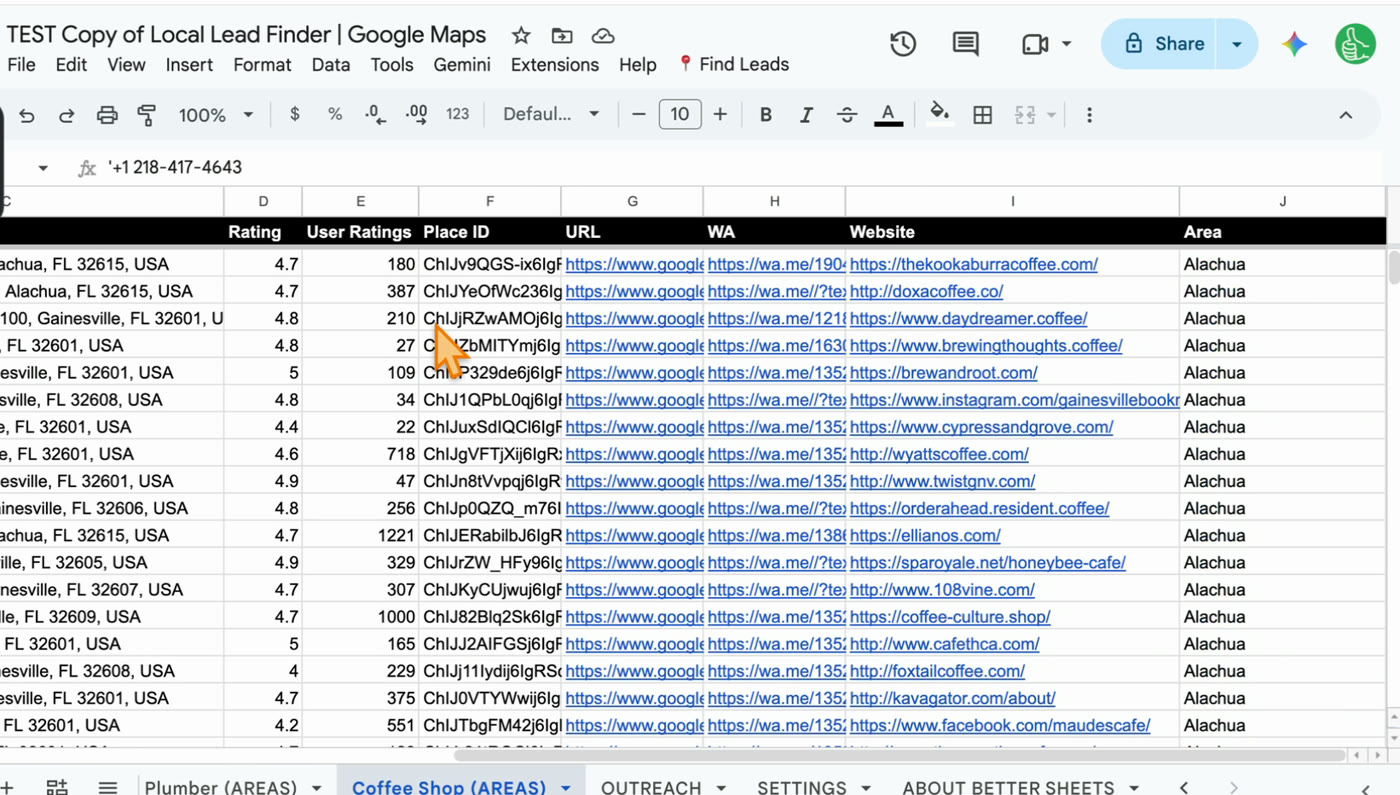
The WhatsApp link already has your message typed in. You write that message once in SETTINGS.
One real run: 20 plumbers on Maps, 98 in the sheet
Here’s why searching every neighborhood matters. I searched “plumber in Boise, ID” in Google Maps and scrolled to the bottom of the list.
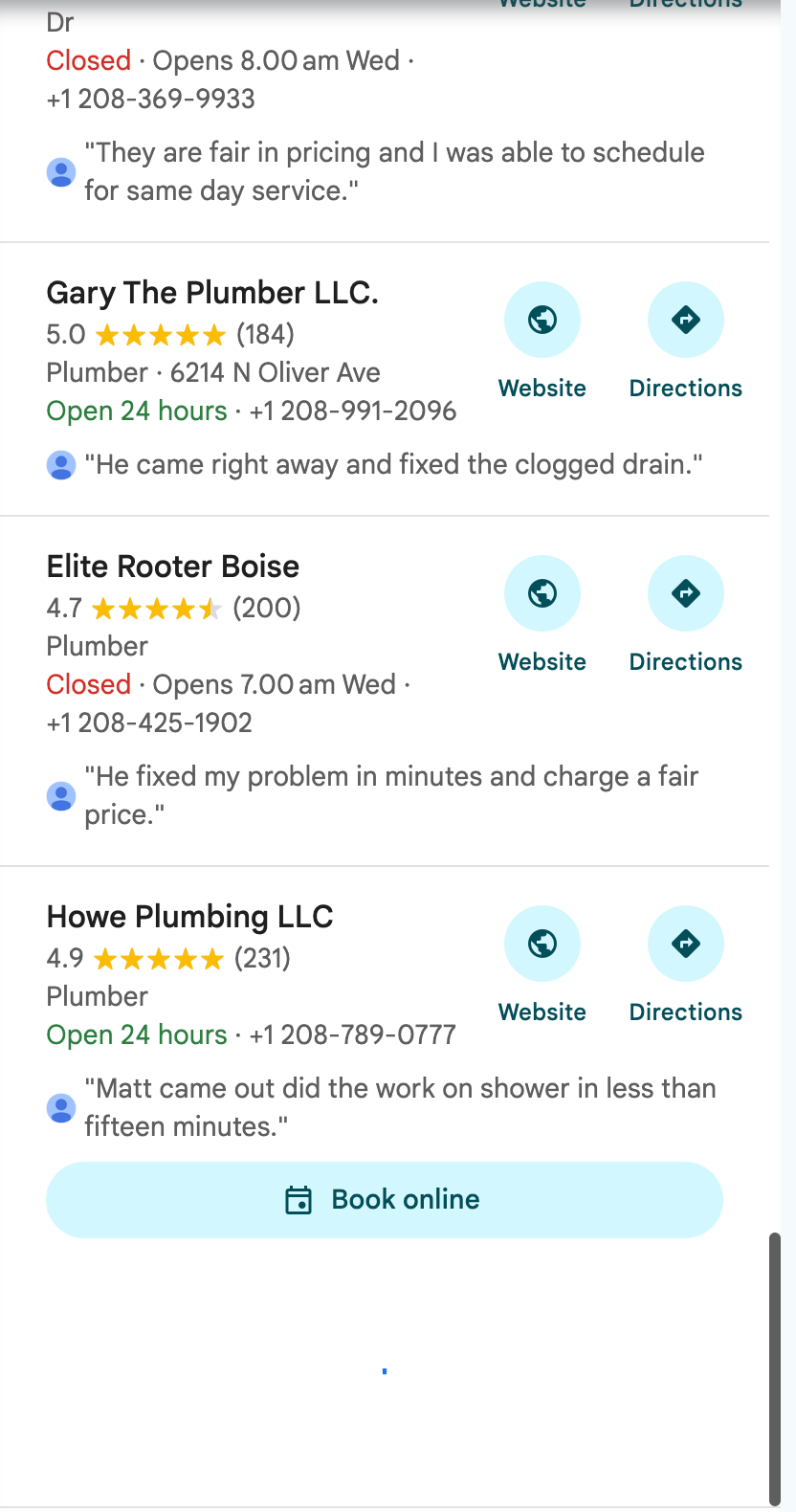
It loaded 20 businesses, 2 of them sponsored, then showed a loading spinner and nothing more.
Same keyword in Local Lead Finder. Find Areas turned Boise, Idaho into 42 areas, from Meridian, Eagle, Garden City and Kuna to Boise neighborhoods like the North End, Collister and Barber Valley. One search across all 42 found 98 plumbers.
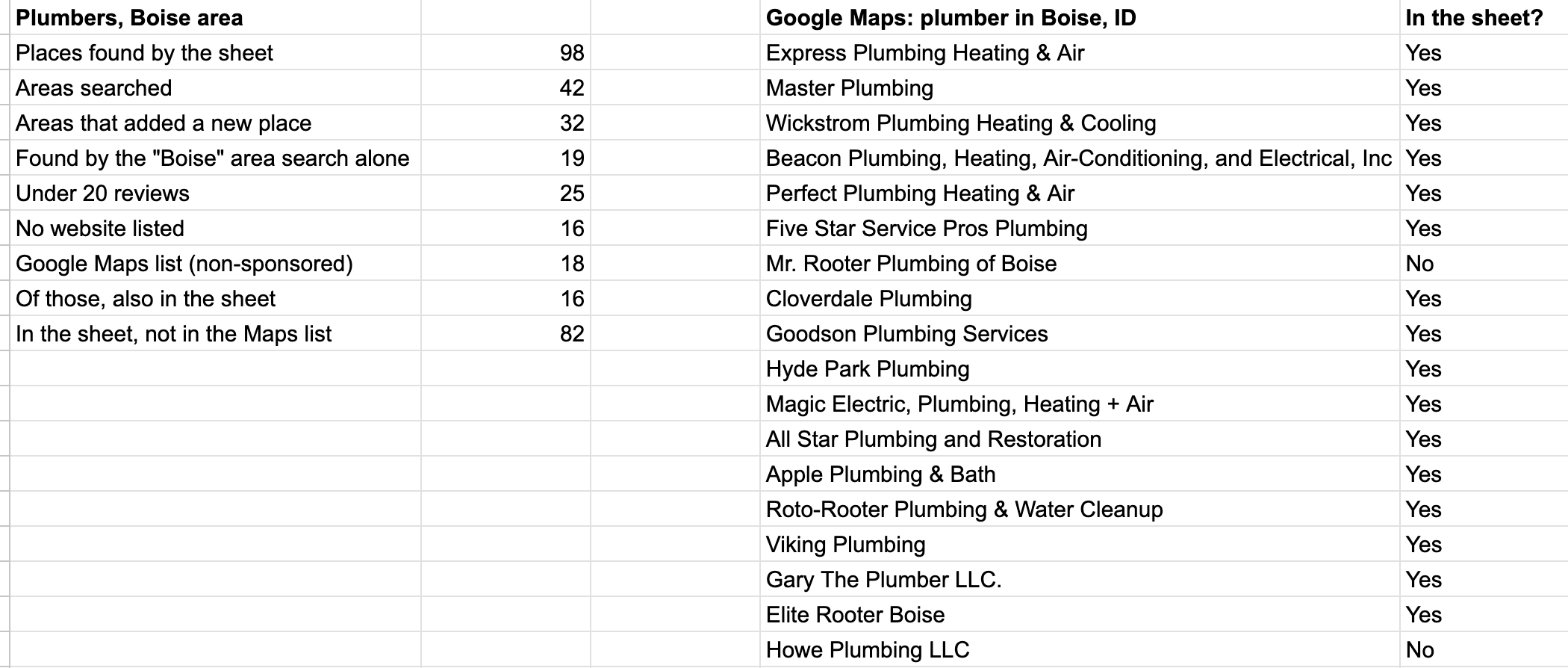
- The “Boise” area search alone found 19, about what Maps showed me. The other 79 came from the neighborhoods.
- 32 of the 42 areas added at least one plumber nobody else had found.
- 82 plumbers in the sheet weren’t on the Maps list at all.
- 25 have under 20 reviews, and 14 of those are rated 5.0.
- All 98 have a phone number. 16 list no website.
It used 42 Places API requests, well inside the 1,000 free a month. The full Boise write-up is here.
What it doesn’t do
I’d rather you know this before you buy it.
- It doesn’t find email addresses. You get phone numbers, websites and a WhatsApp link. Some scrapers on page 1 advertise emails; this sheet doesn’t do that yet.
- It doesn’t send messages for you. It opens each WhatsApp message already typed, and you send it.
- It doesn’t find businesses that aren’t on Google Maps. The Maps list and the sheet both come from Google. The sheet runs more searches and keeps everything in one place.
- It needs a Places API key. That’s a five minute job, but it is a step.
- It isn’t free to buy. The searches are free up to Google’s monthly allowance. The sheet is $10 once, and free for Better Sheets lifetime members.
Step by step
- Get a free Places API (New) key (how).
- Copy Local Lead Finder to your Google Drive and paste the key into SETTINGS (setup).
- Click Find Leads > 1. Find Areas for region, authorize the sheet the first time, and type your city.
- In the AREAS tab, untick any areas you don’t want searched.
- Click Find Leads > 2. Search in All AREAS, type your keyword, check the request count and click OK.
- Open the new tab and sort it: by reviews, by rating, or by the empty Website column.
- Contact businesses from the list, and mark each one with Find Leads > 3. Outreached.
Common pitfalls
- Searching the city name once: one search only goes 20 deep. The “Boise” search alone found 19 plumbers; the 42 areas found 98.
- Enabling the old Places API: the sheet needs Places API (New). If you enabled the other one, go back and enable the new one.
- Searching before Find Areas finishes: it keeps adding areas for a minute or two. In one run I started at 87 areas and it finished at 150.
- Leaving junk neighborhoods ticked: neighborhood names that are also other place names pull in junk, like a park, a cemetery, or a dentist in Dartford, England. Untick those and check names that don’t fit.
- Running a huge region without looking at the count: the sheet shows the most a search could cost before it runs. Read it before you click OK on a big city.
- Posting a copy of the sheet with your key in it: treat the key like a password and keep your copy private.
- Forgetting to mark Outreached: if you skip it, the next search won’t show you in green who you already contacted.
Learn the Google Sheets formulas in this post
- 3 Ways to Count in Google Sheets: the counting behind numbers like 25 plumbers under 20 reviews and 16 with no website.
- How to Find Duplicates: the same idea as checking which Maps plumbers were already in the sheet.
- How To Sort A Filter: sorting your results so the businesses with the fewest reviews come first.
- Fabulous Filters: more ways to pull just the rows you want, like businesses with no website.
Better Sheets has hundreds more tutorials like these. If you want to get better at Google Sheets, join Better Sheets.
Other ways to use Local Lead Finder
- How to Build a Local Business List in Google Sheets (142 coffee shops, Boise): for anyone who wants a whole local business list in one sheet.
- How to Find Local Businesses Without Websites (131 hair salons, Chattanooga): for web designers looking for businesses that need a site.
- How to Get Bookkeeping Clients: 25 small plumbers in Boise: for bookkeepers, VAs and answering services looking for small trades clients.
- 18 Ways to Make Money With a Google Maps Lead List: for anyone who has the list and wants to know what to sell.
All 18, grouped by who they’re for: Lead generation ideas: 18 local businesses to sell to.
FAQ
How can I scrape leads from Google Maps for free?
You don’t have to scrape. Google’s Places API gives you the same business data, and Google gives up to 1,000 searches a month free on your own key. Local Lead Finder runs those searches area by area and puts every result in a Google Sheet; the sheet itself is $10 once.
Does Google Maps provide an API?
Yes. It’s the Places API, and the current version is Places API (New). You enable it in Google Cloud and copy a key. Here’s every step with screenshots.
Is the Google Maps API still free?
For most searches, yes. Google gives up to 1,000 searches a month free. In Local Lead Finder each area is one request per results page, so 42 Boise areas used 42. The sheet shows the most a search could cost before it runs.
Is a Google Maps scraper legal?
I’m not a lawyer, and this isn’t legal advice. What I can tell you is that Local Lead Finder doesn’t scrape: it asks Google for the data through the Places API, the way Google built for getting Maps data, using a key in your own Google account.
How do I get Google Maps data without getting banned?
Use the API instead of scraping. There are no proxies or bot tricks involved, because nothing is being scraped. Google sees ordinary API requests from your own key, and the only limit is the quota on that key.
Can ChatGPT or Claude scrape Google Maps for me?
They can write you a scraper, and the gosom GitHub project even suggests running it with an AI coding agent. You still have to run it and fix it. If you just want the list, a sheet that uses Google’s API is less to look after.
Does it get email addresses?
Not yet. You get phone numbers, websites and a WhatsApp link with your message typed in. Every one of the 98 Boise plumbers had a phone number.
Can I export the results to CSV or Excel?
Yes. Each search makes its own tab. In Google Sheets, File > Download gives you a CSV or Excel file for your CRM or a VA.
Get the sheet
Local Lead Finder is $10, and free for Better Sheets lifetime members.
