One way to use Local Lead Finder. Local Lead Finder is a $10 Google Sheets template I built that turns any Google Maps search into a lead list: every business, with phone, website, rating and reviews. This post is one use case for it: building a local business list (every coffee shop in Boise). I’m not someone selling to coffee shops; this is the playbook I’d follow if I were, run for real with the template. Other ways to use it are listed at the end, or see all 18 lead generation ideas.
If you sell anything to local businesses, whether it’s web design, coffee beans or cleaning, you need a local business list before you can do anything else. Search for one and page 1 is directories: state “shop local” pages, a chamber of commerce members list, a city tourism board’s listings, and an agency’s roundup of 134 directories to list your own business in. Those are made for people browsing, and they only show the businesses that joined or signed up. None of them hands you a spreadsheet you can sort and call down.
So here’s what I’d do instead. I ran it for real in Boise with Local Lead Finder, a $10 Google Sheet I built that pulls every business on Google Maps into a spreadsheet: name, phone, address, rating, reviews and website. One search gave me 142 coffee shops. Below is the list, how it breaks down by town, why one Google search stops at 20, and what to clean up before you use it.
TL;DR
- One “coffee shop” search across 42 Boise areas gave me 142 coffee shops, each with phone, address, rating, reviews and website.
- One Google search stops at 20 results, so the sheet searches every neighborhood; 30 of the 42 areas added new shops.
- Clean it before you use it: the Basque Block area added 11 rows, and several aren’t coffee shops at all.
Who this is for
- Web designer: you get every local business in a category in one sheet, with a website column that shows who has none.
- Local SEO or marketing freelancer: the rating and review columns show which businesses might want help before you reach out.
- Coffee roaster or wholesale supplier: if you sell to coffee shops, this is the list of every shop to pitch, sorted by town.
- Someone opening a coffee shop: it’s your competition, with ratings and review counts for every shop in the area.
- B2B sales rep with a local territory: you get one list per business type, with phone numbers, instead of building it by hand from Google Maps.
Before you start
- A Google Places API (New) key
- Local Lead Finder set up in your Google Drive
- Local Lead Finder itself
- Your region, like Boise, Idaho
- A keyword for the kind of business you want, like “coffee shop”
Don’t have a Places API key yet? How to get one free. Haven’t set up the sheet? Setup takes 5 minutes.
From Google Maps to Google Sheets: the setup
Region: Boise, Idaho. Find Areas pulled 42 areas from OpenStreetMap: Boise, Meridian, Eagle, Garden City and Kuna, plus Boise neighborhoods like the North End, Depot Bench and the Basque Block.
Then Find Leads > Search in All AREAS, and the keyword:
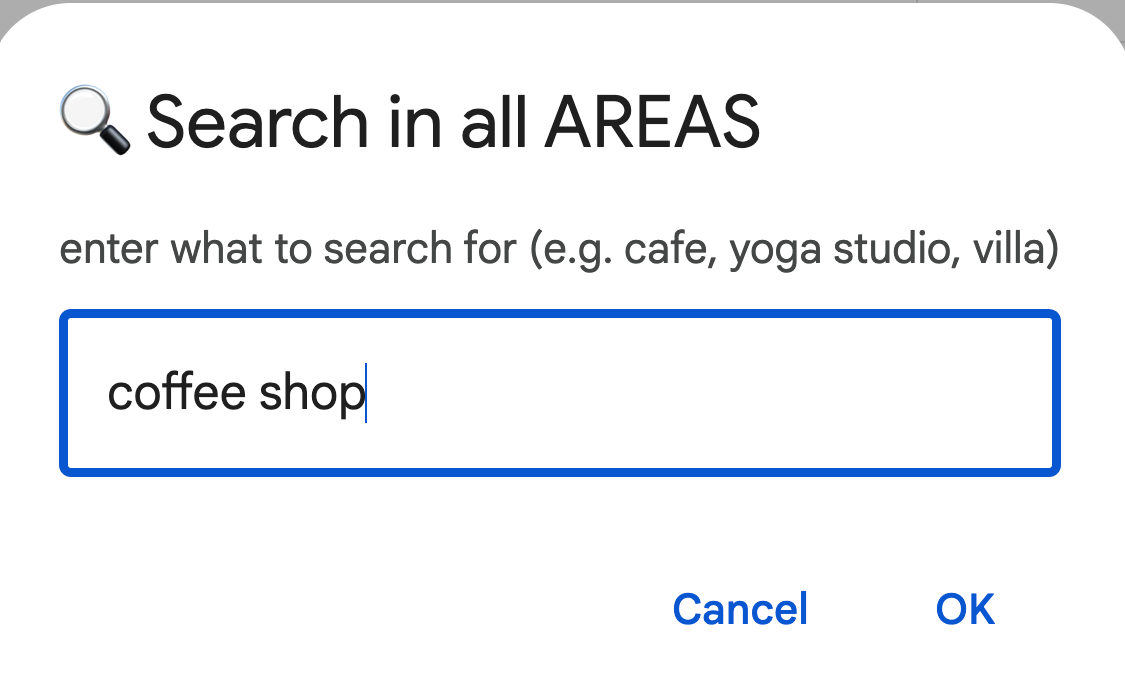
Before it runs, the sheet tells you how many Google requests it’s about to make:
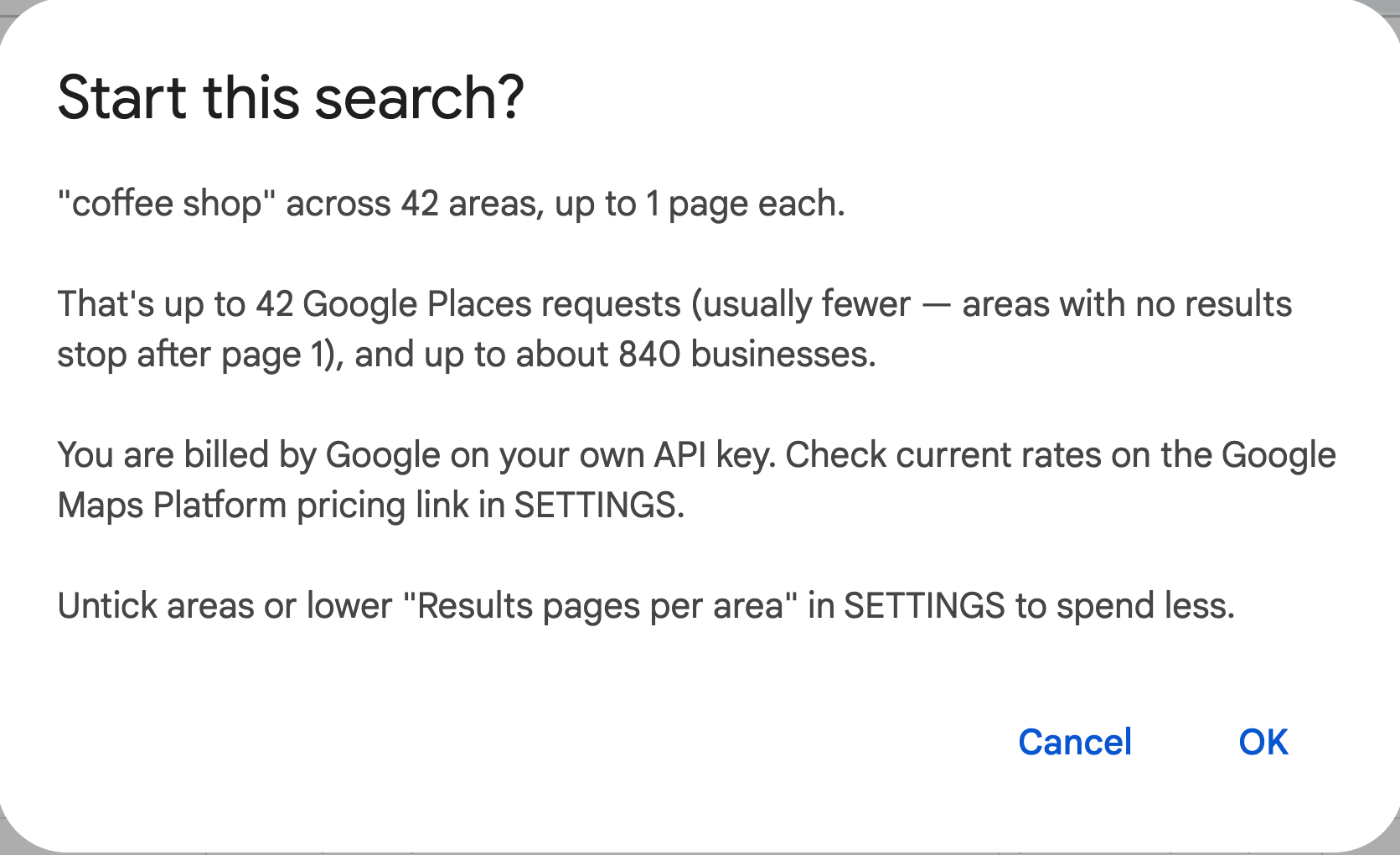
42 areas, one request each. Up to 20 results per area, so up to 840 rows before duplicates come out.
The list of coffee shops
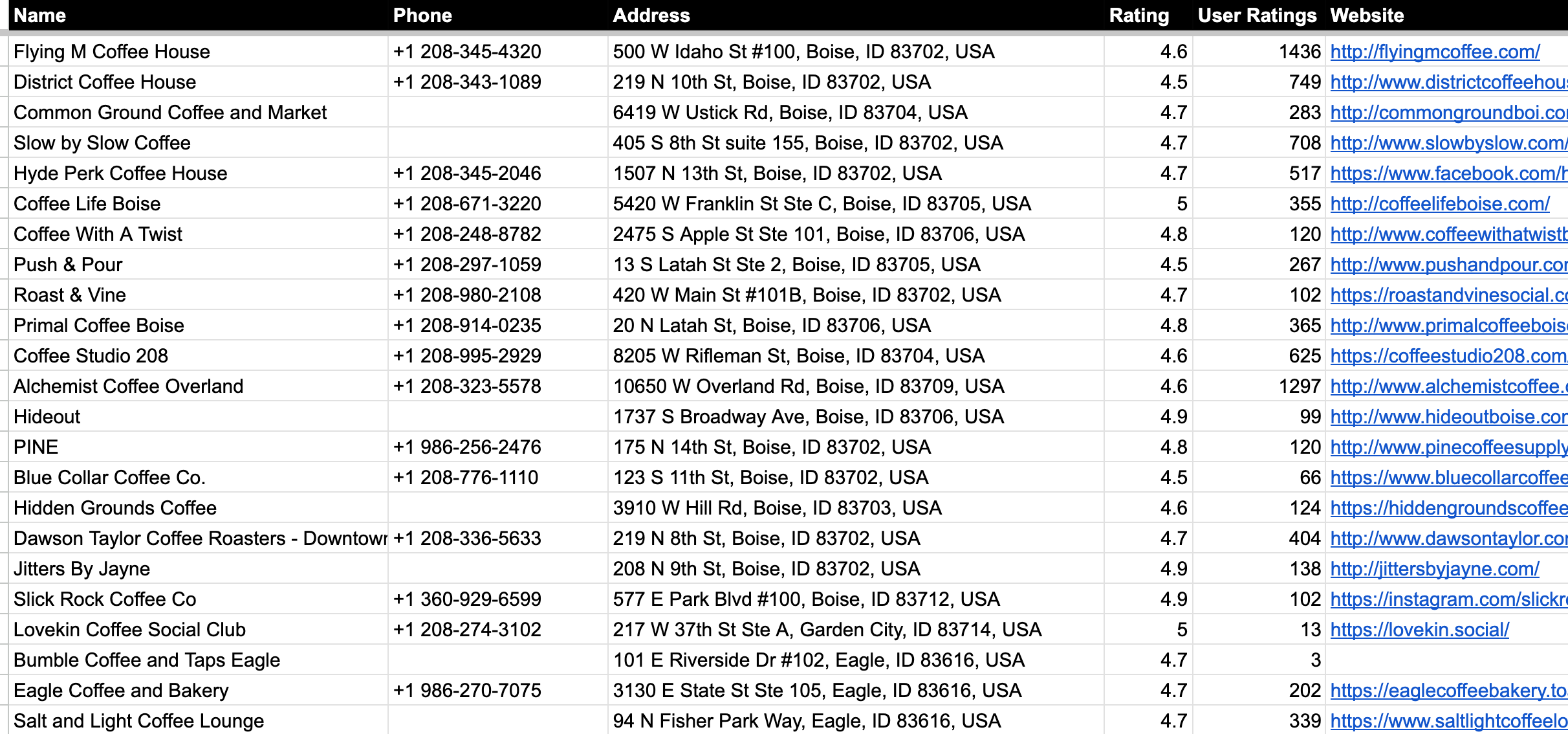
142 coffee shops. Every row has the name, phone, full address, Google rating, number of reviews, website, a Google Maps link and a WhatsApp link. (I hid the Place ID, Maps link and WhatsApp columns for the screenshot.)
That’s the list. If you sell to coffee shops, it’s your list of local business leads. If you’re opening one, it’s your competition.
How it breaks down
I added a tab with a few formulas to see what’s in it.
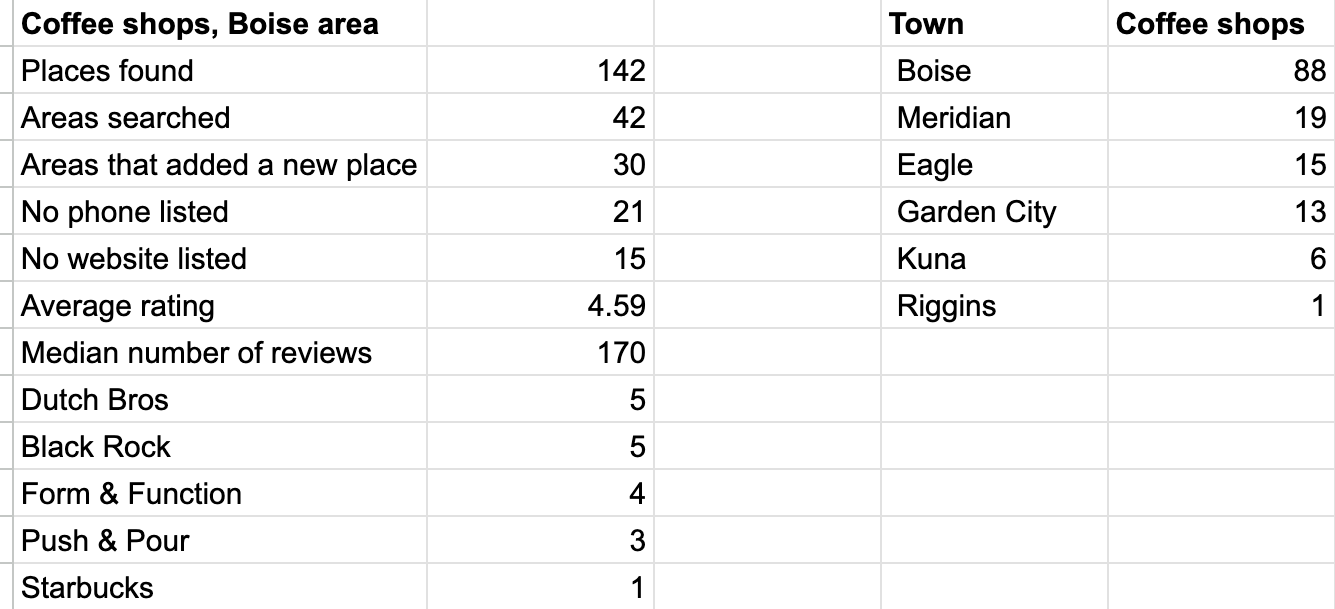
- 88 of the 142 are in Boise itself. Meridian has 19, Eagle 15, Garden City 13, Kuna 6.
- The average rating is 4.59 and the median shop has 170 reviews. Boise likes its coffee shops.
- 21 have no phone number on Google and 15 have no website. If you’re planning to call down the list, those 21 need a walk-in.
“They exist in every town, ready to be taken over and grown. Just ask the owner.” (Codie Sanchez, How Small Business Can Transform Your Wealth)
Every town in that table has coffee shops, and for 121 of the 142 the list already has a phone number to ask with.
The town column comes from the address:
=QUERY({ARRAYFORMULA(REGEXEXTRACT('coffee shop (AREAS)'!C2:C143,"([^,]+), [A-Z]{2} \d{5}"))},"select Col1, count(Col1) group by Col1 order by count(Col1) desc")
Chains barely show up
I counted a few names with COUNTIF and a wildcard, like =COUNTIF('coffee shop (AREAS)'!A2:A,"*Dutch Bros*"):
- Dutch Bros: 5
- Black Rock: 5
- Form & Function: 4
- Push & Pour: 3
- Starbucks: 1
One Starbucks in the whole Boise area is obviously not true. Google’s “coffee shop in [area]” results lean toward independent shops here, and I don’t know why. If you need every location of a chain, search the chain’s name as its own keyword.
Which areas actually added shops
This is the part I didn’t expect. The sheet searches each area separately, then removes duplicates. So I counted how many shops each area added that no earlier area had already found:
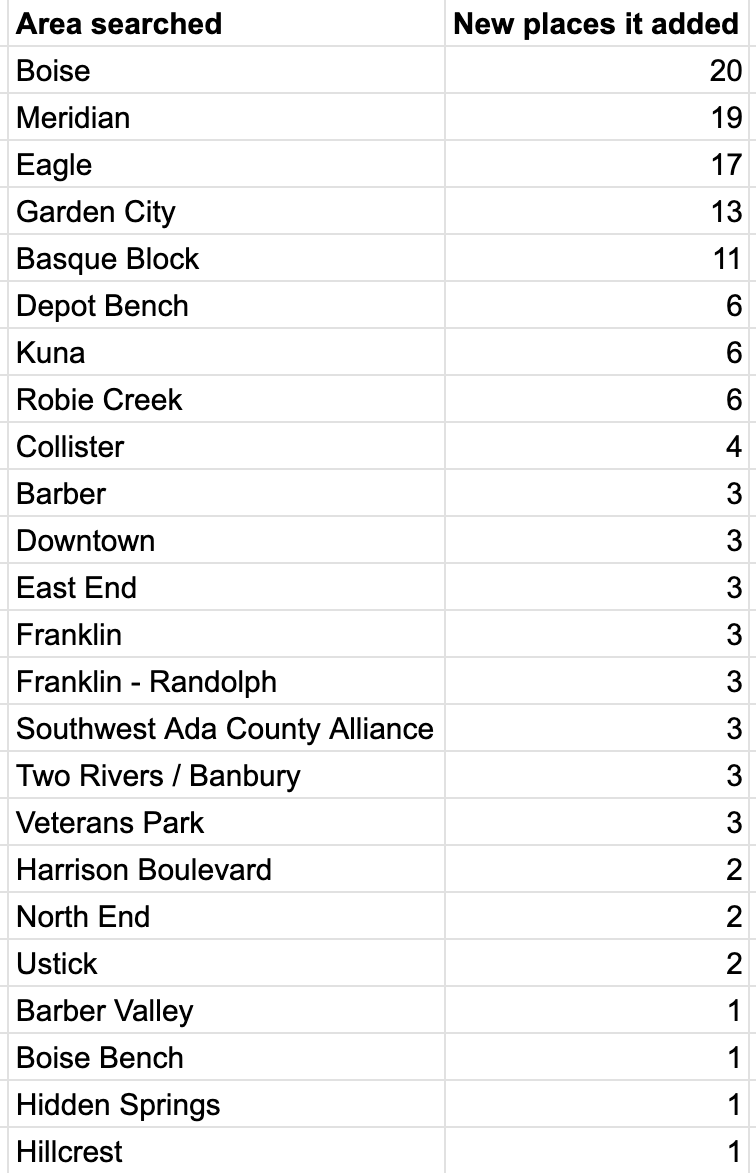
=QUERY('coffee shop (AREAS)'!A1:J143,"select J, count(A) where A is not null group by J order by count(A) desc",1)
30 of the 42 areas added at least one new shop. The other 12 only found shops that were already on the list.
The “Boise” search on its own added 20, which is exactly one page of Google results. That’s the ceiling for one search. Meridian (19) and Eagle (17) came close to it too. This is why the sheet searches every neighborhood instead of just “coffee shop in Boise”: one search stops at 20, and the neighborhoods are where the other 122 came from.
“To choose quality you need quantity. You still need to cast a wide net.” (Nick Huber, The golden rule of real estate and small business)
42 areas is the wide net. The rating and review columns are how you pick from it.
Clean your local business list before you use it
Searching by neighborhood name has one side effect: some neighborhood names are also the names of places.
- Basque Block added 11 rows. Some are coffee shops downtown (Neckar Coffee, Form & Function, Caffé D’arte). Others are the Basque Market, a chorizo shop, the Basque Center, Bar Gernika, and the Basque Block itself.
- Veterans Park found Veterans Memorial Park.
- Two Rivers / Banbury found Two Rivers Coffee Roasters, which is in Riggins. That’s the one Riggins row in the town table, and it’s nowhere near Boise.
None of that is hard to spot. Sort by the Area column, look at the few areas with odd names, and delete what doesn’t belong.
A few notes if you try this
- 42 areas is 42 Places API requests on your own key. Google gives you a free monthly amount; the API key post covers it.
- If a big area hits 20 results (like Boise did), set “Results pages per area” to 2 or 3 in SETTINGS. You get deeper coverage, and you pay for more requests.
- Untick areas in the AREAS tab you know you don’t need before you search. Fewer areas, fewer requests.
- Every search makes its own tab, so you can run “cafe” or “espresso” next and compare.
Step by step
- Get a free Google Places API key (how) and paste it into SETTINGS (setup).
- Run Find Leads > Find Areas with your region. Boise gave me 42 areas in the AREAS tab.
- Untick any areas you don’t need.
- Run Find Leads > Search in All AREAS and type your keyword, like “coffee shop”.
- Check the request count in the “Start this search?” box, then start it. The first run asks you to authorize the script.
- Open the new tab and sort by the Area column.
- Delete rows from odd area names that aren’t what you searched for.
- If a big area hit 20 results, raise “Results pages per area” in SETTINGS and search again.
Common pitfalls
- Searching only your city’s name: “coffee shop in Boise” stopped at 20, one page of Google results. The neighborhoods are where the other 122 came from.
- Trusting neighborhood names: some are also place names. Basque Block added 11 rows, including the Basque Market, a chorizo shop and Bar Gernika, so sort by Area and check the odd ones.
- Keeping a result that isn’t in your area: Two Rivers / Banbury found Two Rivers Coffee Roasters in Riggins, about 150 miles from Boise. Check the town column.
- Expecting chains to show up: the list had one Starbucks for the whole Boise area. If you need every location of a chain, search the chain’s name as its own keyword.
- Planning to call everyone: 21 of the 142 have no phone number on Google. Those need a walk-in.
- Leaving a big area at 20 results: if an area hits 20, raise “Results pages per area” in SETTINGS to 2 or 3. You get deeper coverage and pay for more requests.
- Forgetting to mark Outreached: mark a row with Find Leads > 3. Outreached so it stays green in every future search and you don’t call the same shop twice.
Learn the Google Sheets formulas in this post
- 3 Ways to Count in Google Sheets: the COUNTIF with a wildcard that counted 5 Dutch Bros and 1 Starbucks.
- 3 More Ways to Count in Google Sheets: more ways to get counts like 21 with no phone and 15 with no website on a summary tab.
- How to Find Duplicates: the idea behind counting which areas added new shops and which only found ones already on the list.
- How To Sort A Filter: sorting the list so odd areas or top-rated shops sit together, like the town counts sorted biggest first.
- 200 REGEXMATCH Examples in Google Sheets: the pattern matching behind pulling the town out of each address.
Better Sheets has hundreds more tutorials like these. If you want to get better at Google Sheets, join Better Sheets.
Other ways to use Local Lead Finder
- Where to Get Local Leads: Google Maps showed 20 plumbers, the sheet found 98: for anyone choosing where their leads come from.
- How to Sell to Coffee Shops: 83 independent cafes in Boise: for roasters, commercial bakeries and suppliers pitching local cafes.
- How to Find Local Businesses Without Websites (131 hair salons, Chattanooga): for web designers looking for businesses that need a site.
- How to Get Landscaping Contracts: 255 Minneapolis property managers: for lawn care and landscaping companies after commercial work.
All 18, grouped by who they’re for: Lead generation ideas: 18 local businesses to sell to.
FAQ
How do I get a list of coffee shops in my city?
Put your city in Find Areas, then search “coffee shop” in all areas. For Boise that was 42 areas and 142 shops. Searching each neighborhood matters, because a single “coffee shop in Boise” search stops at 20.
Can I get Google Maps results into Google Sheets?
Yes. Local Lead Finder writes each result as a row: name, phone, address, rating, number of reviews, Place ID, Google Maps link, WhatsApp link, website, and the area searched. Every search gets its own tab.
Is this a good way to find local business leads?
If your customers are a type of local business, yes. Mark a row as contacted with Find Leads > 3. Outreached: it turns green, copies to the OUTREACH tab, and stays green in every future search, so you don’t call the same shop twice.
Is Local Lead Finder a scraper?
No. It uses Google’s official Places API with your own key.
What does it cost?
The sheet is $10, and free for Better Sheets lifetime members. Searches run on your own Places API key, and Google gives up to 1,000 searches a month free. Each area is one request per results page, so this search was 42 requests, and the sheet shows the most a search could cost before it runs.
Why does one search stop at 20 results?
One Google Places request returns one page of up to 20 results. The “Boise” search on its own added exactly 20, so the sheet searches every area separately and removes duplicates, which is how it got to 142.
How is this different from a local business directory?
A directory shows the businesses that joined it. This pulls the businesses Google Maps has for your keyword, area by area, into rows you can sort, count and call down.
Get the sheet
Local Lead Finder is $10, and free for Better Sheets lifetime members. Pick a region, type a keyword, and you get the list.
