You want a list of local businesses from Google Maps, and before you install a scraper you want to know if you’re going to get in trouble. Fair question. Search “is scraping Google Maps legal” and most of page 1 answers a different one: is web scraping legal in general. You get blog posts from scraping and proxy companies, a LinkedIn post, Reddit and Quora threads, and a Stack Overflow question from 12 years ago. Lots of talk about court cases and “public data”. Not much about what Google itself writes about Google Maps.
So I read Google’s own documents: the Google Maps and Google Earth Additional Terms of Service (for anyone using Google Maps), the Google Maps Platform Terms of Service and Service Specific Terms (for anyone using a Maps API key), and the Places API policies page. Below is what they say about scraping and about storing Places data, in short quotes with links, so you can read the full text yourself. One thing up front: I built Local Lead Finder, a $10 Google Sheet that gets businesses from Google Maps through the official Places API, so I have a stake in this. That’s why I’m quoting the terms instead of telling you what to think, including the parts that limit what a sheet like mine can keep.
This is not legal advice. I’m not a lawyer. This is what Google’s documents say, read on October 15, 2026. Terms change, laws differ by country and state, and how they apply to you depends on what you do. If it matters for your business, ask a lawyer.
TL;DR
- Google’s Maps terms bar copying, mass downloading and bulk feeds; the Platform terms name copying and saving business names and addresses as scraping.
- Through the official Places API you may store Place IDs indefinitely and latitude and longitude for up to 30 days; other Places content has no exception I found.
- The common mistake is thinking “I used the API” settles it: the API is the way Google built, but its terms still limit what you keep.
Who this is for
- Freelance web designer: you want leads from Google Maps and need to know what Google says before you pick a tool.
- Marketing agency owner: you’re about to buy a scraper subscription for your team and want the terms in one place.
- Sales rep building a territory list: you want to know the difference between a scraper and Google’s own API.
- Virtual assistant: clients ask you to “pull leads from Google Maps,” and you want to know what you’re agreeing to.
- Developer or no-code builder: you’re wiring the Places API into a sheet or a tool and need the caching rules.
Before you start
- The four Google documents, open in tabs: the Google Maps/Google Earth Additional Terms of Service, the Google Maps Platform Terms of Service, the Maps Service Specific Terms and the Places API policies
- A Google Places API (New) key, if you go the official route
- Local Lead Finder set up in your Google Drive
- Local Lead Finder itself
- A clear idea of what you’ll do with the list (call it, email it, resell it), because that changes the answer
The short answer
Google’s terms don’t use the word “illegal.” They’re a contract. What they say is that you can’t scrape Google Maps content, and that’s true whether you use Google Maps in a browser or through Google’s own API. Whether breaking a site’s terms is also against the law where you live is a separate question, and that one is for a lawyer.
What the terms do give you is a front door: the Places API. You sign up, use your own key, and Google answers your requests. Even then, the terms limit what you can keep from those answers. The rest of this page is the exact wording.
What the Google Maps terms say (anyone using Maps)
The Google Maps/Google Earth Additional Terms of Service (last modified January 27, 2026) have a section called Prohibited Conduct. It opens by saying that following it is “a condition of your license to use Google Maps.” When using Google Maps, you may not:
- “copy the content,” unless the Google Maps permissions page or the law (like fair use) allows it.
- “mass download or create bulk feeds of the content,” or let anyone else do it.
- use Google Maps to create or augment another dataset, which the terms say includes a “business listings database, mailing list, or telemarketing list,” for use in a service that is “a substitute for, or a substantially similar service to, Google Maps.”
That third one has a condition attached: it’s about building a dataset for a service that competes with Google Maps. The first two don’t have that condition.
A browser extension or scraping service that scrolls through Google Maps and copies every listing is doing the copying and mass downloading those first two lines are about.
What the Google Maps Platform terms say (anyone with an API key)
When you make a Google Maps Platform key, you’re using the Google Maps Platform Terms of Service (last modified August 26, 2026). These are the terms behind the Places API. Section 3.2.3 is called “Restrictions Against Misusing the Services,” and part (a) is literally titled “No Scraping”:
- “Customer will not export, extract, or otherwise scrape Google Maps Content” for use outside the Services.
- Its examples include “pre-fetch, index, store, reshare, or rehost Google Maps Content outside the services.”
- Another example: “copy and save business names, addresses, or user reviews.”
Part (b) is “No Caching”: “Customer will not cache Google Maps Content except as expressly permitted” under the Service Specific Terms.
And “Google Maps Content” is defined to include “places data (including business listings).” So business names, addresses, phone numbers and ratings from the Places API are Google Maps Content.
One more, because people ask about AI: part (c) lists, as something you can’t do, “use Google Maps Content to improve machine learning and artificial intelligence models.”
What you’re allowed to keep
The exceptions are in the Maps Service Specific Terms (last modified June 10, 2026) and the Places API policies (last updated October 13, 2026).
Places data What the terms allow Where it says so Place ID Store it with no time limit: “You can therefore store place ID values indefinitely.” Places API policies; Service Specific Terms, “Google ID Caching” Latitude and longitude Cache “for up to 30 consecutive calendar days,” then delete Service Specific Terms, section 14.3 (Places API, Legacy and New) Everything else (name, address, phone, rating, reviews, website) No exception I could find. The policies page says you “must not pre-fetch, cache, or store Places API content beyond the allowed exceptions.” Places API policiesThe Places API policies page also says that if you show Places data without a Google Map, you must include the Google logo, and you must show any attributions that come with the data.
So what about a lead list in a Google Sheet?
Here’s the honest version, because Local Lead Finder writes results into a sheet.
Local Lead Finder doesn’t scrape. It doesn’t open Google Maps pages or scroll through them. It sends requests to Google’s Places API (New) using a key from your own Google Cloud account, and Google sends back the results. Before a search runs, the sheet tells you how many Places requests it will use, billed on your own key.
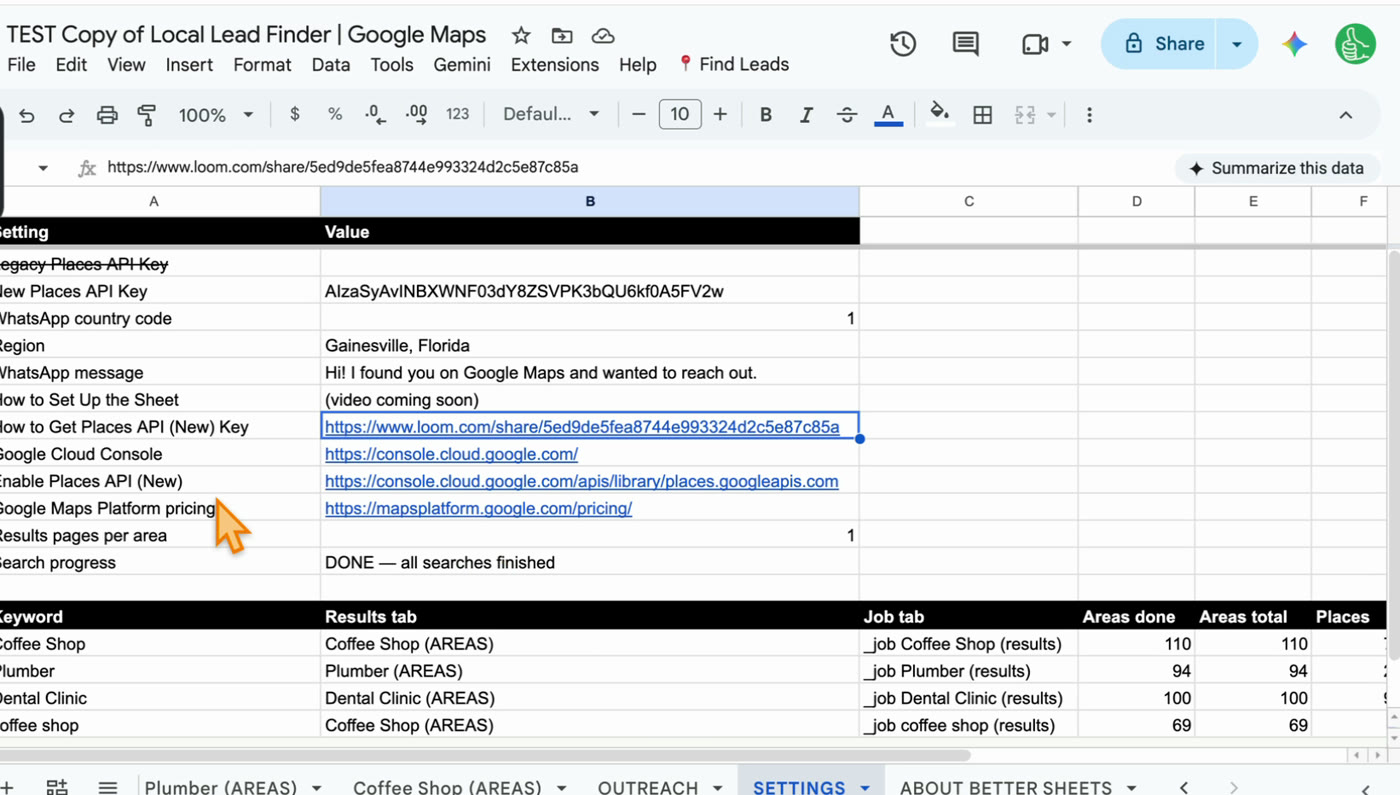
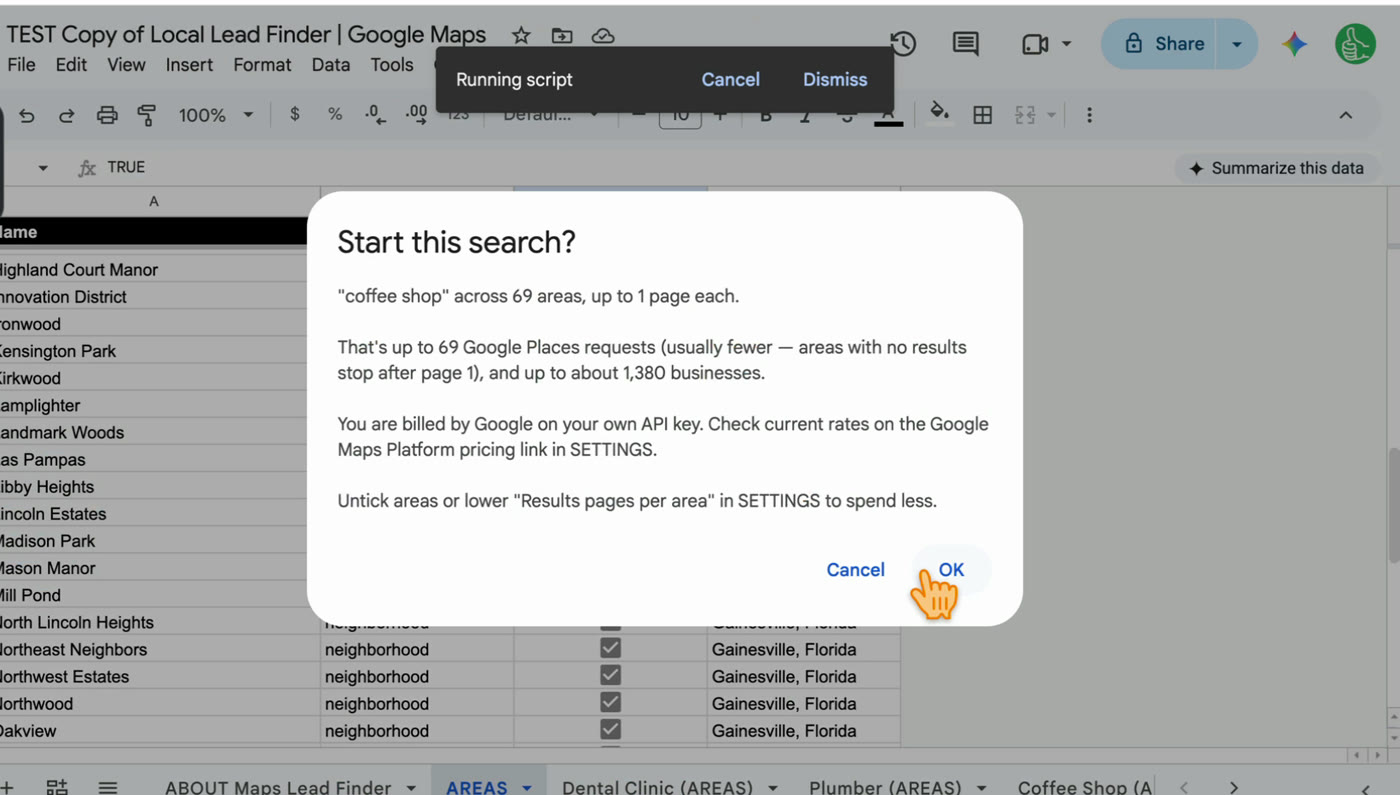
But the sheet does keep what comes back. Each row has name, phone, address, rating, number of reviews, Place ID, Google Maps link, WhatsApp link, website, and the area searched. Going by the table above:
- Place ID: the terms say you can store it indefinitely.
- Latitude and longitude: the sheet doesn’t write these as columns, so the 30 day rule doesn’t come up for them.
- Name, address, phone, rating, reviews, website: I didn’t find an exception for these, and “copy and save business names, addresses” is one of Google’s own examples of scraping “for use outside the Services.”
What I can’t tell you is exactly how Google reads “outside the Services” for a working list you call from in your own Google account. I’m not going to tell you a sheet like this is “fully compliant.” What I can say is that it uses the API Google built for this data, under your own key and your own agreement with Google, rather than copying Google Maps pages, which the consumer terms prohibit outright.
If you want to stay as close to the letter of the terms as you can, here’s what I’d do:
- Treat the sheet as a working list for your own outreach, not a database you keep forever.
- Keep the Place ID column. That’s the part you’re allowed to store indefinitely, and it’s how you look a business up again.
- Run the search again when you need fresh data, instead of holding on to an old copy.
- Don’t sell, share or republish the list, and don’t use it to build a Maps lookalike.
- Read the four documents yourself, and ask a lawyer if this is a big part of your business.
Scraping vs the official API
Scraping Google Maps Google’s Places API How it gets data Copies what Google Maps shows in a browser, through an extension, a hosted scraper or a script Asks Google for the data with your own API key Google’s terms The Maps terms bar copying the content and mass downloading it The Platform terms allow the requests, and limit what you store Cost Whatever the tool charges Google gives up to 1,000 searches a month free; past that, Google bills your key What you can keep The terms don’t carve out anything for scraped content Place IDs indefinitely, latitude and longitude for 30 daysLaws are a separate question
Google’s terms are a contract between you and Google. Laws are different and depend on where you are: data protection rules, rules about calling or emailing businesses, and court cases about scraping public websites, which several page 1 results discuss. Some of those results say scraping public data is broadly legal. That may or may not hold for you, and none of it changes what Google’s terms say. This is where a lawyer earns their fee.
One practical point: Local Lead Finder never sends anything. It builds the list. Calling, texting or emailing the businesses is up to you, so follow the rules for contacting businesses where you live.
Step by step: get Google Maps business data the official way
- Read the four Google documents linked above, at least the parts quoted here.
- Get a free Google Places API (New) key (how).
- Set up Local Lead Finder (about 5 minutes) and paste your key into SETTINGS.
- Run Find Areas on your region, then Search in All AREAS with your keyword. Check the request count before you click OK.
- Use the list for your own outreach, and mark each business Outreached after you contact it.
- Keep the Place ID column, and re-run the search when you need fresh data.
Common pitfalls
- Treating “public” as “allowed”: Google Maps is public to look at, but its terms still bar copying and mass downloading the content.
- Thinking the API makes everything fine: the Platform terms have their own “No Scraping” and “No Caching” sections. Only Place IDs can be stored indefinitely, and latitude and longitude for 30 days.
- Asking a chatbot to write a scraper: the tool doesn’t matter. A script a chatbot writes for you is still scraping, and the same terms apply.
- Building a list to resell: the Maps terms name a “business listings database, mailing list, or telemarketing list” built for a Maps substitute. Use your list for your own outreach.
- Posting your API key: the key is tied to your Google account and billing. Treat it like a password and don’t share a copy of the sheet with it filled in.
- Skipping the local rules: Google’s terms don’t cover calling or emailing rules where you live. Check those before you contact anyone.
Learn the Google Sheets formulas in this post
This post doesn’t use any formulas, but once you have a list in a sheet these are where I’d start.
- 3 Ways to Count in Google Sheets: count how many businesses you found, by area or by rating.
- How to Find Duplicates: check two lists against each other, like an old search and a fresh one.
- How To Sort A Filter: sort a filtered list so the businesses you want to call first are at the top.
Better Sheets has hundreds more tutorials like these. If you want to get better at Google Sheets, join Better Sheets.
Other ways to use Local Lead Finder
- Free Google Maps Scraper in Google Sheets (That Doesn’t Scrape): for anyone who searched for a scraper and wants the official API route instead.
- Where to Get Local Leads: Google Maps showed 20 plumbers, the sheet found 98: for anyone choosing a lead source.
- How to Build a Local Business List in Google Sheets (142 coffee shops, Boise): for anyone who wants a whole local business list in one sheet.
All 18, grouped by who they’re for: Lead generation ideas: 18 local businesses to sell to.
FAQ
Does Google allow data scraping?
Not of Google Maps. The Google Maps terms say you may not copy the content or “mass download or create bulk feeds of the content,” and the Platform terms have a section titled “No Scraping.” Google’s allowed route is the Places API, which has its own limits on what you store.
Is Google Maps scraper legal?
Google’s terms prohibit scraping Google Maps. Whether a particular scraper also breaks a law depends on where you are and what you do with the data, which is a question for a lawyer, not a blog post. This isn’t legal advice.
Is scraping data illegal?
It depends on the site, the data, the country and what you do with it, so there’s no single answer. For Google Maps specifically, Google’s own terms prohibit it, whatever the law says.
How to scrape leads from Google Maps for free?
I’d skip scraping and use the Places API. Google gives up to 1,000 searches a month free on your own key. Local Lead Finder runs those searches for every area of a city and puts the results in a sheet; it’s $10 once, and free for Better Sheets lifetime members.
Does Google Maps provide an API?
Yes. The Places API (New) returns business listings with name, address, phone, rating, reviews and website. Here’s how to get a key free.
Can I store Google Maps data in a spreadsheet?
The terms let you store Place IDs indefinitely and latitude and longitude for up to 30 consecutive calendar days. For other Places content, the policies page says you “must not pre-fetch, cache, or store Places API content beyond the allowed exceptions,” and I didn’t find an exception for names, addresses or phone numbers. Read the terms and decide for your own use.
Can ChatGPT do web scraping?
A chatbot can write you a scraper script, but you still have to run it, and Google’s terms apply to the script the same way they apply to any other scraper. The Platform terms also bar using Google Maps Content to train or improve AI models.
Will Google ban me for using Local Lead Finder?
The sheet doesn’t scrape, so there are no proxies or bot tricks involved. Google sees API requests from your own key, and the limit is the quota on that key. The terms on storing data, above, still apply to you.
Get the sheet
Local Lead Finder is $10, and free for Better Sheets lifetime members. It uses Google’s official Places API with your own key.
