One way to use Local Lead Finder. Local Lead Finder is a $10 Google Sheets template I built that turns any Google Maps search into a lead list: every business, with phone, website, rating and reviews. This post is one use case for it: getting local leads Google Maps alone won’t show you. I’m not someone selling to plumbers; this is the playbook I’d follow if I were, run for real with the template. Other ways to use it are listed at the end, or see all 18 lead generation ideas.
You need local leads: small businesses to sell a website, ads, review help or a supply deal to, and you’re deciding where to get them. Search “local leads” and page 1 is mostly people selling leads: Google’s Local Services Ads (pay-per-lead listings), lead generation agencies, a managed pay-per-click shop, and lead generation software for agencies. The free option is Google Maps. Type “plumber in Boise” and there they are, with phone numbers and ratings, until the list stops loading.
So I compared the two free-ish ways on the same search. Google Maps on one side, and on the other Local Lead Finder, a $10 Google Sheet I built that runs a Maps search for every neighborhood in a region and puts the results in rows. Both looked for plumbers in Boise. Maps gave me 20. The sheet found 98, including 25 small plumbers with under 20 reviews that Maps never showed me.
“People on the street are leads. If you can contact them, they are leads.” (Alex Hormozi, $100M Leads)
Every plumber on Maps has a phone number, so every one is a lead. The question is how many of them you actually see.
TL;DR
- Google Maps loaded 20 plumbers for “plumber in Boise, ID”; Local Lead Finder searched 42 Boise areas and found 98.
- One search only goes 20 deep, so you need one search per neighborhood: 42 areas was 42 Places API requests.
- Stopping at the first 20 skips the small ones: 25 plumbers with under 20 reviews, 14 of them rated 5.0.
Who this is for
- Web designer: you get the 16 plumbers with no website and the small ones nobody else is calling.
- Local SEO or Google reviews freelancer: the 25 plumbers with under 20 reviews are the ones that need help getting found.
- Google Ads freelancer: small and new plumbers that don’t show up in the top 20 are the ones who might want help getting seen.
- Bookkeeper for trades businesses: you get a full list of local plumbers with phone numbers instead of the 18 Maps shows.
- Plumbing supply sales rep: you get every plumbing company in the area, not just the 20 Maps shows first.
Before you start
- A Google Places API (New) key
- Local Lead Finder set up in your Google Drive
- Local Lead Finder itself
- A keyword and a region, like plumber in Boise, Idaho
- A short outreach message that says what you do and asks one question
Don’t have a Places API key yet? How to get one free. Haven’t set up the sheet? Setup takes 5 minutes.
Google Maps leads: 20 plumbers
I searched “plumber in Boise, ID” in Google Maps and scrolled the results list down to the bottom.
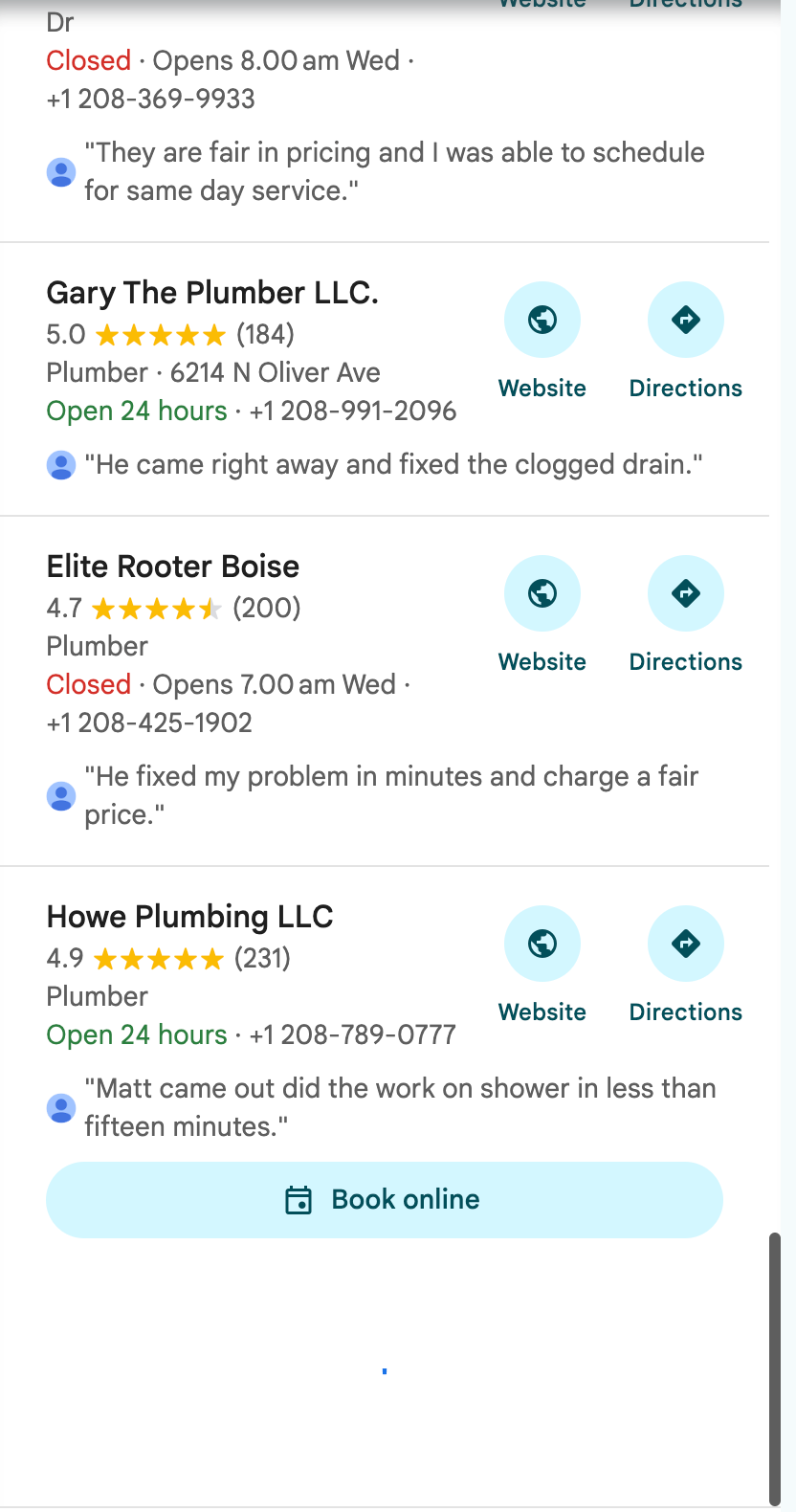
It loaded 20 businesses. Two of them were sponsored (Aqua Source and Owyhee Heating and Air Conditioning). After Howe Plumbing LLC, the list showed a loading spinner and nothing more loaded, however long I waited or scrolled.
Maybe it loads more for you. Either way, that’s what a plain Maps search gave me: 18 plumbers that weren’t ads.
The sheet: 98 plumbers
Same keyword in Local Lead Finder. Region: Boise, Idaho, which Find Areas turned into 42 areas: Boise, Meridian, Eagle, Garden City, Kuna, and Boise neighborhoods like the North End, Collister and Barber Valley. The sheet searches “plumber in [area]” for each one and removes duplicates.
98 plumbers. Then I typed the 18 non-sponsored names from the Maps list into the sheet and checked each one against the results:
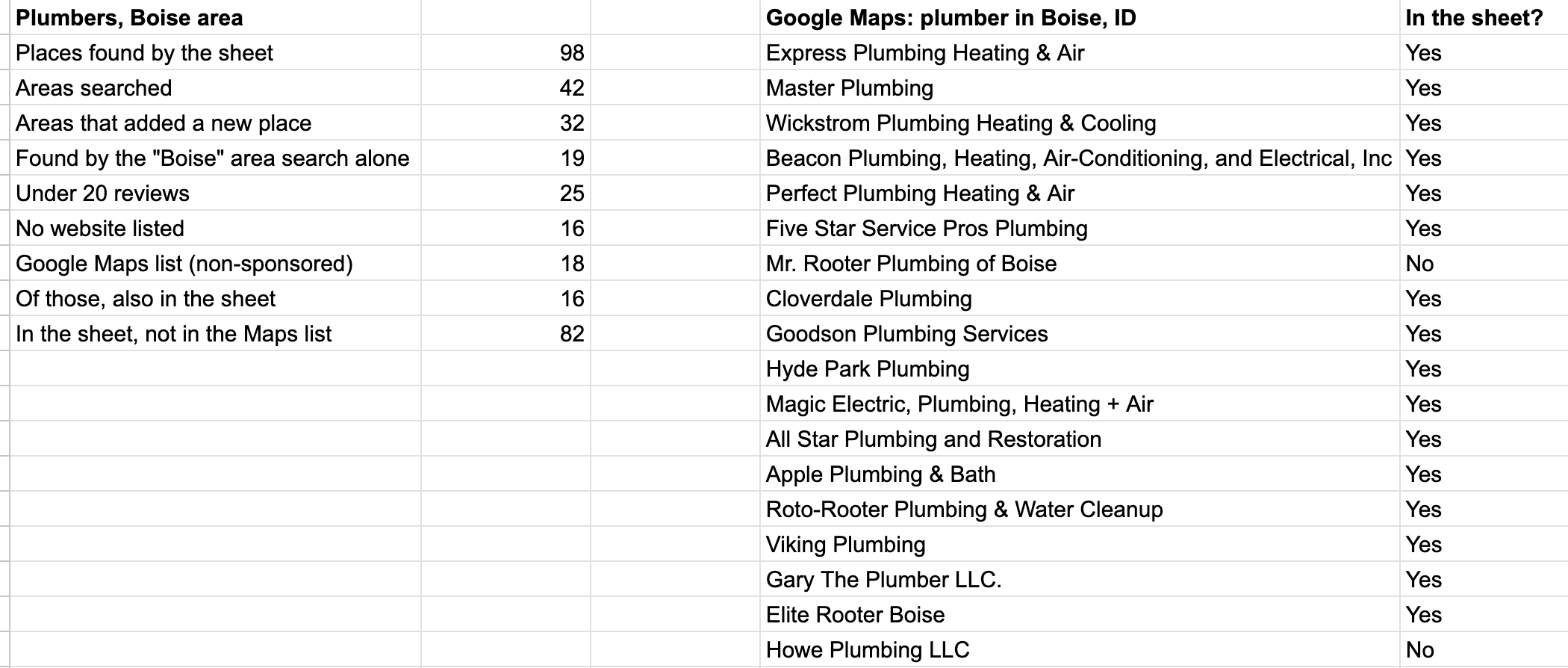
=ARRAYFORMULA(IF(D2:D19="","",IF(COUNTIF('plumber (AREAS)'!A2:A,D2:D19),"Yes","No")))
- 16 of the 18 Maps plumbers are in the sheet.
- 82 plumbers in the sheet weren’t in the Maps list at all.
Two from the Maps list didn’t show up in the sheet: Mr. Rooter Plumbing of Boise and Howe Plumbing LLC. I don’t know why. Neither one turned up in any of the 42 area searches.
Why the neighborhoods matter
One Google search returns 20 results per page. The “Boise” area search in the sheet found 19 plumbers on its own, which is about what Maps showed me. The other 79 came from the neighborhood searches.
32 of the 42 areas added at least one plumber nobody else had found. That’s the point of searching every neighborhood: each search only goes 20 deep, so more searches in smaller places dig further down.
The local leads you miss with one search
The plumbers you don’t see in a single Maps search aren’t random. Here are the ones in the sheet with fewer than 20 reviews:
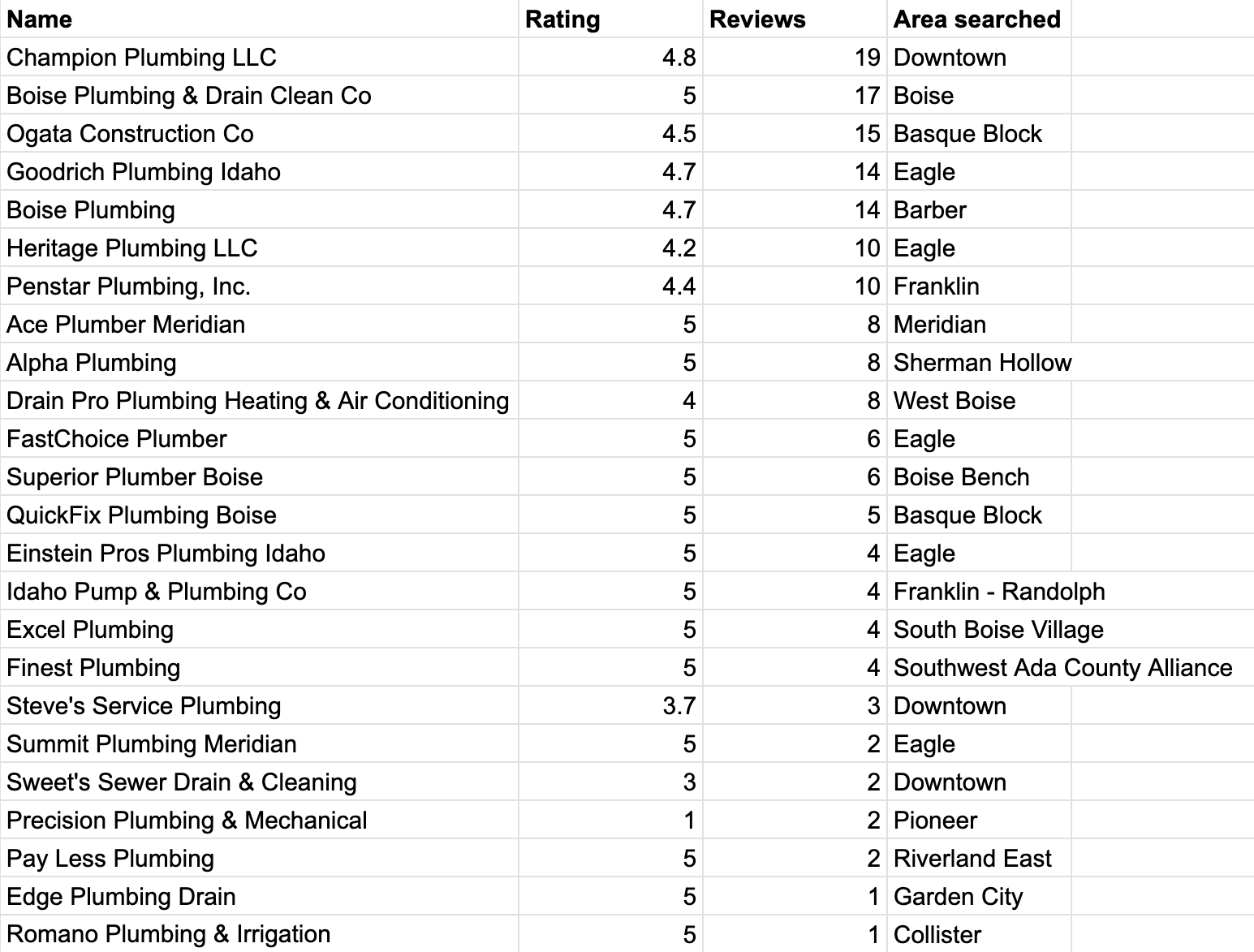
=QUERY('plumber (AREAS)'!A1:J99,"select A, D, E, J where A is not null and E < 20 order by E desc",1)
25 plumbers with under 20 reviews, and 14 of them are rated 5.0. Another 5 have no reviews at all. The fewest reviews on any plumber from the Maps list was 70 (Hyde Park Plumbing).
Those are small or new businesses. If you’re selling them something (a website, ads, review help, bookkeeping, a supply deal) they’re the ones nobody else is calling, because nobody else scrolled far enough to find them.
“As you begin to think like an entrepreneur, you’ll notice that business ideas can come from anywhere.” (Chris Guillebeau, The $100 Startup)
A list of 25 plumbers with under 20 reviews is one of those places: each row is a small business that probably needs help getting found.
Clean it before you use it
- Ogata Construction Co came back from the “Basque Block” search. It may do plumbing; it’s not called a plumber. Check names that don’t fit before you call.
- 16 of the 98 list no website, so they won’t have a contact form. All 98 have a phone number.
Step by step
- Get a free Google Places API key (how) and set up Local Lead Finder (about 5 minutes).
- Run Find Areas on your region (I used Boise, Idaho, which gave 42 areas). Untick any areas you don’t want.
- Run Search in All AREAS with your keyword (I used “plumber”). The sheet shows the most the search could cost before it runs.
- Open the new tab. Each row has name, phone, address, rating, reviews, website and a Maps link, with duplicates removed.
- Sort or filter by number of reviews to find the small and new businesses (my under 20 reviews QUERY is above).
- Clean the list: check names that don’t fit the keyword, and note which ones have no website.
- Contact them, then mark each one Outreached so it stays green in every future search.
A few notes if you try this
- Google Maps is free and fine if you want the top 20. If you want the whole list, you need more searches than one, and the sheet does that for you.
- 42 areas is 42 Places API requests on your own key.
- The Maps list and the sheet both come from Google. The sheet isn’t finding hidden businesses; it’s running more searches and keeping everything they return in one place.
- After you message someone, mark them Outreached. They turn green in every future search, so you don’t contact the same plumber twice.
Common pitfalls
- Stopping when the Maps list stops: my Maps search loaded 20 plumbers and then spun forever. Maybe it loads more for you, but one search is still only one search; run one per neighborhood.
- Counting sponsored results as leads: 2 of my 20 Maps results were ads (Aqua Source and Owyhee Heating and Air Conditioning). That left 18 real plumbers.
- Calling names that don’t fit: Ogata Construction Co came back from the “Basque Block” search. It may do plumbing, but it’s not called a plumber, so check names like that before you call.
- Writing off businesses with no website: 16 of the 98 list no website, so they won’t have a contact form. All 98 have a phone number, so call or text them.
- Not marking Outreached: if you don’t, the next search won’t show who you already messaged. Marked rows turn green in every future search.
- Running big regions without checking the cost: each area is one Places API request per results page, so 42 areas was 42 requests. The sheet shows the most a search could cost before it runs.
Learn the Google Sheets formulas in this post
- 3 Ways to Count in Google Sheets: the counting behind the summary, like 25 under 20 reviews and 16 with no website.
- How to Find Duplicates: the same idea as the COUNTIF and ARRAYFORMULA check that found 16 of the 18 Maps plumbers in the sheet.
- How To Sort A Filter: sorting a filtered list, like the under 20 reviews QUERY sorted by reviews.
- Fabulous Filters: more ways to pull just the rows you want, like small plumbers or ones with no website.
- How to Create a CRM in google sheets w/ Dashboard: a next step for tracking who you called and what they said.
Better Sheets has hundreds more tutorials like these. If you want to get better at Google Sheets, join Better Sheets.
Other ways to use Local Lead Finder
- How to Get Bookkeeping Clients: 25 small plumbers in Boise: for bookkeepers, VAs and answering services looking for small trades clients.
- How to Build a Local Business List in Google Sheets (142 coffee shops, Boise): for anyone who wants a whole local business list in one sheet.
- Local Lead Generation for Web Designers: 225 dentist leads: for web designers pitching great businesses nobody can find.
- How to Find Local Businesses Without Websites (131 hair salons, Chattanooga): for web designers looking for businesses that need a site.
All 18, grouped by who they’re for: Lead generation ideas: 18 local businesses to sell to.
FAQ
Is Google Maps a good place to find local leads?
Yes, for the top results. My “plumber in Boise, ID” search loaded 20, 2 of them sponsored, and stopped there in the browser. If you want more leads for local businesses than one search shows, you need more searches, one per neighborhood.
Is Local Lead Finder a Google Maps lead generator?
It’s a Google Sheet that runs Google Maps searches for you. It runs “keyword in area” for every area you tick, removes duplicates, and writes the results to a new tab. Each row has name, phone, address, rating, number of reviews, Place ID, Google Maps link, WhatsApp link, website, and the area searched.
Why did Google Maps stop at 20 plumbers?
One Google search returns 20 results per page. In the browser, my Maps list loaded 20 and then showed a loading spinner, however long I scrolled. Maybe it loads more for you, but searching each neighborhood is how the sheet got to 98.
Does the sheet find businesses that aren’t on Google Maps?
No. The Maps list and the sheet both come from Google. The sheet runs more searches, one per area, and keeps everything they return in one place with duplicates removed.
Is this a lead scraper?
No. It doesn’t scrape Google Maps. It uses Google’s official Places API with your own key.
What does it cost to run?
The sheet is $10, and free for Better Sheets lifetime members. Searches run on your own Google Places API (New) key, and Google gives up to 1,000 searches a month free. Each area is one request per results page, so my 42 areas was 42 requests.
How long does setup take?
About 5 minutes. The first run asks you to authorize the script in Google. Here’s the setup walkthrough.
Get the sheet
Local Lead Finder is $10, and free for Better Sheets lifetime members.
