How to sum dropdown in Google Sheets
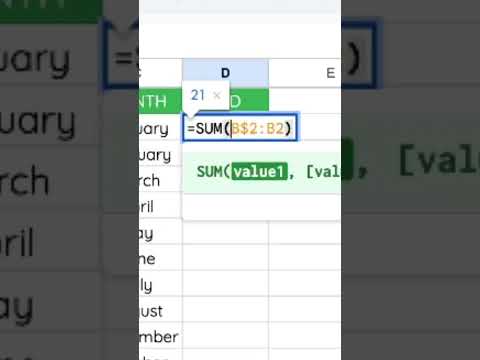
Click the cell for the total and enter =SUM(range), for example =SUM(A2:A100). Or select the numbers and read the sum in the bottom-right explore/status area, then click it to paste. SUM ignores text; use SUMIF/SUMIFS when you need conditions.
Steps
-
1
Click the result cell.
-
2
Type =SUM( and select the range.
-
3
Press Enter.
-
4
Use SUMIF if you need criteria.

Related tutorials
These videos might help you go deeper on this topic.
Magical Things You Can do with Checkboxes in Google Sheets
Embed a Number in a Website from a Google Sheet
How do I Insert Emojis into Google Sheets?
Related blog posts
Written guides that go deeper on this question.
How To Hide Data with Checkboxes in Google Sheets
Google Sheets, Google Sheets Tutorials | This tutorial is meant to show you not just what magical things you can do with checkboxes, but also to show you my process on how when you become a member of Better Sheets.
Read post →Are Google Sheets sexy now? Dropdown Chips might do the trick!
Replace typing with clicking. Instantly color-code options. Discover a revolutionary way to manage your lists with Google Sheets new dropdown feature!
Read post →Create a Many to Many Database inside Google Sheets
Master Google Sheets & simplify work with this tutorial on creating a many-to-many database. No more manual entry! Learn, apply & save time.
Read post →Better Sheets on YouTube
Watch matching videos from youtube.com/bettersheets.


Terms and formulas behind this
Want the full definition or how a formula works? Start here.
dropdowns / data validation
Data validation restricts what people can type in a cell. A dropdown is the friendly face of that feature: pick from ...
Open →Data validation
Data validation restricts what can be entered in a cell before bad data spreads through your model. Rules can enforce...
Open →Explore tab
The Explore tab is a sidebar panel that analyzes your selected data and suggests charts, pivot tables, formatting, an...
Open →SUMIF
SUMIF totals values in a sum_range when a matching row in criteria_range meets your criterion. It is the classic sing...
Open →SUMIFS
SUMIFS adds values in sum_range only when every criteria_range passes its paired test. Argument order is sum_range fi...
Open →SUM()
Google Sheets SUM() function guide
Open →SUMIF()
Google Sheets SUMIF() function guide
Open →SUMIFS()
Google Sheets SUMIFS() function guide
Open →Related questions
How to calculate sum on Google Sheets
Click the cell for the total and enter =SUM(range), for example =SUM(A2:A100). Or select the numbers and read the sum in the bottom-right explore/status area, then click it to paste. SUM ignores text; use SUMIF/SUMIFS when you need conditions.
Get the answer →How to find the sum in Google Sheets
Click the cell for the total and enter =SUM(range), for example =SUM(A2:A100). Or select the numbers and read the sum in the bottom-right explore/status area, then click it to paste. SUM ignores text; use SUMIF/SUMIFS when you need conditions.
Get the answer →How to find sum on Google Sheets
Click the cell for the total and enter =SUM(range), for example =SUM(A2:A100). Or select the numbers and read the sum in the bottom-right explore/status area, then click it to paste. SUM ignores text; use SUMIF/SUMIFS when you need conditions.
Get the answer →How to do the sum of a column in Google Sheets
Click the cell for the total and enter =SUM(range), for example =SUM(A2:A100). Or select the numbers and read the sum in the bottom-right explore/status area, then click it to paste. SUM ignores text; use SUMIF/SUMIFS when you need conditions.
Get the answer →How to sum time in Google Sheets
Click the cell for the total and enter =SUM(range), for example =SUM(A2:A100). Or select the numbers and read the sum in the bottom-right explore/status area, then click it to paste. SUM ignores text; use SUMIF/SUMIFS when you need conditions.
Get the answer →How to sum filtered cells in Google Sheets
Click the cell for the total and enter =SUM(range), for example =SUM(A2:A100). Or select the numbers and read the sum in the bottom-right explore/status area, then click it to paste. SUM ignores text; use SUMIF/SUMIFS when you need conditions.
Get the answer →Need more than a quick answer?
600+ walkthrough videos, unlimited generators, and every template. From $9/month. Practical lessons. Zero fluff.
Need one fix
Watch a free tutorial for the step-by-step version of any answer.
Learning Sheets for real
Unlock the full library, generators, and templates with membership.