One way to use Local Lead Finder. Local Lead Finder is a $10 Google Sheets template I built that turns any Google Maps search into a lead list: every business, with phone, website, rating and reviews. This post is one use case for it: building a cold calling list of local businesses. Other ways to use it are listed at the end, or see all 18 lead generation ideas.
You’ve got the pitch. You’re ready to dial. What you don’t have is a cold calling list: a list of businesses worth calling, with a phone number on every row. Search “cold calling list” and page 1 splits two ways. Half is B2B data companies explaining how to build a list on their platform, plus a telemarketing list seller that asks you to call them for a count. The other half is people on Reddit and in Facebook groups asking where everyone else gets their lists. Google’s own AI answer mentions Google Maps as a free source, then says doing it by hand is slow.
It is slow by hand. So here’s how I’d build a cold calling list of local businesses this week, without buying one. I ran it for real with Local Lead Finder, a $10 Google Sheet I built that pulls every business on Google Maps into a spreadsheet. One “plumber” search across 42 Boise areas came back with 98 plumbers, and all 98 have a phone number. By the end you’ll know which ones I’d call first, how to call or text from the sheet, and how to make sure you never call the same business twice.
TL;DR
- One “plumber” search across 42 Boise areas found 98 plumbers, and every one of the 98 has a phone number.
- Google Maps showed me only 20, so you need one search per neighborhood to get a full calling list.
- The most common mistake is not marking who you called; mark them Outreached and they stay green in every future search.
Who this is for
- Outside sales rep: you get every business of one kind in your territory, with a phone number on every row.
- Freelance web designer: you get the 16 plumbers with no website, and the phone is the one way to reach them.
- Bookkeeper or virtual assistant: you get small trades businesses to call, sorted so the smallest come first.
- Appointment setter or SDR for a local services company: you get a fresh list for any trade and city, instead of a shared, worked-over one.
- Answering service owner: you get a list of busy small businesses who are probably missing calls.
Before you start
- A Google Places API (New) key
- Local Lead Finder set up in your Google Drive
- Local Lead Finder itself
- One kind of business to call, like plumbers
- A city or region, like Boise, Idaho
- A short opener that says what you do and asks one question
Don’t have a Places API key yet? How to get one free. Haven’t set up the sheet? Setup takes 5 minutes.
What a cold calling list of local businesses needs
A list of local businesses to call needs four things:
- A phone number on every row. Otherwise it’s a list, not a calling list.
- A reason to call each one first. A filter that puts the most likely yes at the top.
- A way to never call twice. Calling the same owner twice by accident looks careless.
- Somewhere to write what happened. Called, left a message, call back Thursday.
Google Maps has the first one. A sheet handles the rest.
The run: 98 plumbers in Boise
I searched “plumber in Boise, ID” in Google Maps first. The list loaded 20, 2 of them sponsored, and then stopped. That’s 18 real plumbers to call, and the smallest one had 70 reviews.
Then I ran the same keyword in Local Lead Finder. Find Areas turned Boise, Idaho into 42 areas: Boise, Meridian, Eagle, Garden City, Kuna, and Boise neighborhoods like the North End, Collister and Barber Valley. Search in All AREAS ran “plumber in [area]” for each one and removed duplicates.
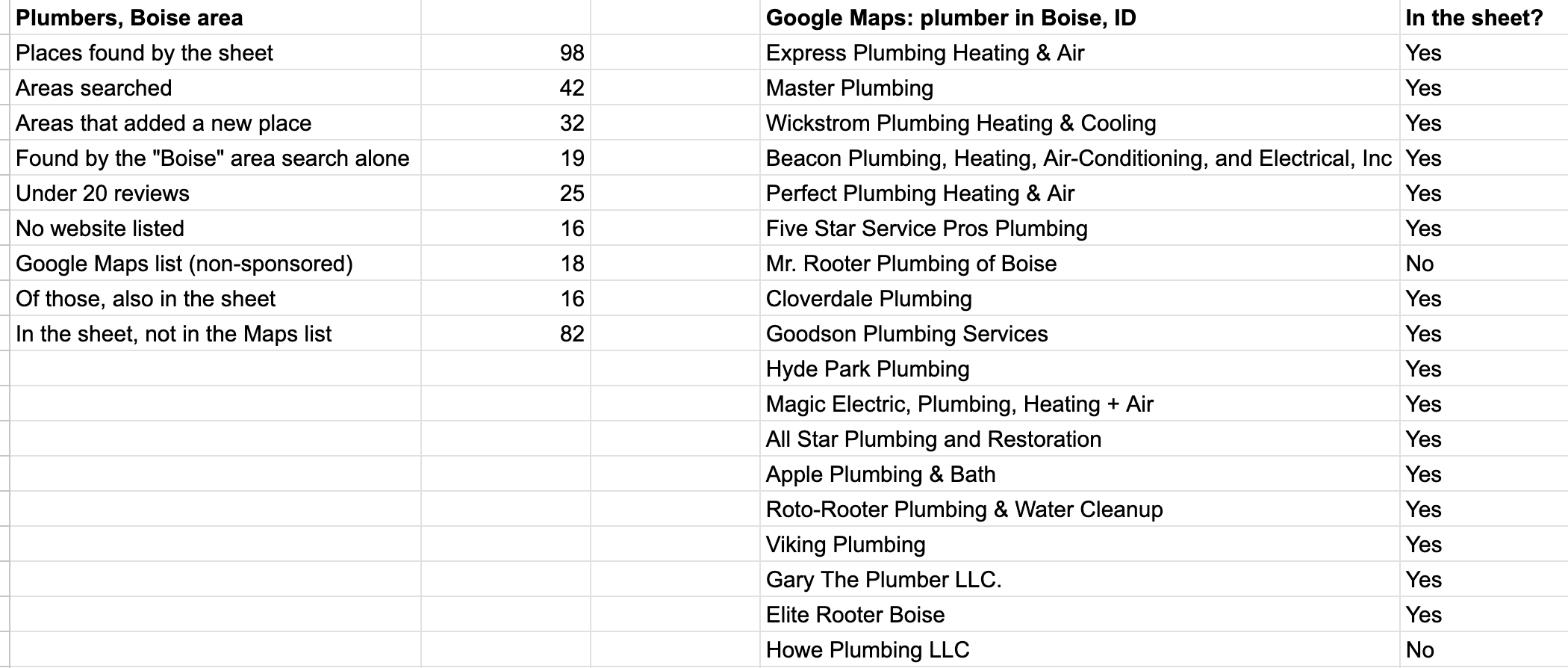
98 plumbers, and all 98 have a phone number. 82 of them weren’t in the Maps list at all. 16 list no website, so for those the phone is the only way in.
Each row has name, phone, address, rating, number of reviews, Place ID, Google Maps link, WhatsApp link, website, and the area searched. That’s your cold calling list.
Who I’d call first
98 is a lot of dials. I’d start with the small ones, because they’re the ones nobody else is calling: they don’t show up in the top 20 on Maps.
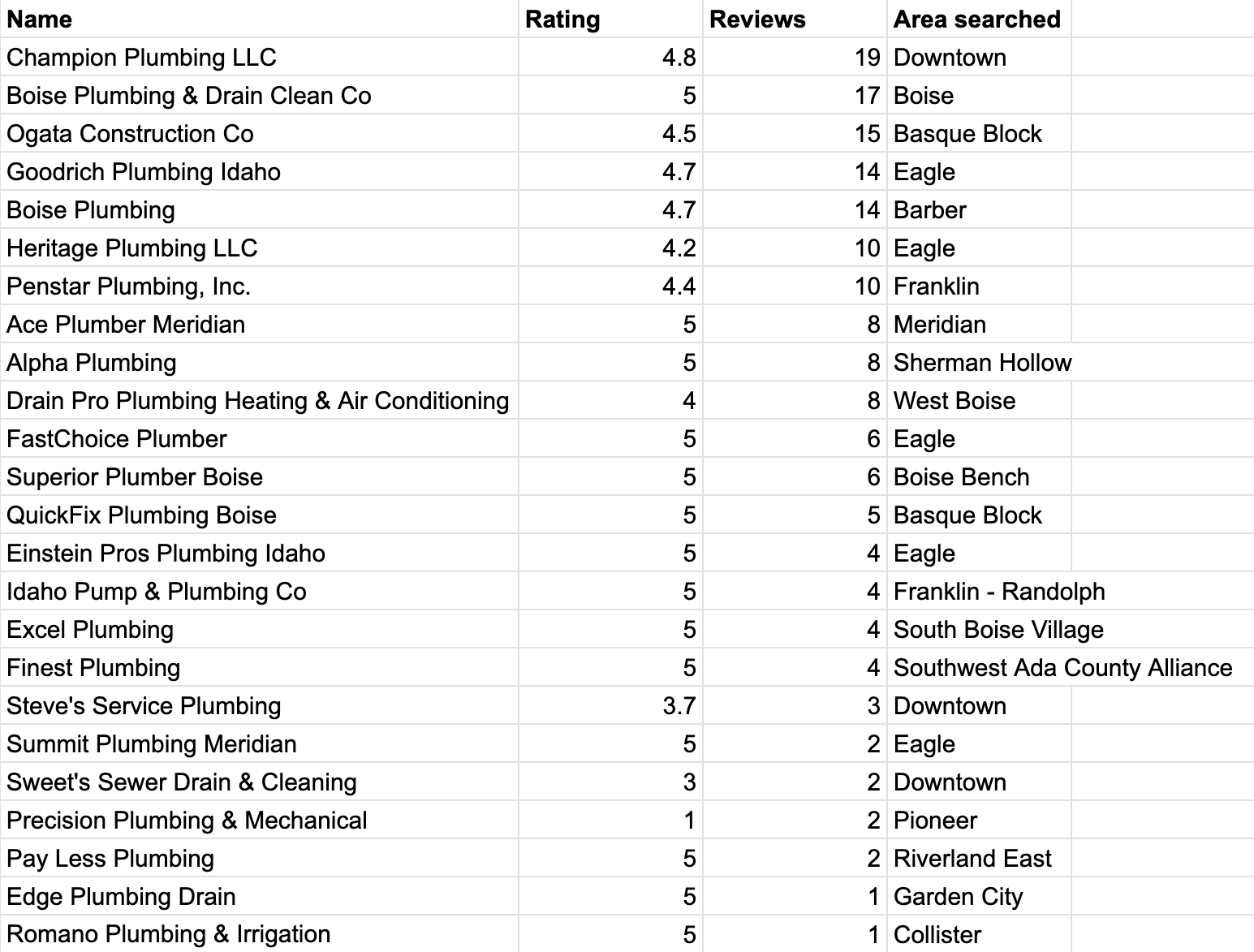
=QUERY('plumber (AREAS)'!A1:J99,"select A, D, E, J where A is not null and E < 20 order by E desc",1)
That pulls name, rating, reviews and area for every plumber with under 20 reviews, most reviews first. 25 plumbers have under 20 reviews, and 14 of them are rated 5.0. Another 5 have no reviews at all.
What “first” means depends on what you sell. If you build websites, start with the 16 that list no website. If you sell review help, start with the 25 under 20 reviews. Same list, different filter.
Call or text from the sheet
The phone column is ready to dial. Scroll right and there’s also a link to each place on Google Maps, a WhatsApp link, and the website.
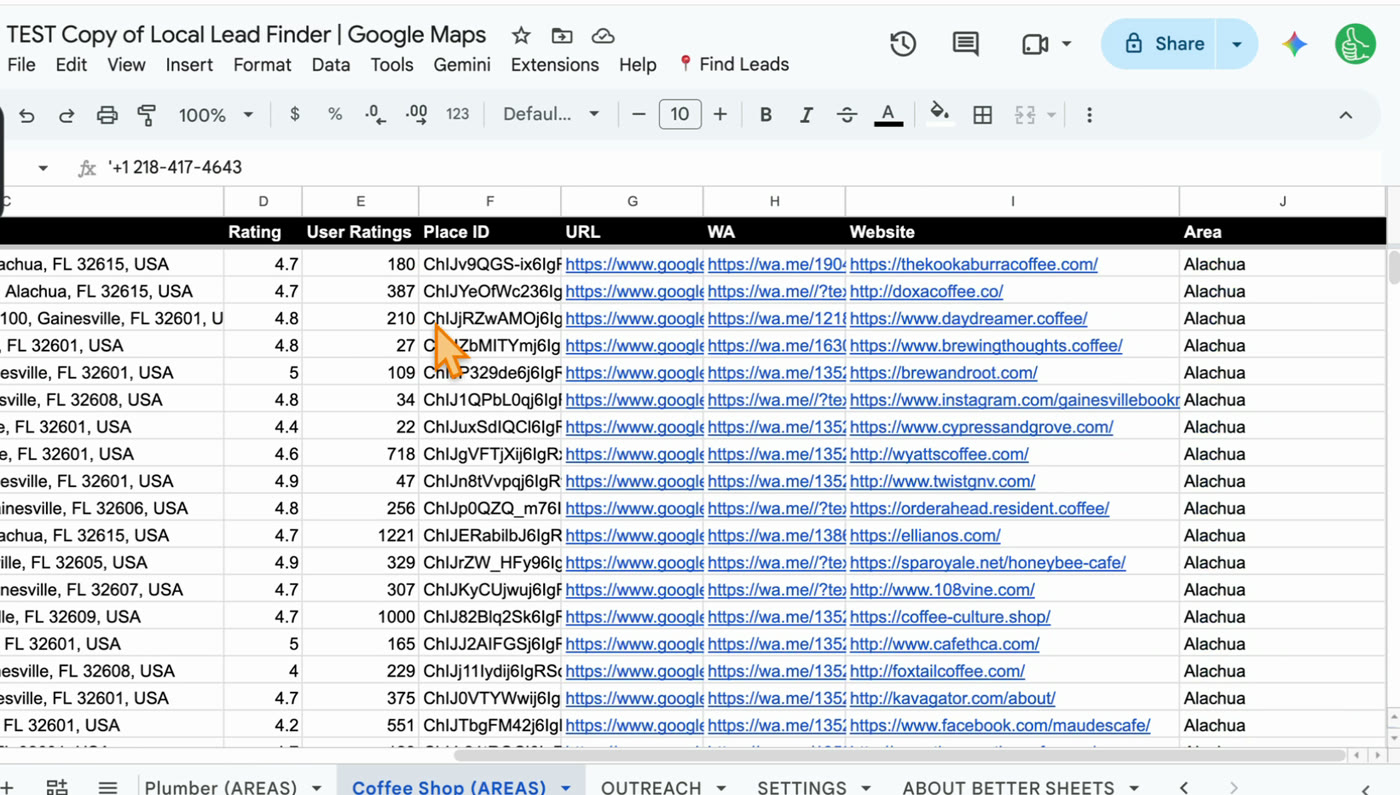
The WhatsApp link opens a chat with that business, with your message already typed in. You set the message once in SETTINGS. It’s handy for a text before you call, or a follow-up after a voicemail.
Here’s the kind of opener I’d use on the phone. Swap in what you do:
Hi, is this the owner? I’m [name], I [what you do] for plumbers around Boise. Quick question: [one question about their business]?
Short, says what you do, asks one question. If you want a worked example, the bookkeeping clients post has the full message I’d send to these same plumbers.
Never call the same business twice
After you call someone, click their row, go to Find Leads, and click 3. Outreached.
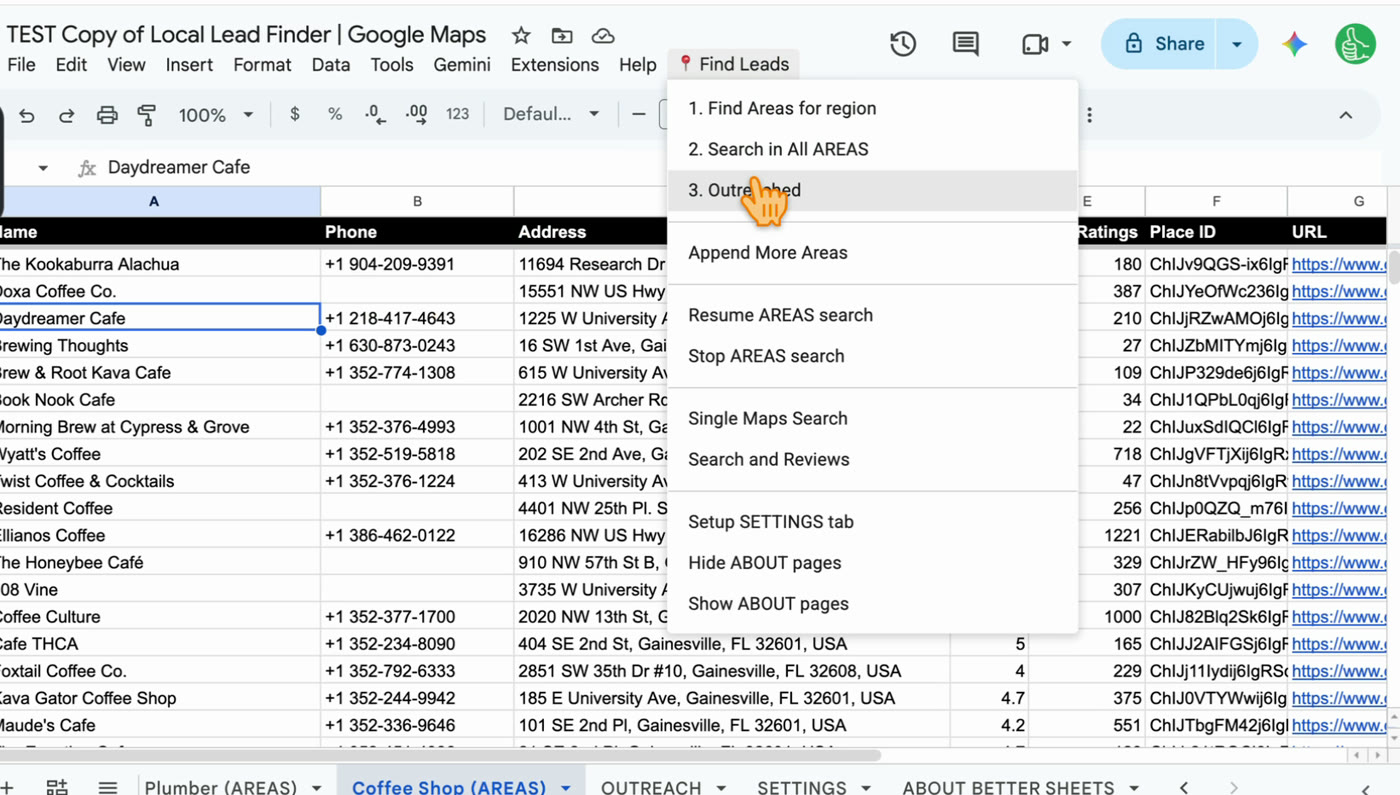
It turns the row green and copies it to the OUTREACH tab. The green follows them into every future search. When I searched “tea shop” after “coffee shop” in Gainesville, the cafe I’d already contacted came back highlighted:
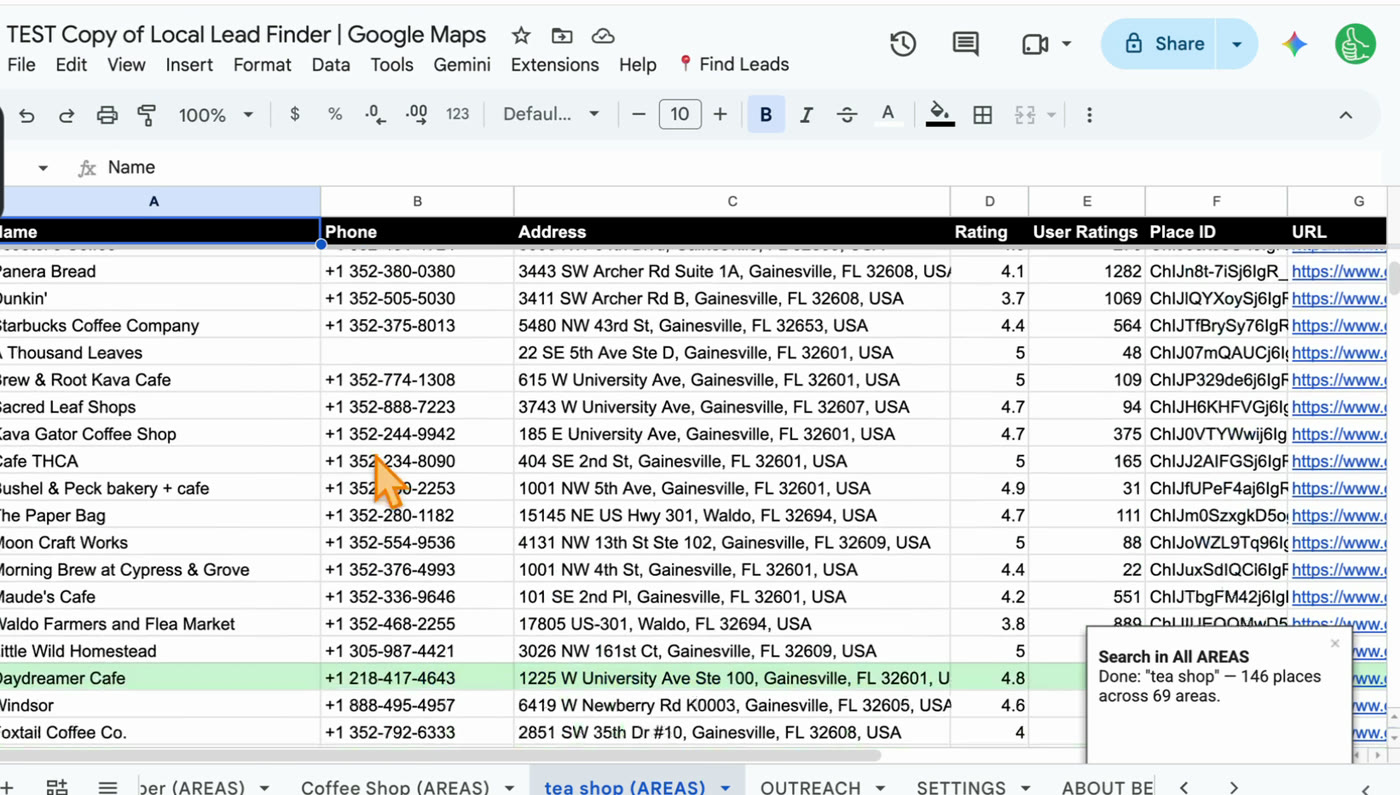
So if you search “plumber” this week and “water heater repair” next week, any plumbers you already called show up green. You skip them.
Write down what happened
The OUTREACH tab is where I’d keep notes, because it’s where every business you’ve called ends up. Add a few columns to the right of the data:
- Result: no answer, voicemail, talked, not interested, interested.
- Notes: who you spoke to and what they said.
- Call back: a date.
Put them on the OUTREACH tab, not the search tab. If you run the exact same search again, it writes over that search tab, notes and all. For a fuller setup, see Google Sheets CRM for Leads: Pipeline, Follow-Ups, No Repeats.
Build it or buy it?
Buy a cold calling list Build one from Google Maps Where it comes from A list seller or a B2B data platform Google Maps, through Google’s Places API on your own key What’s on each row Depends on the seller; B2B platforms focus on names, job titles and direct dials Business name, the phone number listed on Google, address, rating, reviews, website, Place ID Who else has it Anyone else who bought it Anyone can run the same search, but you pick the trade, city and filter Fresh? As fresh as the seller’s last update As fresh as the moment you run the search Cost Whatever the seller charges $10 for the sheet; Google gives up to 1,000 searches a month freeTo be fair to the data platforms: if you need a named decision maker at a large company with a direct line, Google Maps won’t give you that. It gives you the business’s main number. For a small plumber, salon or coffee shop, that’s the same number their customers call.
Step by step
- Get a free Google Places API key (how) and set up Local Lead Finder (about 5 minutes).
- Pick one kind of business to call. I used plumbers.
- Type your region and run Find Areas (Boise, Idaho gave me 42 areas). Untick any areas you don’t want.
- Run Search in All AREAS with your keyword. The sheet shows the most the search could cost before it runs.
- Filter to the ones you’d call first, like under 20 reviews or no website.
- Clean the list: check names that don’t fit the keyword before you call.
- Call down the list. Text first with the WhatsApp link if you prefer.
- Mark each one Outreached, and write the result on the OUTREACH tab.
Common pitfalls
- Stopping when the Maps list stops: my Maps search loaded 20 plumbers, 2 of them sponsored. 82 plumbers on my list weren’t in the Maps list at all.
- Calling names that don’t fit: Ogata Construction Co came back from the “Basque Block” search. It may do plumbing, but it’s not called a plumber, so check names like that before you dial.
- Calling in list order: sort first. Start with whoever your offer fits best, like the 16 with no website or the 25 with under 20 reviews.
- Not marking Outreached: if you skip it, your next search won’t show who you already called. Marked rows turn green in every future search.
- Writing notes on the search tab: running the exact same search again writes over that tab. Keep notes on the OUTREACH tab.
- Running big regions without checking the cost: each area is one Places API request per results page, so 42 areas was 42 requests. Look at the number before you click OK.
- Skipping the calling rules: rules for calling businesses depend on where you are and where they are. Check yours before you start.
Learn the Google Sheets formulas in this post
- How To Sort A Filter: sorting a filtered list, like the under 20 reviews QUERY sorted by reviews.
- 3 Ways to Count in Google Sheets: count how many you’ve called, how many said yes, and how many are left.
- Fabulous Filters: more ways to pull just the rows you want to call, like no website.
- Rishabh Asks: Conditional Format Whole Row Via Text inside a Cell: color a whole row by its Result, like the green Outreached rows.
- Make a Quick Pipeline (For Sales and More): move each call from “called” to “interested” to “customer”.
Better Sheets has hundreds more tutorials like these. If you want to get better at Google Sheets, join Better Sheets.
Other ways to use Local Lead Finder
- List of Plumbers: 98 in Boise, for Anyone Who Sells to Plumbers: for suppliers, bookkeepers and marketers who want the same plumber list.
- How to Get Bookkeeping Clients: 25 small plumbers in Boise: for bookkeepers, VAs and answering services calling small trades.
- How to Get Clients for Web Design: 4 Real Lead Lists, in Order: for web designers who want local businesses with no website.
- Google Sheets CRM for Leads: Pipeline, Follow-Ups, No Repeats: for anyone who wants to track every call in the same sheet.
All 18, grouped by who they’re for: Lead generation ideas: 18 local businesses to sell to.
FAQ
Where can I get free cold calling lists?
For local businesses, Google Maps is the free source. One Maps search showed me 20 plumbers; running the search for every Boise neighborhood found 98, all with phone numbers. Local Lead Finder does that for $10, and Google gives up to 1,000 searches a month free on your own key.
Does cold calling still work in 2026?
I don’t have numbers on that, so I won’t make any up. What I can say is that for some local businesses the phone is the only way in: 16 of my 98 plumbers list no website, so there’s no contact form to fill in.
Should I buy a cold calling list or build one?
If you need named decision makers with direct lines at larger companies, a B2B data platform is built for that. For local businesses, building your own from Google Maps gets you a list as fresh as the moment you ran it, in the trade and city you pick, for $10 and your own free Places API allowance.
What’s on each row?
Name, phone, address, rating, number of reviews, Place ID, Google Maps link, WhatsApp link (with your message from SETTINGS), website, and the area it was found in.
How do I avoid calling the same business twice?
Mark each business Outreached after you call. The row turns green, gets copied to the OUTREACH tab, and shows up green in every future search, even a different keyword.
Is it legal to build a cold calling list from Google Maps?
Local Lead Finder doesn’t scrape. It uses Google’s official Places API with your own key. More in Is Scraping Google Maps Legal? What Google’s Own Terms Say. Rules for calling businesses depend on where you are. This isn’t legal advice.
How much does a search cost?
Each area is one Places API request per results page, so my 42 Boise areas was 42 requests. Google gives up to 1,000 searches a month free, and the sheet shows the most a search could cost before it runs.
Get the sheet
Local Lead Finder is $10, and free for Better Sheets lifetime members.
