Your competitors publish all the time. A launch post here, a changelog entry there, a new pricing page nobody announced. You see each one, think “I should keep an eye on that”, and then it’s gone into your browser history.
This post keeps competitor content in a Google Sheet. Each page is saved in one click, with a note on what it says and a status for whether it needs a response. I set it up on November 12, 2026 as if I ran a project management app, and saved seven real pages from five companies.
Here is the short version:
- Get a copy of Link Saver and run its one setup step. It gives you a Save Link button for your bookmarks bar.
- Set the categories to the kinds of thing competitors publish.
- When you see something, click Save Link. Put the company in tags and what changed in notes.
- Once a week, go down the list and set a status on each one.
If you haven’t set the sheet up yet, the swipe file post walks through setup with screenshots.
Set the categories and statuses
On the SETTINGS tab I changed the categories to the kinds of content I wanted to watch:
- Product updates
- Launches
- How-to posts
- Comparison pages
- Pricing
And the statuses to what I’d do about each one:
- To Review
- Worth a response
- Noted
- Ignore
The first status is where every new link starts. After changing the categories, click Link Saver → Setup → Update Categories in Form so the Save Link window shows the new list.
Save a competitor’s page
Here is a release post from Notion.
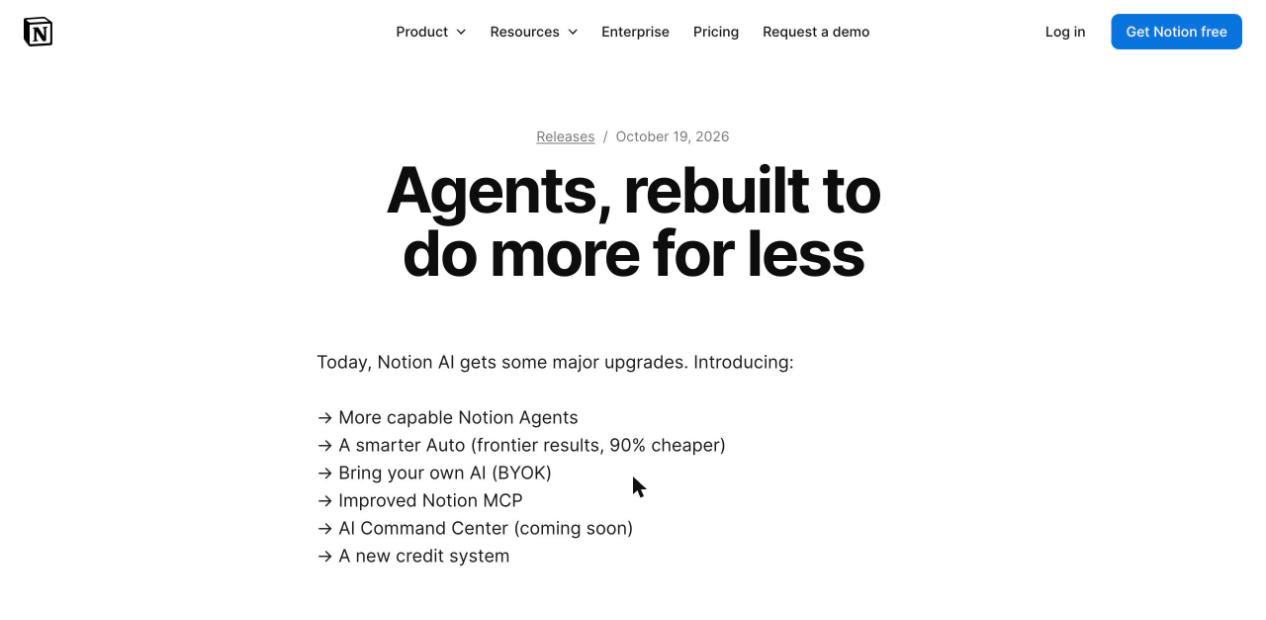
With the page open, click Save Link. The title and URL are filled in. I picked a category, put the company first in tags, and wrote what changed.
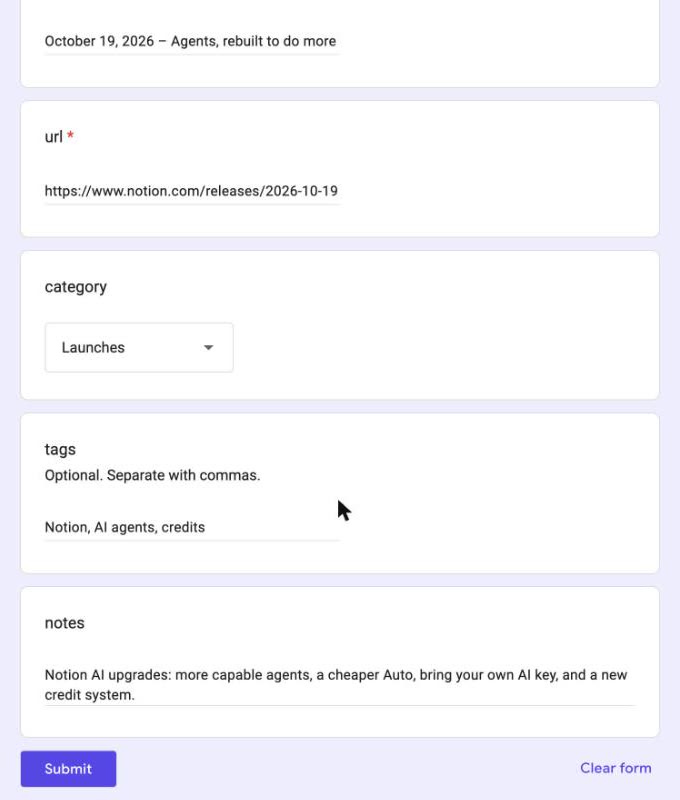
Put the company name first in tags, every time. A page title often doesn’t say who published it. This one is “October 19, 2026 – Agents, rebuilt to do more for less”, with no mention of Notion.
Seven pages later
I saved six more, from four other companies.
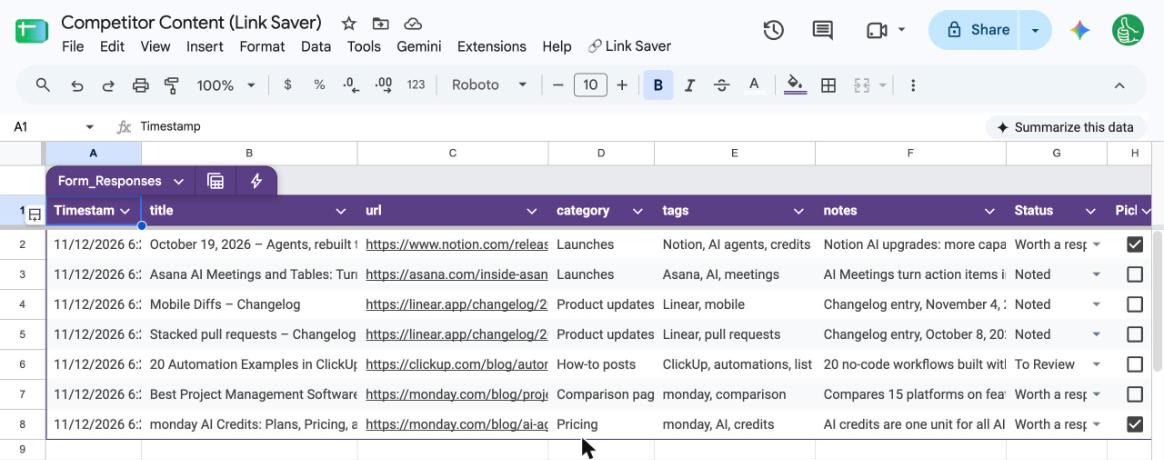
What I saved, from each page on the day I saved it:
- Notion: Agents, rebuilt to do more for less. Launch. More capable agents, a cheaper Auto, bring your own AI key, and a new credit system.
- Asana: AI Meetings and Tables. Launch. AI Meetings turn action items into assigned tasks. Tables keep business data current across projects.
- Linear: Mobile Diffs. Product update. Changelog entry, November 4, 2026.
- Linear: Stacked pull requests. Product update. Changelog entry, October 8, 2026.
- ClickUp: 20 Automation Examples in ClickUp Worth Stealing Today. How-to post. 20 no-code workflows built with ClickUp Automations.
- monday.com: Best Project Management Software For 2026 (Top 15 Picks). Comparison page. Compares 15 platforms and puts monday first.
- monday.com: monday AI Credits: Plans, Pricing, and Free Features. Pricing. AI credits are one unit for all AI usage, with what each plan includes.
Seven rows is enough to see a pattern you’d miss one tab at a time:
- Two companies wrote about AI credits. Notion’s release mentions a new credit system, and monday.com has a whole page on how its credits work.
- Both of Linear’s entries are about code. Diffs and pull requests, in a product for tracking issues.
- One company wrote the comparison page. monday.com compares 15 tools and lists itself first.
Decide what needs a response
Once a week, go down the Status column. For each row, pick one:
- Worth a response means you should do something: write your own page, update your pricing page, tell the team.
- Noted means you read it and that’s enough.
- Ignore means it isn’t about you.
In my sheet three are Worth a response, three are Noted and one is still To Review.
Then pull a theme out. I ticked Pick on the two rows about AI credits, clicked Link Saver → Create Collection from Picked Links, and called it “AI credits”.
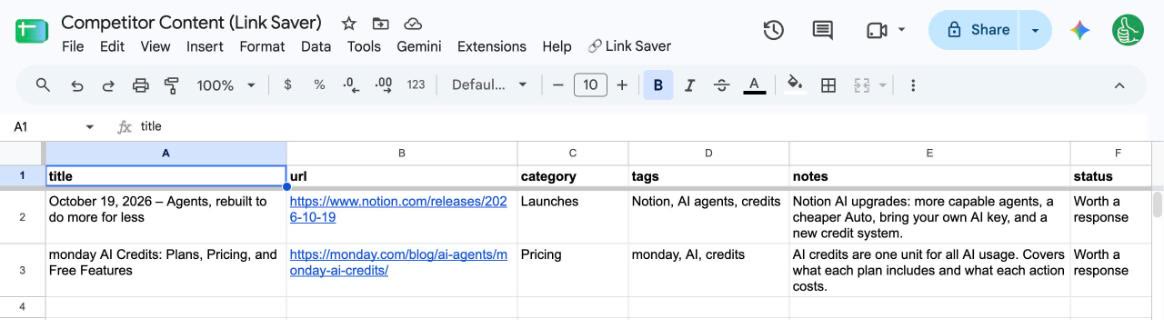
That tab is what you bring to the pricing conversation. Link Saver → Export Collection turns it into plain text, Markdown or HTML to paste into a doc or a message.
Notes if you try this
- Save from the changelog, not only the blog. Changelog entries are short and dated, and they show what a company is building. Blog posts show what it wants to be found for.
- The date saved is filled in for you. The first column is when you saved the page. Put the publish date in notes if it matters, like I did for the changelog entries.
- Keep the notes to what the page says. Write down what they announced, not what you think of it. Your opinion goes in the Status.
- Sort by tags to see one company. Because the company comes first in tags, sorting that column groups each competitor’s pages together.
- Add your own columns. It’s a sheet. An “Owner” column or a “Our response” column to the right of the others won’t break anything.
Get the sheet
Link Saver is $10, one time. Better Sheets lifetime members get it free.