
Free template. Everything in this post runs in the Holidays API sheet. Log in free at bettersheets.co/holidays to copy it. This post shows exactly how it works, so you can also build it yourself.
Every year I end up typing holidays into a sheet. For a calendar, a staff rota, a project plan. I look them up, copy them one by one, and get one wrong.
You don’t have to. There’s a free holidays API that covers 204 countries, needs no API key, and Google Sheets can call it with one custom function. Type a country and a year in a cell and every public holiday shows up.
TL;DR
-
=PUBLICHOLIDAYS("US", 2027)returns 17 holidays for the United States in 2027. 11 of them are nationwide. - The API is Nager.Date. It’s free, has no key and no sign up, and covers 204 countries.
- The same data finds long weekends (the US has 6 three day weekends in 2027) and working days (Canada has 254 in 2027).
What you get
Here’s the sheet. Each tab answers one question.
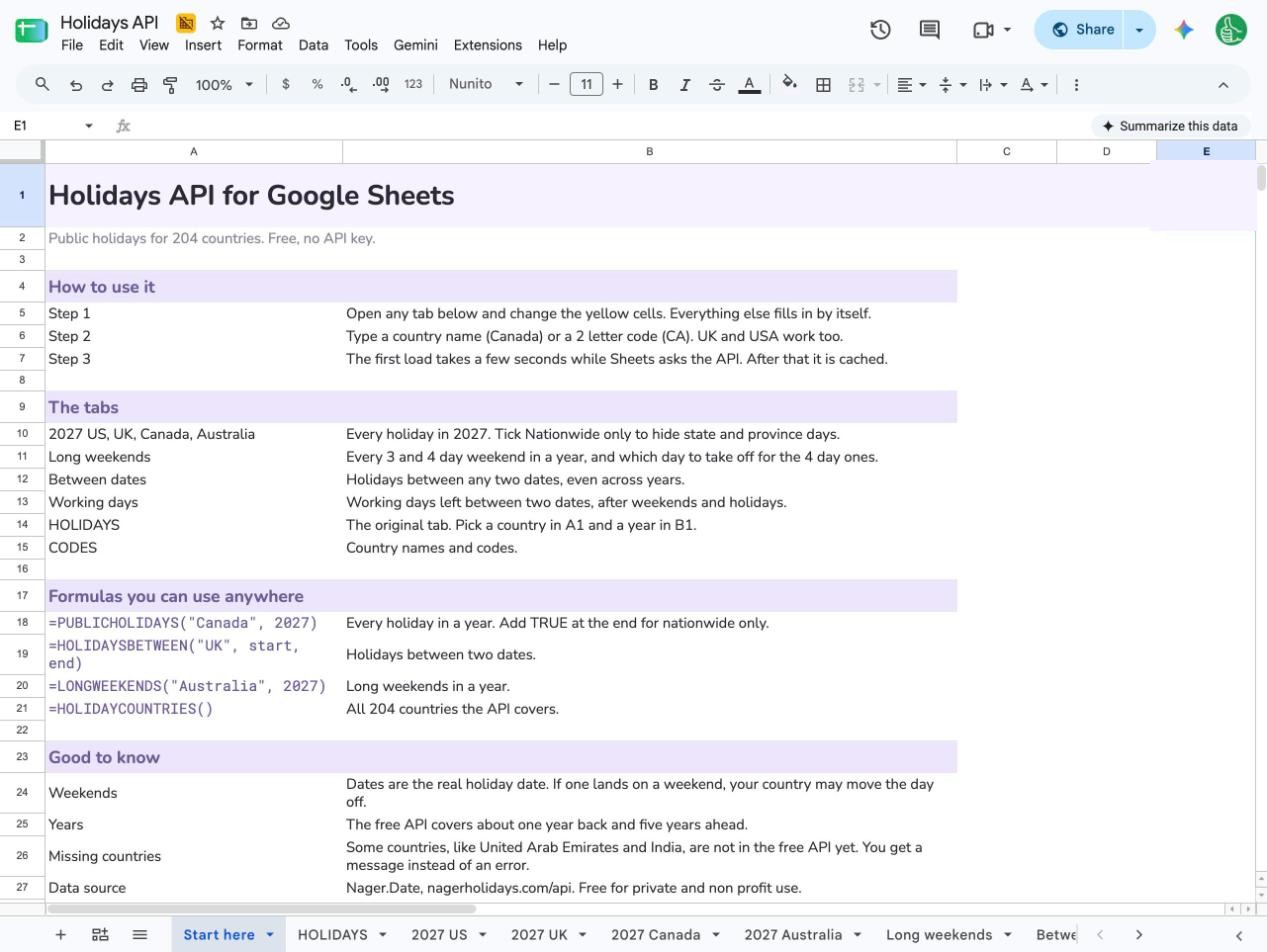 1. The Start here tab.
- HOLIDAYS: pick any country from a dropdown and get its holidays with local names.
- 2027 US, UK, Canada, Australia: every holiday in a year, with where it applies.
- Long weekends: every 3 and 4 day weekend, and which day to take off.
- Between dates: holidays between any two dates, even across years.
- Working days: working days left between two dates.
Change the yellow cells on any tab and it fills in again.
The API: Nager.Date
The sheet uses Nager.Date, an open source holiday API. Here’s why I picked it:
- Free. No plan, no card.
- No key. You call a URL and get JSON back. Nothing to sign up for.
- Documented. Every endpoint is listed in the API reference.
-
204 countries. You can see the full list with
=HOLIDAYCOUNTRIES()in the sheet, or on their coverage page.
One URL gives you a whole year:
https://nagerholidays.com/api/v4/Holidays/US/2027
Two things to know before you build on it.
Some countries aren’t covered. United Arab Emirates and India return nothing. The first version of this sheet broke with an error when you picked them. Now it says so in plain words: “No holiday data for AE. The free API covers 204 countries.”
The terms. Nager.Date is free for private and non profit use. For commercial use they ask you to sponsor the project. If your business depends on it, sponsor it.
Step 1: Pick a country from the dropdown
The fastest way in is the HOLIDAYS tab. Pick a country in A1, type a year in B1, and the list fills in. Each holiday gets its date, its English name, its local name and the day of the week.
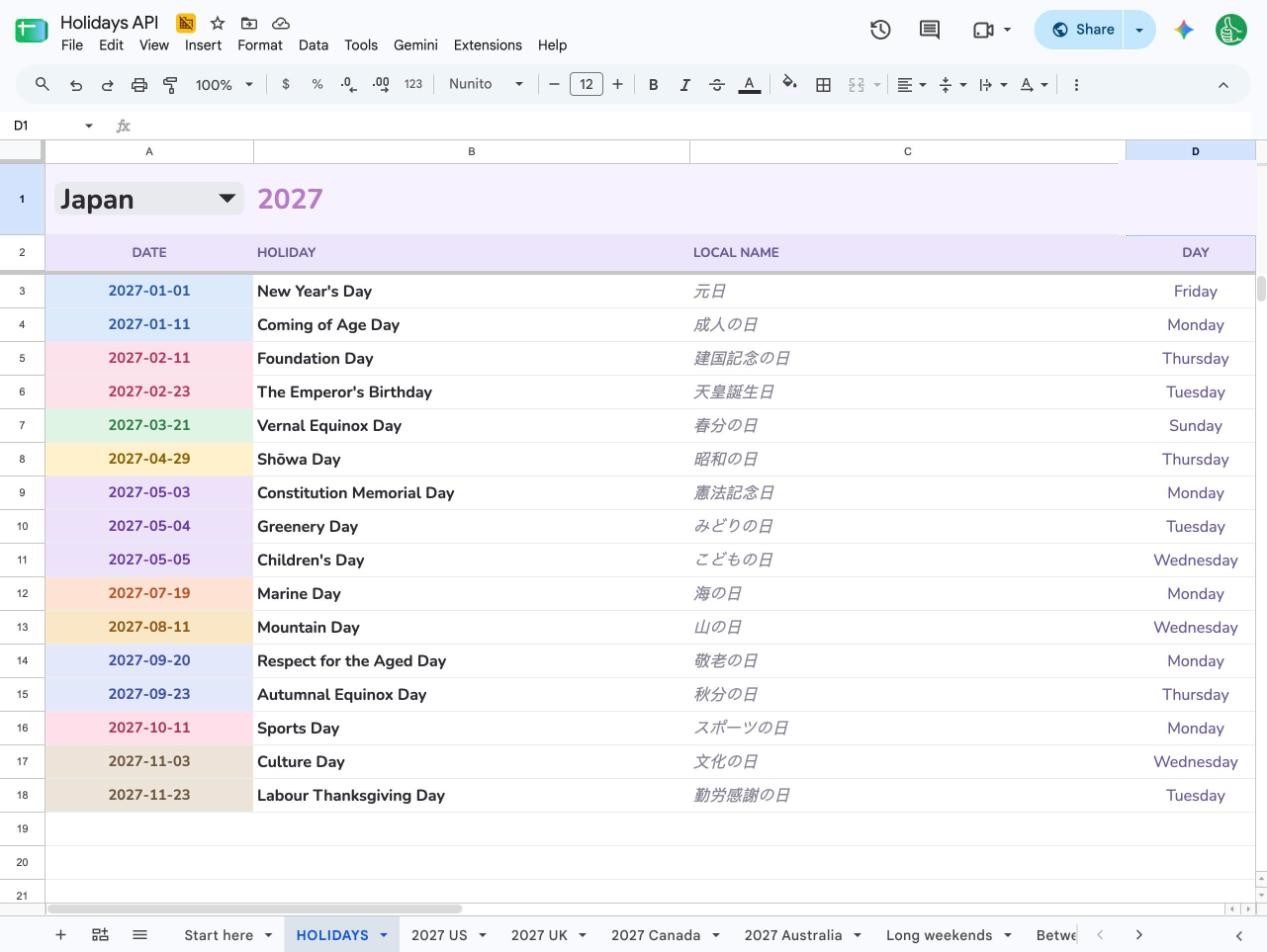 2. Japan in 2027: 16 holidays, with local names in Japanese.
I tried a few countries. In 2027 Japan has 16, Germany 19, Brazil 15, France 11 and Mexico 9. Every date is tinted by month, so you can see the busy months at a glance. Japan’s three in a row in early May jump right out.
Step 2: Get every holiday in a year, with where it applies
Open the 2027 US tab. Cell A10 has one formula:
=PUBLICHOLIDAYS(B4, B5, B6)
B4 is the country, B5 is the year, B6 is a checkbox for nationwide only.
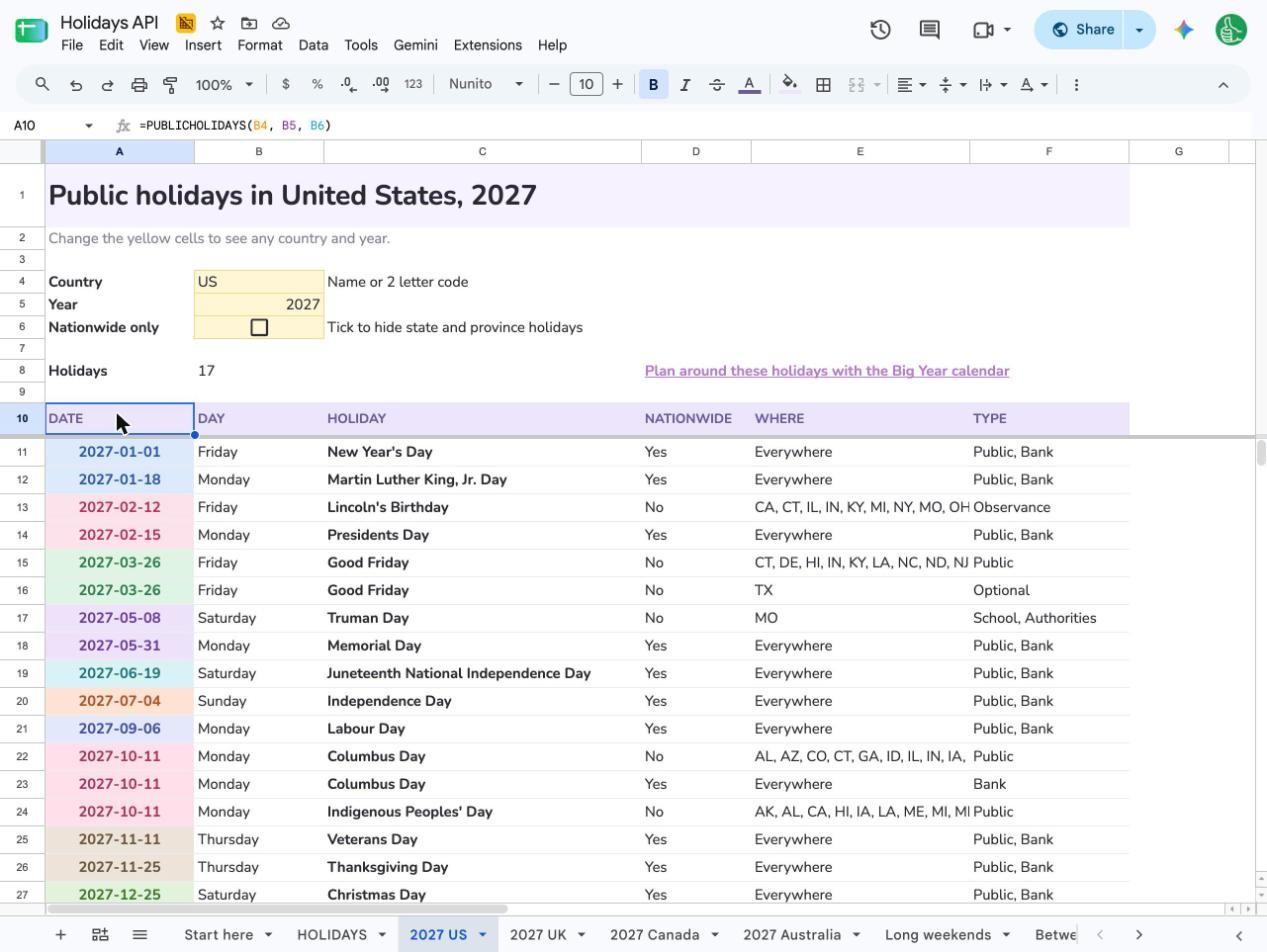 3. One formula, 17 holidays for the United States in 2027.
You get six columns:
- DATE: a real date, so NETWORKDAYS and filters work on it.
- DAY: Monday, Tuesday and so on.
- HOLIDAY: the name in English.
- NATIONWIDE: Yes if it applies to the whole country.
- WHERE: the states or provinces when it doesn’t.
- TYPE: Public, Bank, Observance, School and so on.
The country can be a name or a code. Canada, CA, UK and USA all work.
The WHERE column matters more than I expected. The US list has 17 rows but only 11 are nationwide. Lincoln’s Birthday is only in 9 states. Good Friday is a public holiday in 10 states and optional in Texas.
The UK is even more split. 13 holidays, and only 5 apply everywhere. Easter Monday is England, Wales and Northern Ireland. Scotland has its own Summer Bank Holiday on 2 August.
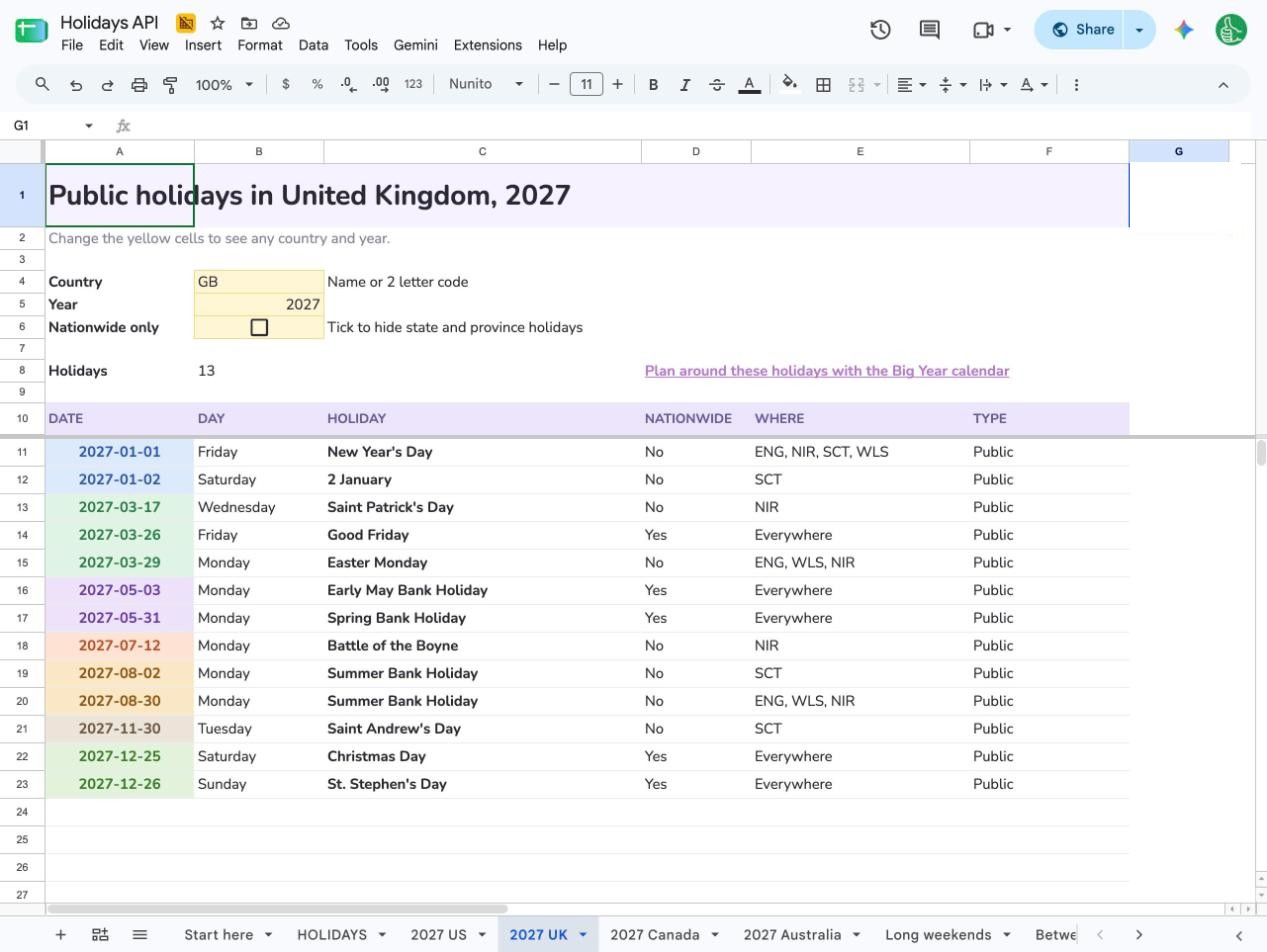 4. The UK in 2027: 13 holidays, 5 nationwide.
Here’s the full picture for the four example tabs:
- United States: 17 holidays in 2027, 11 nationwide.
- United Kingdom: 13 holidays, 5 nationwide.
- Canada: 31 holidays, 8 nationwide.
- Australia: 27 holidays, 6 nationwide.
Tick Nationwide only to hide the state and province days.
Step 3: Find the long weekends
This is the one people actually want. Open the Long weekends tab:
=LONGWEEKENDS(B4, B5)
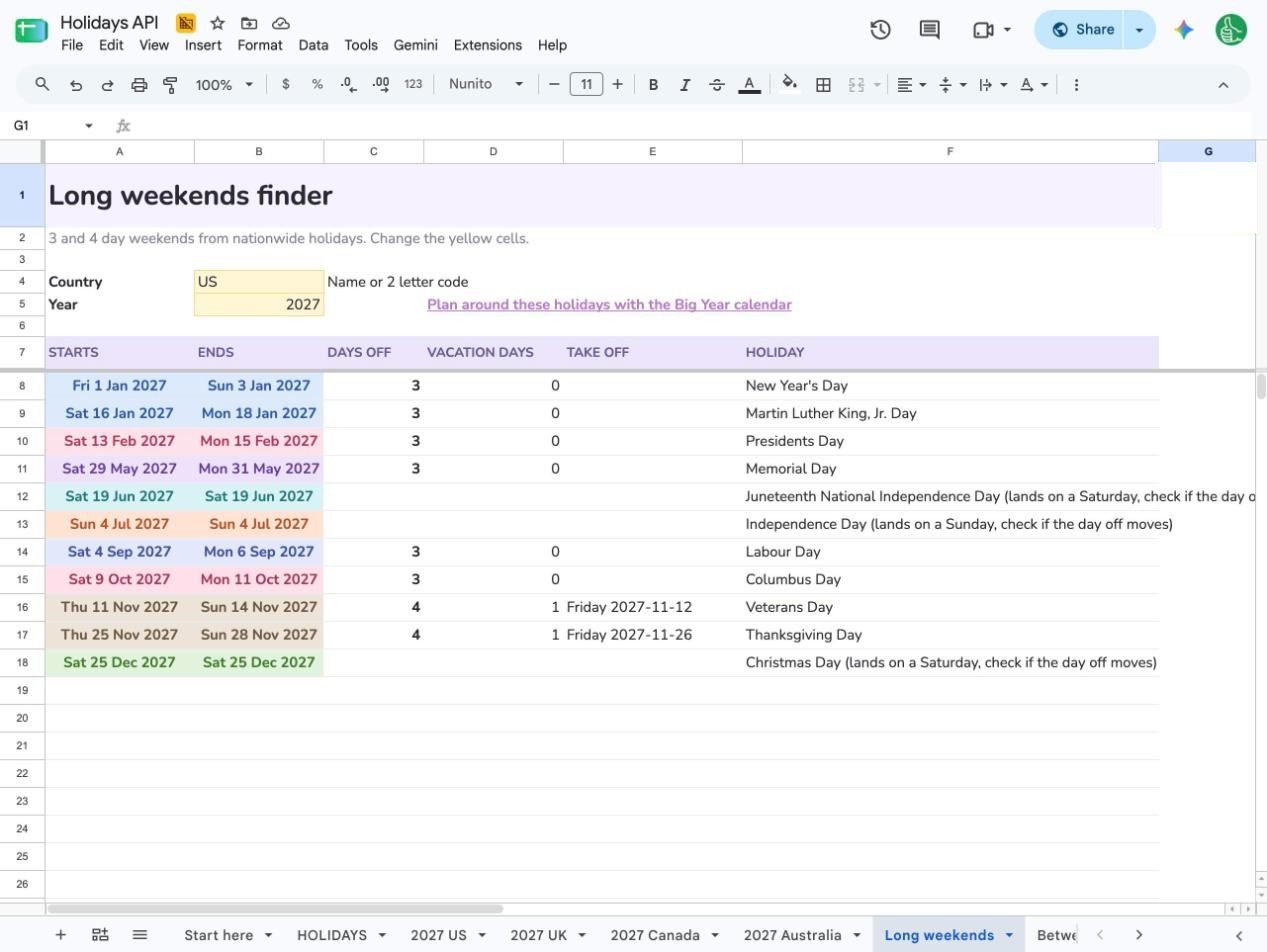 5. Every long weekend in the US in 2027.
For the US in 2027 it finds:
- 6 three day weekends with no vacation days needed: New Year’s Day, Martin Luther King Jr. Day, Presidents Day, Memorial Day, Labour Day and Columbus Day.
- 2 four day weekends for one vacation day each. Veterans Day is Thursday 11 November, so take Friday 12 November. Thanksgiving is Thursday 25 November, so take Friday 26 November.
It also flags 3 holidays that land on a weekend in 2027: Juneteenth (Saturday), Independence Day (Sunday) and Christmas Day (Saturday).
That flag is there on purpose. The API gives the actual date of a holiday. Many countries move the day off to the Friday or Monday when it lands on a weekend, and the API doesn’t say when. So check your own country’s rule for those rows. I’d rather the sheet tell you to check than guess.
It only counts nationwide holidays, so a state holiday doesn’t show up as a long weekend for everyone.
Step 4: Holidays between two dates
Planning December to February? The Between dates tab works across years:
=HOLIDAYSBETWEEN(B4, B5, B6, B7)
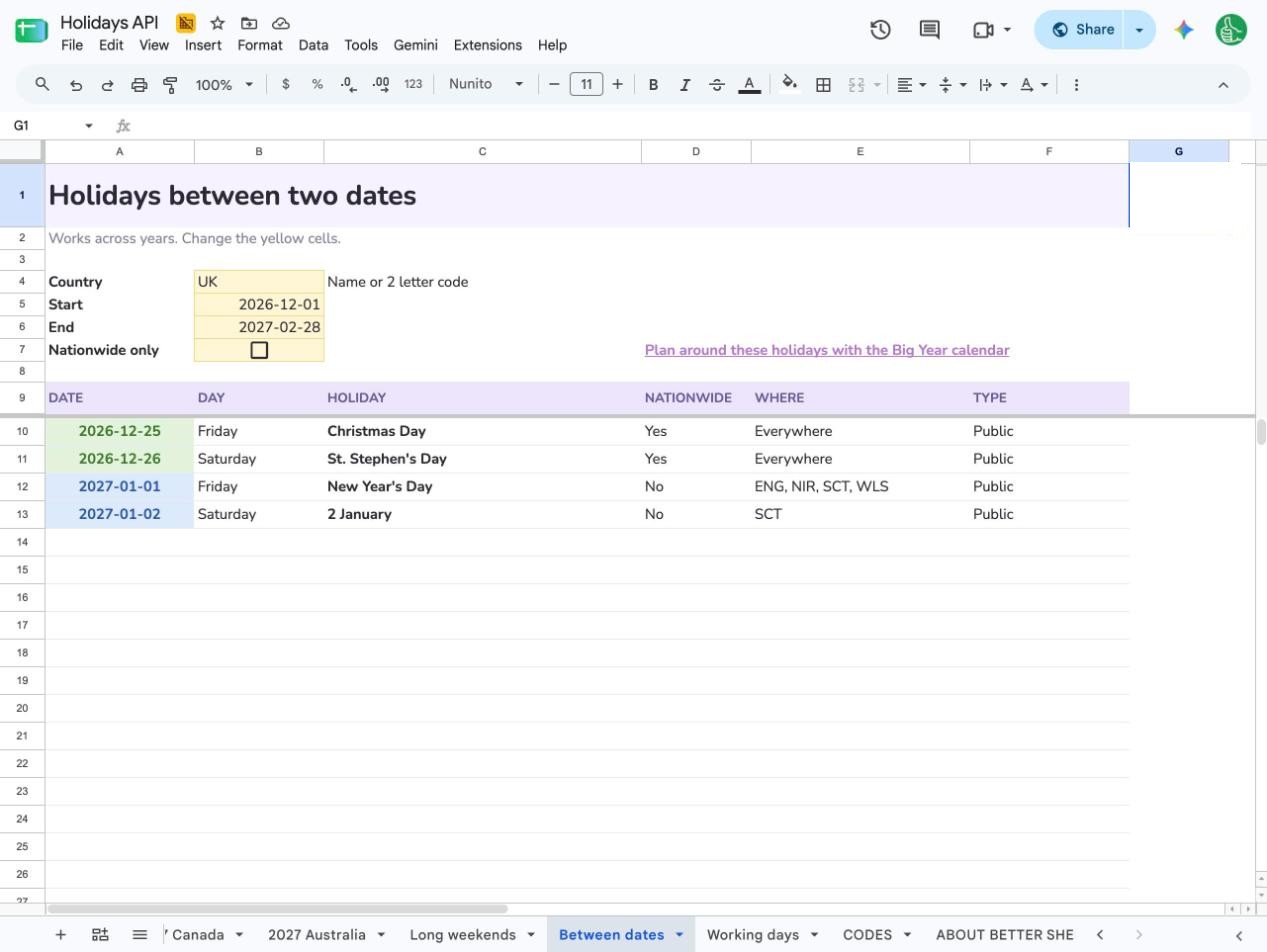 6. The UK between 1 December 2026 and 28 February 2027.
For the UK from 1 December 2026 to 28 February 2027 that’s 4 holidays: Christmas Day, St. Stephen’s Day, New Year’s Day and Scotland’s 2 January.
Step 5: Count working days
Because DATE is a real date, you can hand the list straight to NETWORKDAYS. The Working days tab does it for Canada in 2027:
- 261 weekdays
- 7 nationwide holidays that land on a weekday
- 254 working days
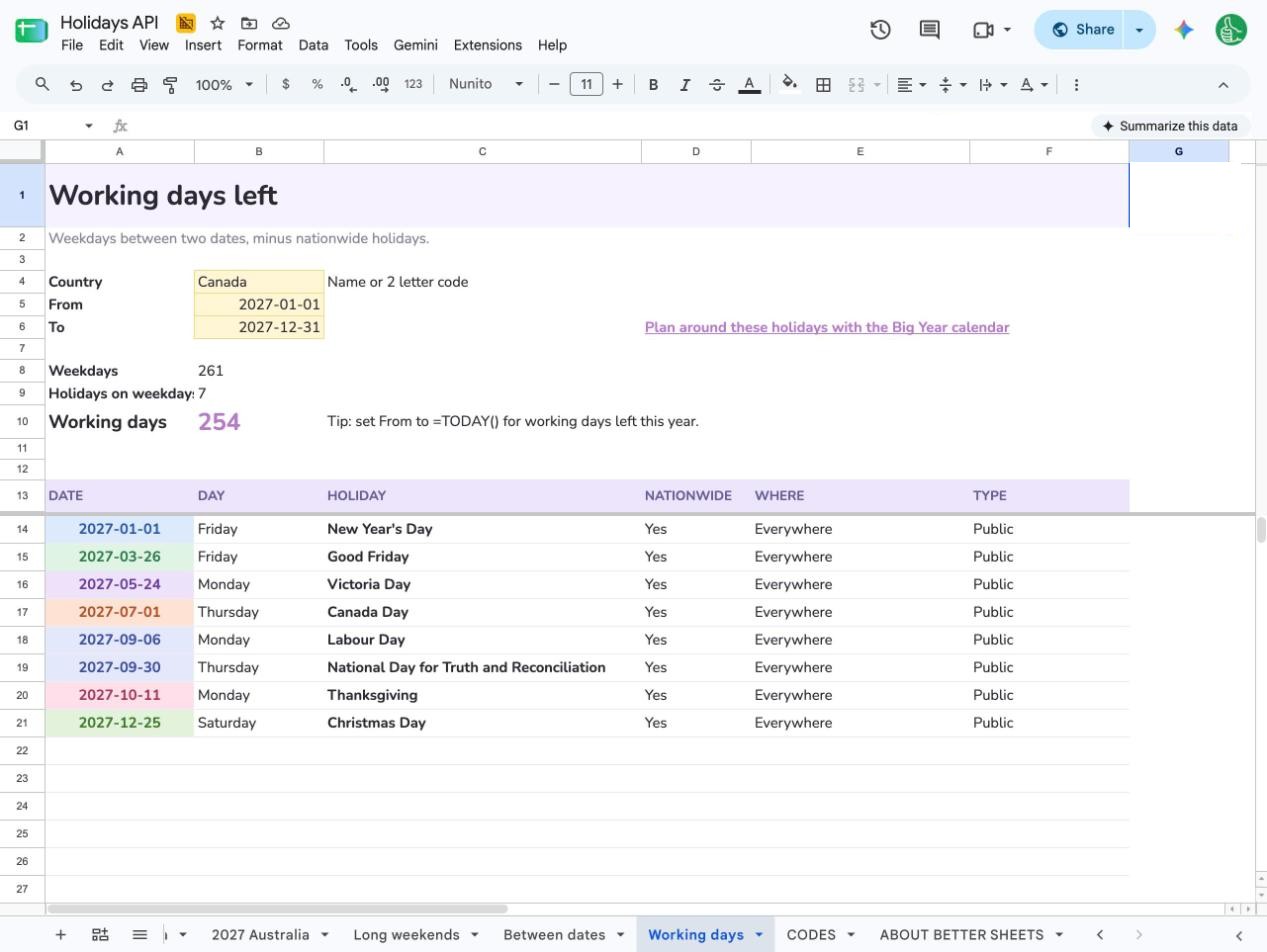 7. 254 working days in Canada in 2027.
The formula is plain Sheets:
=NETWORKDAYS(B5, B6, FILTER(A14:A, ISNUMBER(A14:A)))
Set the From date to =TODAY() and it becomes working days left this year.
Common mistakes in the sheet
The sheet answers in plain words when something’s off, right where the holidays would be.
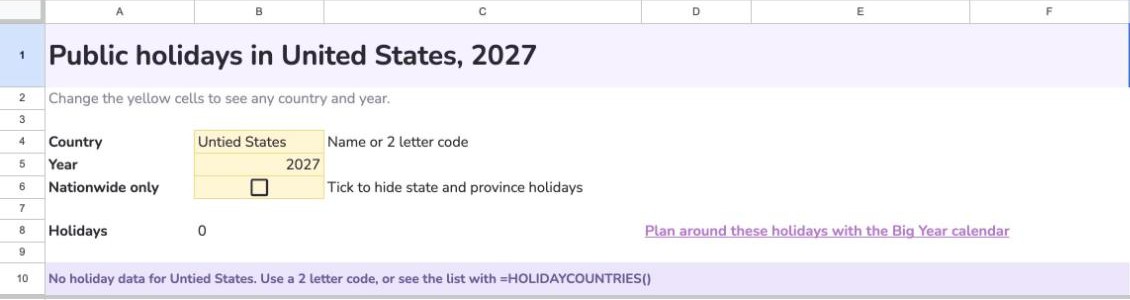 8. A typo in the country name.
-
A typo in the country. “Untied States” shows “No holiday data for Untied States. Use a 2 letter code, or see the list with =HOLIDAYCOUNTRIES()”. Fix the spelling or use the code,
US.
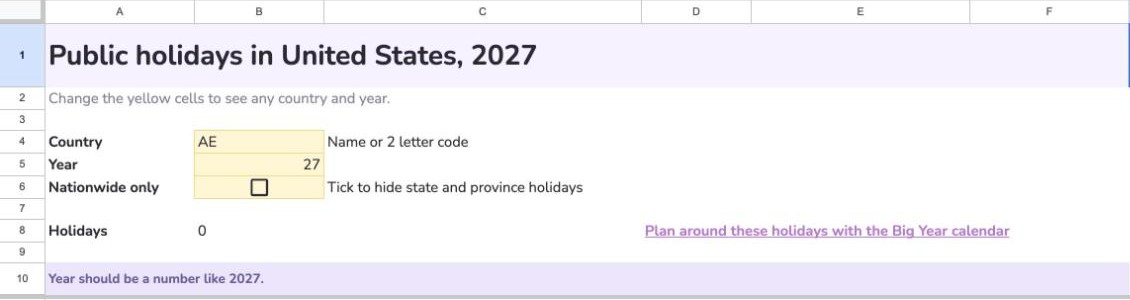 9. A short year.
-
A short year. Type
27and you get “Year should be a number like 2027.” Use all four digits. -
A country the API doesn’t cover.
AEshows “No holiday data for AE. The free API covers 204 countries”. Nothing is broken; that country just isn’t in the free data yet. - Typing over the formula. If you type into A10 on a country tab, the list disappears. Press Cmd+Z (Ctrl+Z on Windows) to bring the formula back.
- Loading for a while. The first load asks the API, so it can say Loading… for a few seconds. After that it’s cached for 6 hours.
Build it yourself
If you’d rather write your own, here’s the core of it. (Want the API on its own, with curl, JavaScript or Python? I wrote that up too: Free holidays API: get public holidays with no key.) Open Extensions > Apps Script and paste:
/**
 * @customfunction
 */
function PUBLICHOLIDAYS(country, year) {
  var url = 'https://nagerholidays.com/api/v4/Holidays/' + country + '/' + year;
  var response = UrlFetchApp.fetch(url, { muteHttpExceptions: true });
  if (response.getResponseCode() !== 200 || !response.getContentText()) {
    return 'No holiday data for ' + country;
  }
  var holidays = JSON.parse(response.getContentText());
  var rows = [['DATE', 'HOLIDAY', 'NATIONWIDE']];
  holidays.forEach(function (h) {
    rows.push([h.date, h.name, h.nationalHoliday]);
  });
  return rows;
}
Save, then type =PUBLICHOLIDAYS("US", 2027) in a cell.
Two lines in there save you from the error I hit. muteHttpExceptions stops Sheets from crashing on a bad country code, and the empty text check catches countries the API doesn’t cover.
The template adds the rest: country names as well as codes, real dates, the nationwide filter, caching so it doesn’t call the API on every edit, long weekends, and readable messages for every error.
Good to know
- Years. The current API covers about one year back and five years ahead, 2025 to 2031 right now. The older version covers more years but switches off on 31 January 2027. The sheet tries the new one first and falls back to the old one while it still runs.
- Speed. The first load takes a few seconds. After that results are cached for 6 hours.
- Limits. A free Google account can make about 20,000 URL fetches a day. A sheet like this uses a handful.
FAQ
Is there a free holidays API with no key? Yes. Nager.Date covers 204 countries, and you call it with a plain URL. No account, no key.
Can Google Sheets get holidays without Apps Script? Not live. IMPORTDATA and IMPORTXML can’t read this API’s JSON cleanly, so a small custom function does the fetching. The template has it ready.
Does it work for state and province holidays? Yes. Each holiday says where it applies, like the 9 states that keep Lincoln’s Birthday. Tick Nationwide only to hide them.
Why is my country missing? The free API doesn’t cover every country yet. United Arab Emirates and India come back empty, and the sheet tells you so instead of breaking.
Can I use it for 2028 or 2030? The current API covers about 2025 to 2031. Change the year cell and it fills in.
Is it really free? The template is free with a free login at bettersheets.co/holidays. The data is free for private and non profit use.
Plan around these holidays
Once you know the holidays, put them on a calendar you’ll actually look at. Big Year is my one page yearly calendar in Google Sheets. Add these dates in SETTINGS and they highlight across every layout. Plan around these holidays before the year fills up.
Copy the Holidays API sheet free · Plan around these holidays with Big Year

