
I wanted a holidays API I could call without signing up for anything. Most of them want an account, a key and a plan. Nager.Date wants nothing. You call a URL and get JSON back.
TL;DR
- One URL:
https://nagerholidays.com/api/v4/Holidays/US/2027 - Free, no key, 204 countries.
- It returns 17 holidays for the US in 2027. 11 are nationwide.
The URL
Put a country code and a year in it:
https://nagerholidays.com/api/v4/Holidays/{countryCode}/{year}
Paste https://nagerholidays.com/api/v4/Holidays/US/2027 into your browser. The first holiday that comes back:
{
  "date": "2027-01-01",
  "name": "New Year's Day",
  "countryCode": "US",
  "nationalHoliday": true,
  "subdivisionCodes": null,
  "holidayTypes": ["Public", "Bank"]
}
-
nationalHolidayis true when it applies to the whole country. -
subdivisionCodeslists the states or provinces when it doesn’t, likeUS-CA. -
holidayTypesis Public, Bank, Observance, School and so on.
Other endpoints worth knowing (full reference):
-
/api/v4/Countries/Available: the 204 countries it covers. -
/api/v4/Holidays/{countryCode}/Next: holidays in the next 365 days.
From the command line
Open Terminal and paste:
curl https://nagerholidays.com/api/v4/Holidays/GB/2027
That returns 13 holidays for the UK in 2027, all on one long line of JSON. Pipe it into jq and it gets readable. Here’s the first US holiday of 2027, and how many there are:
curl -s https://nagerholidays.com/api/v4/Holidays/US/2027 | jq '.[0]'
curl -s https://nagerholidays.com/api/v4/Holidays/US/2027 | jq length
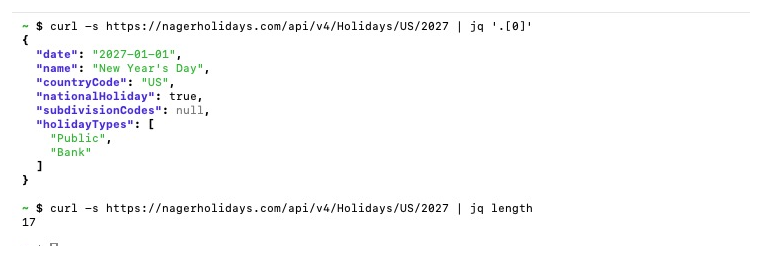 1. Real output: New Year’s Day, and 17 US holidays in 2027.
Want a plain list? Ask jq for just the date and name:
curl -s https://nagerholidays.com/api/v4/Holidays/GB/2027 | jq -r '.[] | "\(.date) \(.name)"'
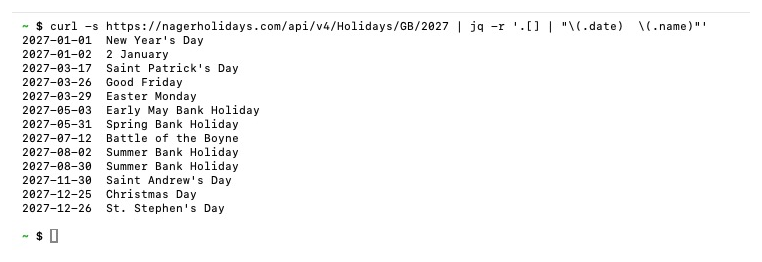 2. All 13 UK holidays in 2027, straight from the API.
On a Mac, jq is already installed. On Windows or Linux, grab it from jqlang.org.
From JavaScript
const res = await fetch('https://nagerholidays.com/api/v4/Holidays/CA/2027');
const holidays = await res.json();
console.log(holidays.length); // 31
From Python
import requests

holidays = requests.get('https://nagerholidays.com/api/v4/Holidays/AU/2027').json()
print(len(holidays))  # 27
The catches
-
Missing countries return nothing. United Arab Emirates and India come back as an empty response with status 204, not a list.
JSON.parseon that throws. Check the status before you parse. -
A bad code returns 404.
XXgets “Unknown country code”. - Years. v4 covers about one year back and five years ahead, 2025 to 2031 right now. Ask for 2020 and you get a 400. The older v3 API covers more years but switches off on 31 January 2027.
- Weekends. You get the actual date. Christmas 2027 comes back as Saturday 25 December. If your country moves the day off to Monday, the API won’t tell you.
- Terms. Free for private and non profit use. Commercial use asks you to sponsor the project.
Here are the first three catches, run for real. These are bad requests on purpose, so you know what each error looks like:
- AE (United Arab Emirates) is a real country the API doesn’t cover yet, so you get an empty 204.
- XX isn’t a country at all, so you get a 404, “Unknown country code”.
- 2020 is outside the years v4 covers, so you get a 400, “The specified year ‘2020’ is not supported.”
Swap in a real code and a year from 2025 to 2031 and they all work.
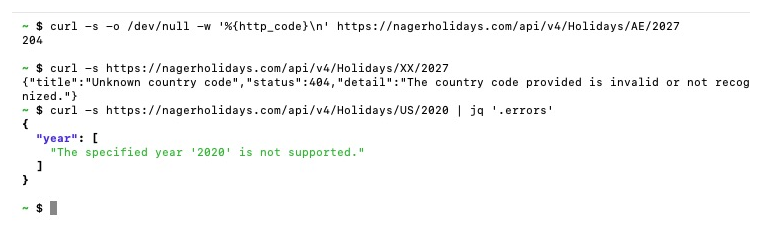 3. Errors on purpose: a 204 for United Arab Emirates, a 404 for the made up code XX, and a 400 for 2020.
Common mistakes, and what you’ll see
Most errors here are copy and paste slips, not the API. These are all real runs.
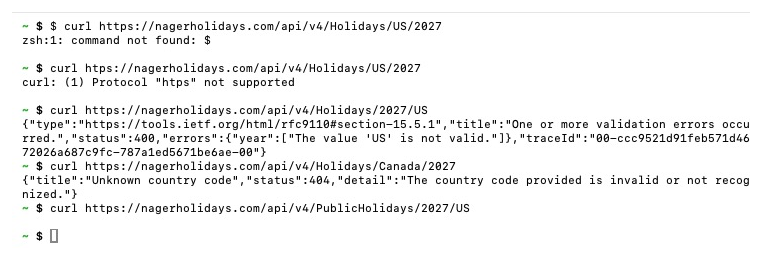 5. Five ways to get the URL wrong, and what each one prints.
-
You copied the
$.zsh: command not found: $means you pasted the prompt too. Copy fromcurl, not from the$in front of it. -
A typo in
https.curl: (1) Protocol "htps" not supportedmeans the start of the URL is off by a letter. Check it starts withhttps://. -
Year and country swapped.
/Holidays/2027/USgets a 400 with “The value ‘US’ is not valid.” The country goes first:/Holidays/US/2027. The older v3 API had it the other way round, which is why old tutorials trip people up. -
A country name instead of a code.
/Holidays/Canada/2027gets a 404, “Unknown country code”. The URL needs the 2 letter code:CA. (Lowercasecaworks too.) -
The old v3 path.
/api/v4/PublicHolidays/2027/USprints nothing at all. Silence is the clue. In v4 it’s/api/v4/Holidays/US/2027.
 6. Curly quotes and a missing tool.
-
Curly quotes. Copy a command out of a doc, an email or some chat apps and the straight quotes
'become curly ones‘ ’. The shell sayszsh: no matches foundand never runs jq. Retype the quotes by hand, or paste into a plain text editor first. -
jq isn’t there.
command not foundmeans the shell can’t find the program. I typedjqqto show the message; on a computer without jq it sayscommand not found: jq. Install it from jqlang.org, or drop the| jq ...part and read the raw JSON.
A few more that don’t need a screenshot:
-
Windows PowerShell. There,
curlcan be a shortcut for a different command that prints headers and a table instead of JSON. Typecurl.exeinstead ofcurl. - A space or a line break in the URL. If a long command wrapped when you copied it, the shell cuts it in two and the second half fails. Paste it onto one line.
-
Leaving out
-s. Without it, curl prints a progress table when you pipe into jq. It’s harmless, just noisy.
FAQ
Do I need an API key? No. Nager.Date is a public API. Call the URL and you get JSON.
How many countries does it cover?
- Call
/api/v4/Countries/Availablefor the list.
Which years can I ask for? v4 covers about 2025 to 2031. Other years return a 400.
What does a 204 response mean? The country isn’t covered yet, like United Arab Emirates or India. The response is empty, so check the status before you parse it.
Can I use it in a business? For commercial use, Nager.Date asks you to sponsor the project on GitHub.
It’s much easier in the sheet
All of that is fine if you’re writing an app. If you just want the holidays, I already did the work in Google Sheets.
Pick a country from a dropdown, or type =PUBLICHOLIDAYS("Canada", 2027) in a cell, and you get the list, with real dates, where each holiday applies, and a plain message instead of an error for the countries that aren’t covered. It also finds long weekends and counts working days.
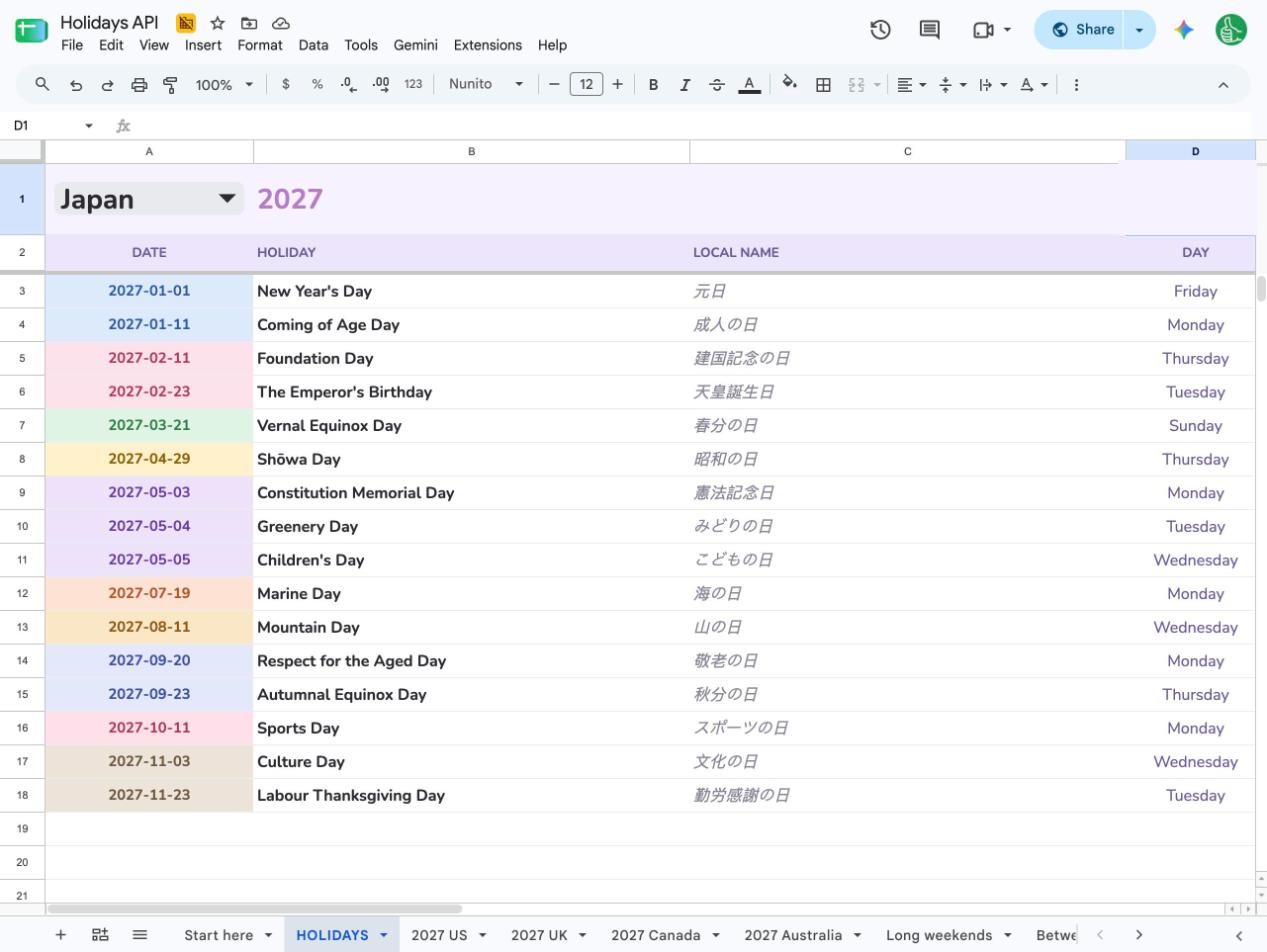 4. Japan in 2027, in the sheet: 16 holidays with local names and weekdays.
The full walkthrough is here: How to get public holidays into Google Sheets with a free API.
Copy the Holidays API sheet free. Free login, your own copy.
Then plan around these holidays with Big Year, my one page yearly calendar in Google Sheets.

