One way to use Local Lead Finder. Local Lead Finder is a $10 Google Sheets template I built that turns any Google Maps search into a lead list: every business, with phone, website, rating and reviews. This post is one use case for it: finding social media management clients. I’m not a social media manager; this is the playbook I’d follow if I were, run for real with the template. Other ways to use it are listed at the end, or see all 18 lead generation ideas.
If I were starting as a social media manager in Chattanooga, the hard part wouldn’t be making posts. It would be getting social media management clients who’ll pay for them. Search for how, and page 1 is an agency blog telling you to ask for testimonials and offer referral fees, a couple of YouTube videos, and Facebook groups, Reddit and Quora threads full of new social media managers asking the exact same question. The advice is “define your target audience” and “get referrals.” That’s fine once you have clients. It skips the first part: which businesses, by name, should you message today? The alternatives are slow or crowded: posting your own content and waiting for someone to find you, or bidding against everyone else on freelance job boards.
So here’s exactly what I’d do this week. I ran it for real with Local Lead Finder, a $10 Google Sheet I built that pulls every business on Google Maps into a spreadsheet. One “hair salon” search across the Chattanooga area found 325 salons, and 25 of them list Facebook, Instagram or Linktree as their website. Those are social media manager clients waiting to happen: they already post, they just have nothing else. You’ll leave with the real counts, the names at the top of the list, and the message I’d send them.
TL;DR
- One “hair salon” search across 73 Chattanooga areas found 325 salons, and 25 list Facebook, Instagram or Linktree as their website.
- Pitch the 25 social-only salons first, because they already post. The 131 with no website listed are a bigger, colder list.
- Don’t assume a salon has no online presence from Google alone. You only see the one link they listed.
Who this is for
- Freelance social media manager: you get a named list of local salons that already use Facebook or Instagram as their whole website.
- Social media marketing freelancer starting out: you skip the “define your niche” stage and start with 25 real businesses and a message to send.
- Small social media agency owner: you can add a one-page site to your posting package and pitch it to salons that don’t have one.
- Web designer who also does social: “I’ll turn your Facebook into a real site and keep posting” is one offer, not two.
- Virtual assistant offering content help: salons already posting on their own may want someone to take it off their plate.
Before you start
- A Google Places API (New) key
- Local Lead Finder set up in your Google Drive
- Local Lead Finder itself
- A city to search, like Chattanooga, Tennessee
- A short outreach message that says what you do and asks one question
- One example post or page you’ve made, to show if they reply
Don’t have a Places API key yet? How to get one free. Haven’t set up the sheet? Setup takes 5 minutes.
Step 1: Find every salon in the city
Region: Chattanooga, Tennessee. Find Areas pulled 73 areas around the city, from Apison and Collegedale to East Ridge and Fort Oglethorpe.
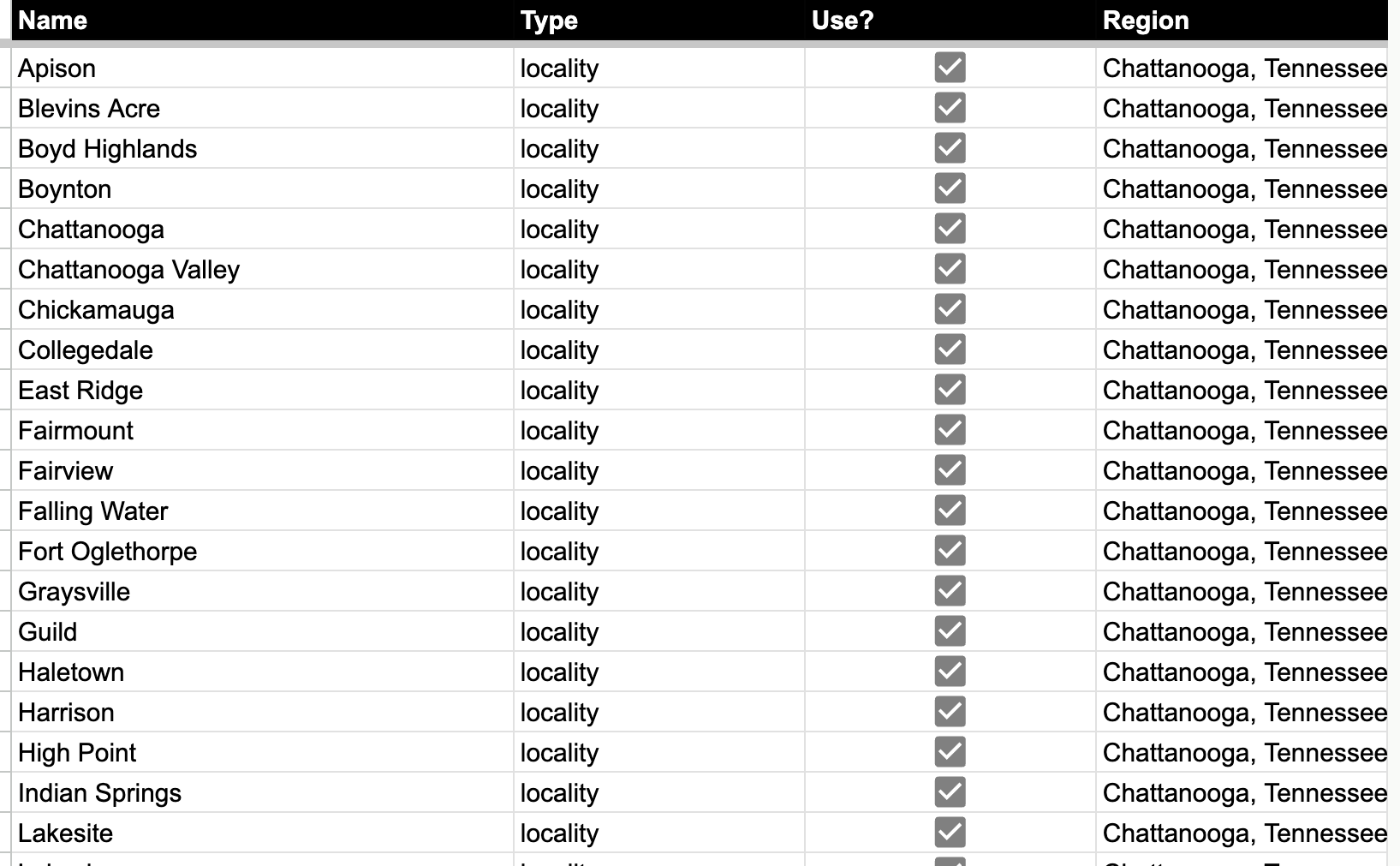
Then I ran “hair salon” in Search in All AREAS. It came back with 325 results. Each row has a name, phone, address, rating, number of reviews and the website the salon lists on Google.
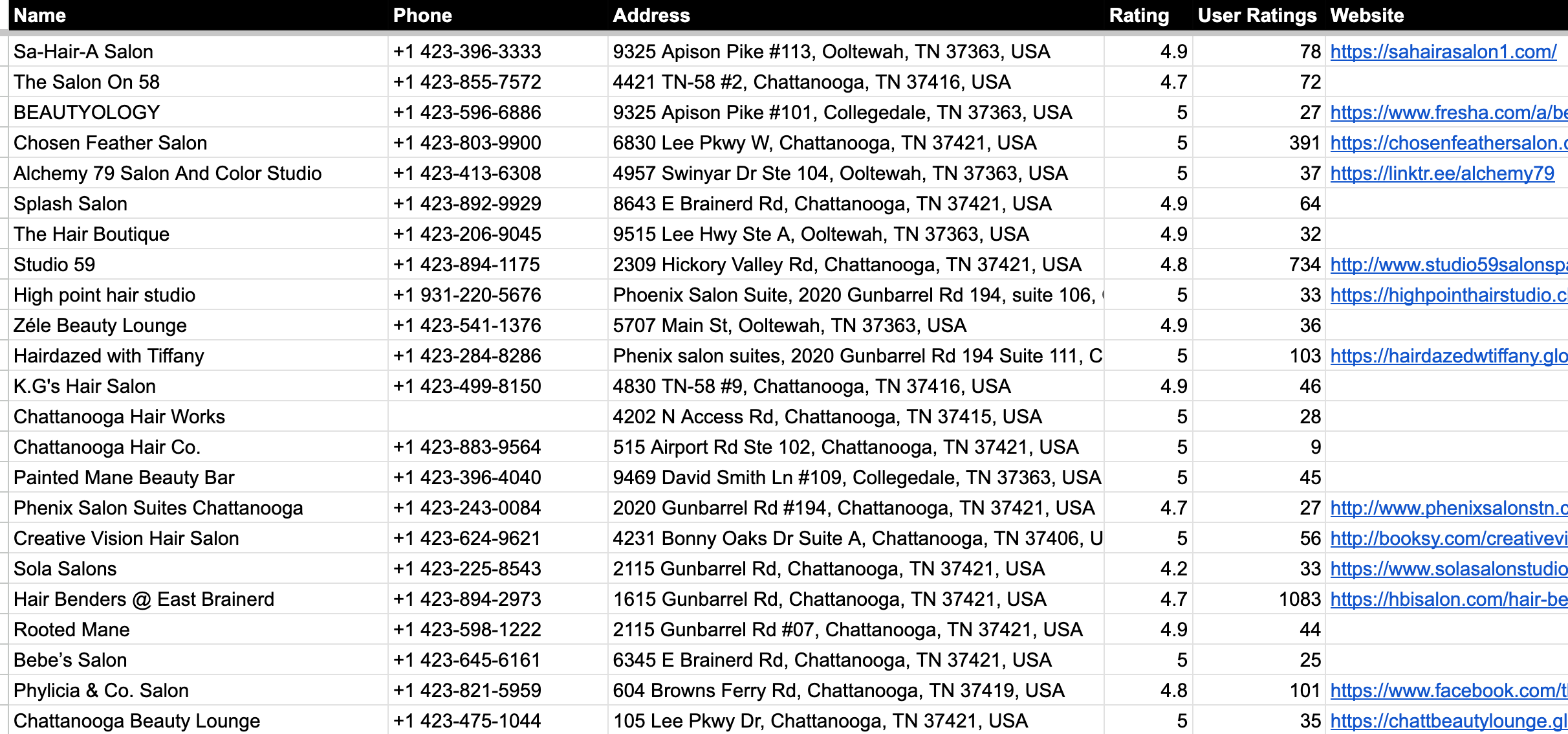
Look at the website column. Some are real websites. Some are blank. And some, like Phylicia & Co. Salon, are a Facebook page.
Step 2: Sort salons by what they list as their website
I counted what the 325 salons put in that website field:
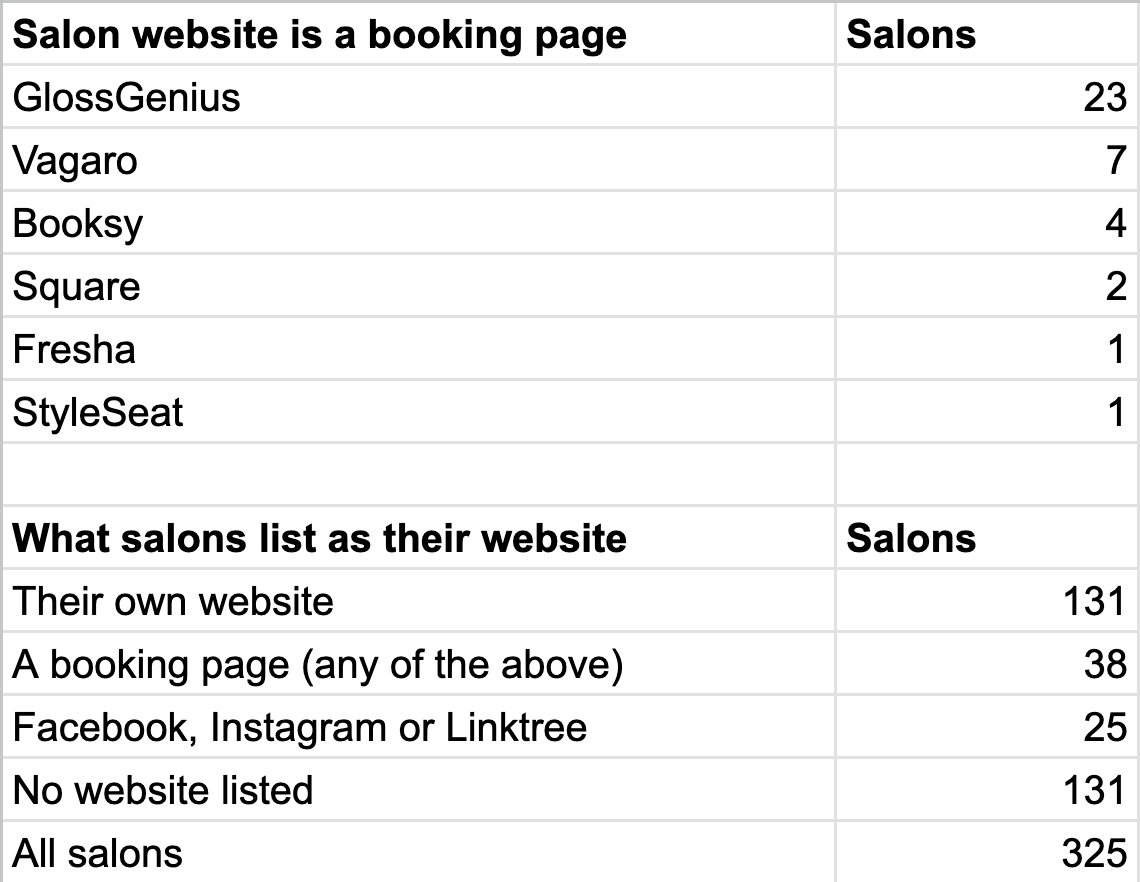
- 131 have their own website. They’ve probably got someone already, or at least they’ve thought about it.
- 38 list a booking page (GlossGenius, Vagaro, Booksy and others) as their website.
- 25 list Facebook, Instagram or Linktree. This is the list.
- 131 have no website listed at all. That’s a bigger list, but a colder one. You don’t know if they post anywhere.
The 25 are the best place to start because they’ve already shown you they care about social media. They post. They just send everyone to a Facebook page instead of a site.
Step 3: Pull out the 25 social-only salons
This formula pulls every salon whose website is Facebook, Instagram or Linktree, with its rating and review count, busiest first:
=QUERY({'hair salon (AREAS)'!A2:A326,'hair salon (AREAS)'!D2:E326,ARRAYFORMULA(IFERROR(REGEXEXTRACT('hair salon (AREAS)'!I2:I326,"(?i)facebook|instagram|linktr"),""))},"select Col1, Col2, Col3, Col4 where Col4 <> '' order by Col3 desc",0)
REGEXEXTRACT reads the website column and keeps just the word “facebook”, “instagram” or “linktr”. QUERY drops every row where that’s blank and sorts by reviews.
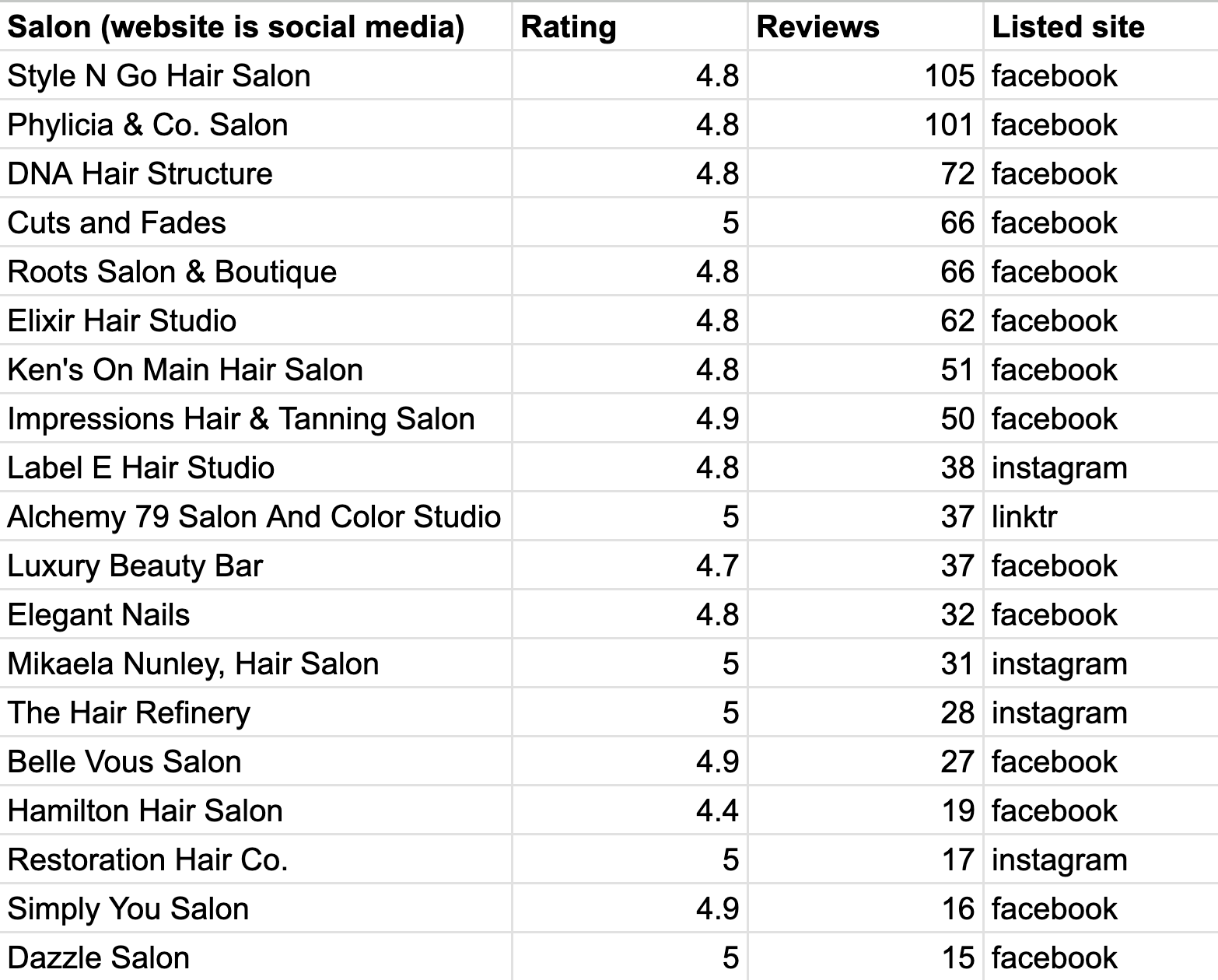
Facebook is most of them. The top of the list, by reviews:
- Style N Go Hair Salon: 4.8, 105 reviews
- Phylicia & Co. Salon: 4.8, 101 reviews
- DNA Hair Structure: 4.8, 72 reviews
- Cuts and Fades: 5.0, 66 reviews
- Roots Salon & Boutique: 4.8, 66 reviews
- Elixir Hair Studio: 4.8, 62 reviews
- Ken’s On Main Hair Salon: 4.8, 51 reviews
- Impressions Hair & Tanning Salon: 4.9, 50 reviews
These are busy, well-rated salons. People love them. Their online home is still a Facebook page.
Two names on the list aren’t hair salons. Cuts and Fades is a barbershop, and Elegant Nails is a nail salon. A “hair salon” search pulls in neighbors like these. For a social media manager that’s fine: a barbershop and a nail salon need posts too. Keep them.
“Reject the tyranny of being picked: pick yourself” (Seth Godin, Seth’s Blog)
You don’t have to wait for a salon to find your Instagram; you can pick the 25 and message them first.
What I found
- 325 salons across 73 Chattanooga areas.
- 25 list Facebook, Instagram or Linktree as their website. They already post.
- 38 list a booking page, and 131 list no website at all.
- The busiest social-only salons have 50 to 105 reviews and ratings of 4.8 or higher.
One honest caveat: this is what each salon lists on Google, nothing more. A salon on the no-website list might have a busy Instagram it never added. A salon with its own website might also post every day. The 25 are just the ones where you can see, from one link, that social media is their whole web presence.
The message
In SETTINGS there’s a WhatsApp message that gets attached to every row’s link. This is what I’d send:
Hi! I’m a social media manager in Chattanooga. I noticed your Google listing links to your Facebook page. I can turn that into a simple one-page website and keep your posts going every week, so you can focus on clients. Want me to show you what it could look like?
Short, says what you do, shows you actually looked at their listing, and asks one question. The offer is two things they can picture: a simple one-page site, plus posting. “I’ll turn your Facebook into a real site and keep posting.”
Then work down the list, most reviews first. Every time you message a salon, mark it Outreached. It turns green and stays green in every future search, so when you move on to the 131 with no website, you won’t message the same salon twice.
Step by step
- Get a Places API key and set up Local Lead Finder.
- Type your city in SETTINGS > Region, run Find Areas, and wait for it to finish.
- Run Search in All AREAS for “hair salon” (or any business that lives on Facebook).
- Use the QUERY formula to pull every row whose website is Facebook, Instagram or Linktree.
- Sort by reviews and start with the busiest ones.
- Send the message: a one-page site plus posting. Mark each salon Outreached.
- When the 25 are done, move to the booking-page salons, then the ones with no website listed.
Common pitfalls
- Searching before Find Areas finishes: Find Areas takes a minute or two to pull areas from OpenStreetMap. Wait until the AREAS tab is filled (73 areas here) before you search.
- Assuming an empty website field means no online presence: 131 salons list no website, but some may still post on Instagram. Check before you pitch them as “not online.”
- Pitching salons that already have a site as if they don’t: a salon can use a booking app and have its own website, and it’s counted as own website here. Read the link before you send the message.
- Throwing out the barbershop and nail salon: Cuts and Fades and Elegant Nails came back in a “hair salon” search. For posting work they’re just as good a lead.
- Pitching without checking the business is real: open the Google Maps link and the Facebook page first. A page that hasn’t posted in a long time is a different conversation.
- Forgetting to mark Outreached: without it you’ll message the same salon twice when you move on to the bigger lists.
- Not watching API spend: each area is one Places request per results page, so 73 areas is 73 requests. The sheet shows the most a search could cost before it runs.
Learn the Google Sheets formulas in this post
- 3 Ways to Count in Google Sheets: the counting behind the summary of what 325 salons list as their website.
- How To Sort A Filter: sort a filtered list so the busiest salons sit at the top, like the QUERY above does.
- 200 REGEXMATCH Examples in Google Sheets: the same kind of pattern as “(?i)facebook instagram linktr”, with lots of examples to borrow.
- How to Create a CRM in google sheets w/ Dashboard: a next step for tracking which salons replied and who wants to see an example.
Better Sheets has hundreds more tutorials like these. If you want to get better at Google Sheets, join Better Sheets.
Other ways to use Local Lead Finder
- How to Get More Google Reviews for Local Businesses (side business): for reputation and local SEO freelancers looking for local clients.
- How to Find Local Businesses Without Websites (131 hair salons, Chattanooga): for web designers looking for businesses that need a site.
- How to Sell Websites To Salons: for web designers pitching the 38 salons whose only website is a booking page.
- How to Sell to Coffee Shops: 83 independent cafes in Boise: for roasters, commercial bakeries and suppliers pitching local cafes.
All 18, grouped by who they’re for: Lead generation ideas: 18 local businesses to sell to.
FAQ
How do I get social media management clients with no experience?
Start with businesses that already post on their own. In this run, 25 Chattanooga salons list Facebook, Instagram or Linktree as their website, so they already care about social media. Send each one a short message that shows you looked at their listing and offers one clear thing.
Where can I find clients for social media marketing?
Google Maps listings are a good start, because the website field tells you how a business shows up online. A salon that lists a Facebook page as its website is a better lead than one with a full website and a marketing team. Local Lead Finder pulls every listing into a sheet so you can filter by that.
What should I offer a salon that uses Facebook as its website?
A simple one-page site plus posting. Something like “I’ll turn your Facebook into a real site and keep posting.” It’s easy to picture, and it fixes the thing their Google listing already shows.
What about the salons with no website at all?
There were 131 of them, more than five times the social-only list. They’re a bigger but colder list, because you don’t know if they post anywhere. Work the 25 first, then the booking-page salons, then these.
Does “no website listed” mean the salon isn’t online?
No. It only means nothing is in the website field on Google. A salon might have an Instagram it never added to its listing, so check before you pitch.
How do I keep track of which salons I’ve messaged?
Mark each one Outreached from the Find Leads menu. The row turns green, gets copied to the OUTREACH tab, and stays green in every future search.
How much does a search cost?
Each area is one Google Places request per results page, on your own Places API (New) key, so 73 areas is 73 requests. Google gives up to 1,000 searches a month free, and the sheet shows the most a search could cost before it runs.
Is Local Lead Finder a scraper?
No. It uses Google’s official Places API with your own key, and writes the results into your own Google Sheet.
Get the sheet
Local Lead Finder is $10, and free for Better Sheets lifetime members.
