Guest post by Zuch. Zuch builds Spreadsheet to App, which turns a Google Sheet into a web app. Want to write for Better Sheets too? Here's how guest posts work.
The opener at a café can see that there are six cartons of oat milk left. The person doing the ordering needs one more number. How many cartons are already on the way? If the sheet only highlights low counts, the next shift can order milk that someone bought yesterday.
I built an inventory sheet for a fictional café called Harbor Lane Coffee. It uses two numbers per item, a reorder point and a target stock level. Two formulas turn the stock count and any incoming orders into a decision and a quantity. A second tab gives the next shift a buying list by supplier.
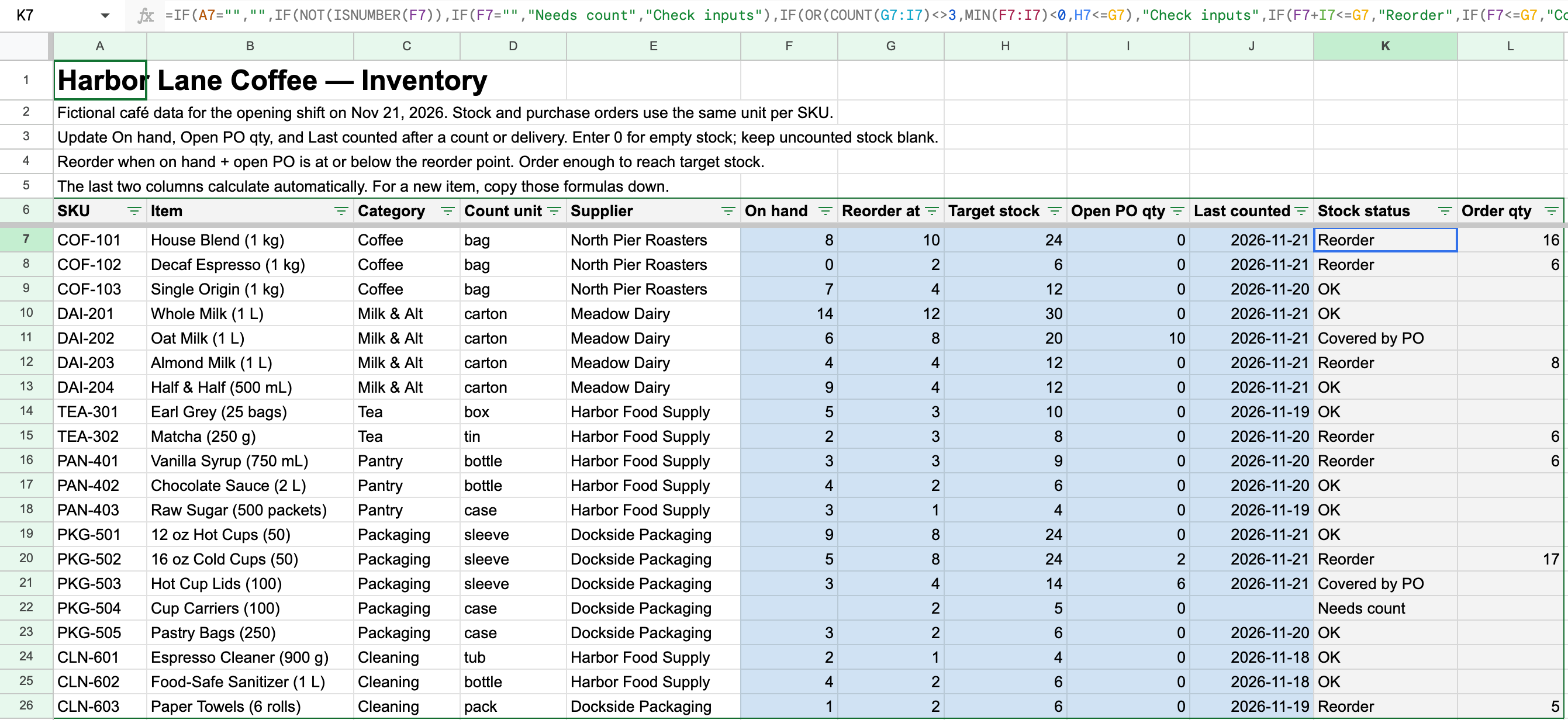
Open the Harbor Lane Coffee sample sheet and choose File → Make a copy. Start in Inventory. The headings are on row 6, and the first item, House Blend, is on row 7.
1. Set a reorder point and a target
Give each item one row and one count unit. The coffee is counted in bags, the milk in cartons, and the cold cups in sleeves. If you count five sleeves and order two more, enter 5 and 2. Using sleeves in one column and individual cups in another throws off both formulas.
- F, On hand. Enter the latest count. Type 0 if you counted and the shelf is empty. Leave it blank if you still need to count.
- G, Reorder at. Pick the level that should trigger a purchase. For House Blend, that's 10 bags.
- H, Target stock. Enter the quantity you want after the delivery. The House Blend target is 24 bags. Keep this number above the reorder point.
- I, Open PO qty. Enter the quantity you've ordered and are still waiting for. Use 0 if there's nothing on order.
So if House Blend has 8 bags on hand and 0 on order, you're below 10 and it's time to buy. With 4 bags already on the way, the same shelf count gives you 12 bags after delivery and you can leave it off today's list.
2. Let the sheet decide what needs attention
In Inventory!K7, click the formula bar and paste the formula below. It checks that the row has a SKU, then looks at the count and the order inputs before deciding whether to buy. In your own sheet, fill it down for every item.
Inventory: K7 (Stock status)
=IF(A7="","",
  IF(NOT(ISNUMBER(F7)),IF(F7="","Needs count","Check inputs"),
    IF(OR(COUNT(G7:I7)<>3,MIN(F7:I7)<0,H7<=G7),"Check inputs",
      IF(F7+I7<=G7,"Reorder",IF(F7<=G7,"Covered by PO","OK"))
    )
  )
)
- Needs count. The on-hand cell is blank. Cup Carriers shows this in the example sheet.
- Check inputs. A quantity is text or negative, a required order input is blank, or the target is at or below the reorder point.
- Reorder. On-hand stock plus what's coming is at or below the reorder point.
- Covered by PO. The shelf is at or below the reorder point, but what's coming takes you above it. The Oat Milk row has 6 cartons on hand and 10 coming, so it clears the trigger of 8.
- OK. The current count is already above the reorder point.
3. Calculate the quantity to order
Put this in Inventory!L7 and fill it down. It takes the target and subtracts both the units you have and the units still due. It leaves the quantity blank for every status except Reorder.
Inventory: L7 (Order qty)
=IF(K7="Reorder",H7-F7-I7,"")
House Blend comes out to 16 bags because 24 minus 8 minus 0 is 16. The cold cups show why the last subtraction matters. There are 5 sleeves on hand and 2 coming. That puts you at 7, below the reorder point of 8. The order is 17 sleeves to reach the target of 24. If you forget the 2 sleeves on order, you buy 19.
4. Pull the buying list into its own tab
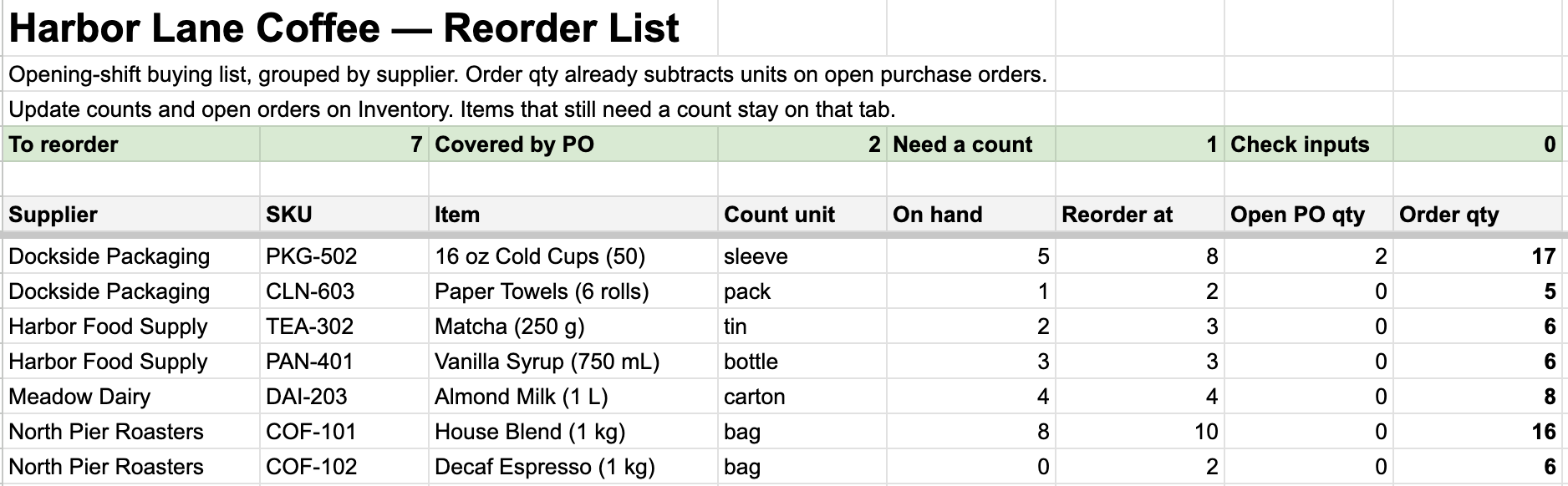
Open Reorder List in the sample. To build the same view in your own workbook, add a tab named Reorder List and paste this into the formula bar for A6. Leave the cells under it clear so the results can expand.
Reorder List: A6
=IFNA(QUERY(Inventory!A6:L,
  "select E,A,B,D,F,G,I,L where K = 'Reorder' "
  &"order by E,L desc label E 'Supplier', A 'SKU', B 'Item', "
  &"D 'Count unit', F 'On hand', G 'Reorder at', "
  &"I 'Open PO qty', L 'Order qty'",1),"No items to reorder")
QUERY keeps rows marked Reorder, puts the supplier first, and sorts by supplier name, then by largest order quantity for that supplier. The 1 tells QUERY that the source range has one header row. The counters above the list use COUNTIF against column K. I check Needs count and Check inputs before placing an order. If a count is missing, the buying list can't tell me whether that item needs stock yet.
Try it with an incoming order
In your copy, change House Blend's Open PO qty in Inventory!I7 from 0 to 4. Stock status should switch to Covered by PO, Order qty should clear, and the row should drop off Reorder List. Put 0 back when you're done. Once you enter a real order, update Open PO qty so the next shift sees it. When the order arrives, add what came in to On hand and subtract those same units from Open PO qty.
Optional phone view
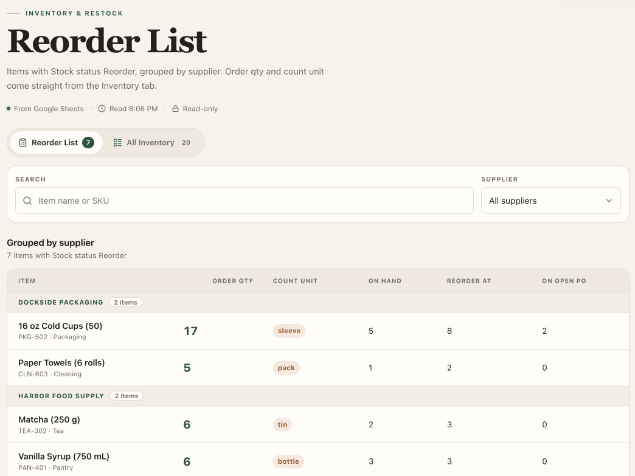
I build Spreadsheet to App, and I used it to make a read-only web view of this same inventory. The sheet still calculates the quantities. The app shows those results by supplier and opens without a sign-in. Try the Harbor Lane Coffee demo and find House Blend under North Pier Roasters.
About the author
Zuch
Zuch builds Spreadsheet to App, which turns a Google Sheet into a web app.
This is a guest post. Read about guest posts on Better Sheets.
