
AI in Google Sheets didn’t start with Gemini. It started in 2015, with a button most people never clicked.
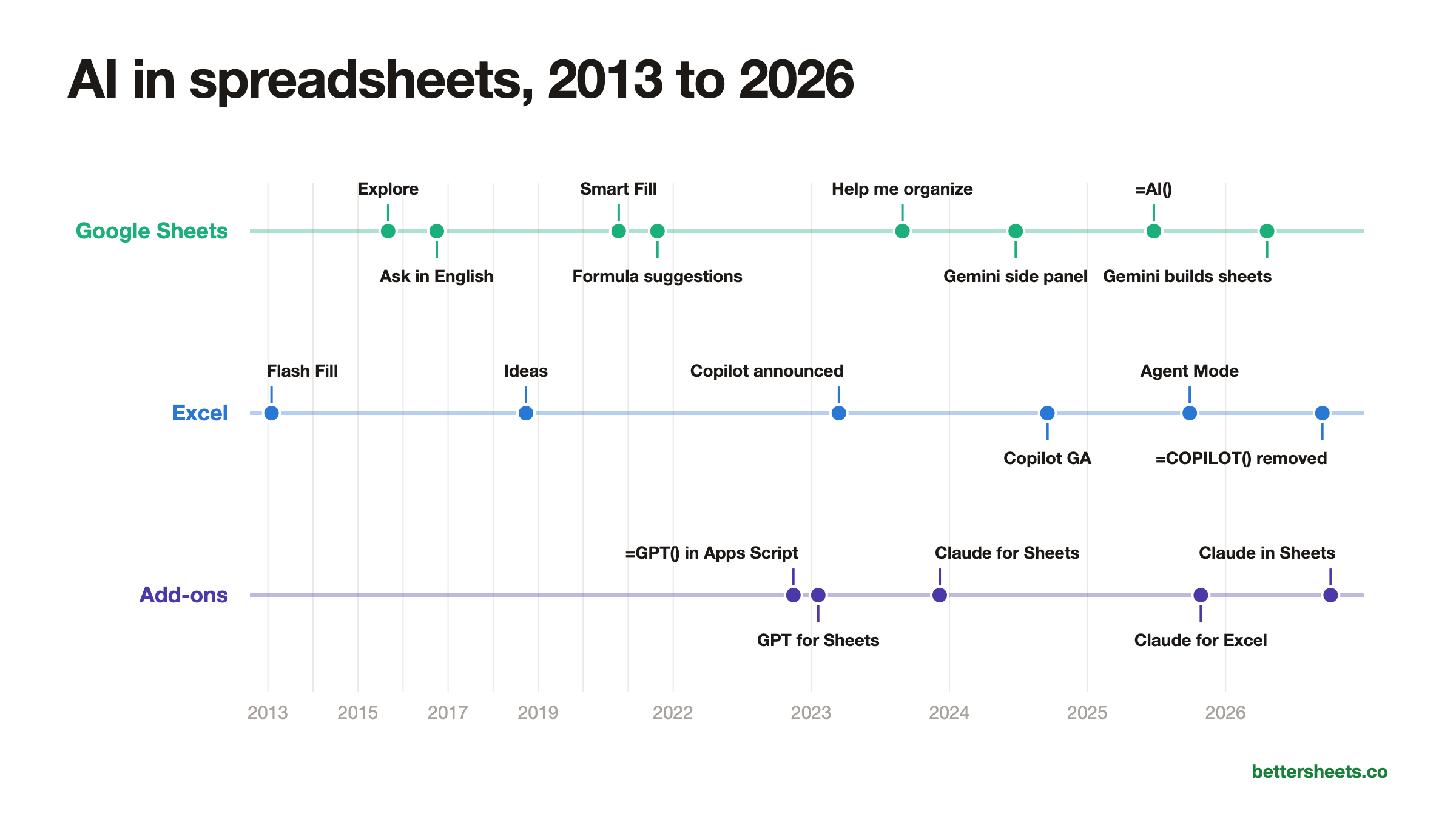
Here’s the whole story in one timeline: what Google built into Sheets, what Microsoft built into Excel, and what everyone else bolted on with Apps Script and add-ons while they waited.
TL;DR
- Google Sheets got its first AI feature, Explore, on September 2, 2015, and understood plain English questions by 2016.
- People were running GPT-3 inside Sheets with Apps Script in November 2022, two weeks before ChatGPT launched.
- Today all three big AI labs have a sidebar inside Google Sheets, but every public benchmark still tests Excel files.
Who this is for
- Google Sheets power user: see how the AI features you already use got there, and which ones are new.
- Teacher or trainer: a dated timeline you can point students to when they ask “since when can Sheets do that?”
- Team lead choosing an AI tool: see how fast each company moved and where each one is today.
- Apps Script developer: see where custom functions and add-ons fit in, and why they came first.
- Writer or researcher: every date links to the original announcement.
Sheets had AI years before anyone called it AI (2013 to 2019)
Excel went first, without saying “AI”. Flash Fill shipped with Excel 2013 on January 29, 2013. Type two examples, and Excel figures out the pattern and fills the rest of the column. Microsoft Research called it program synthesis, and the write-up says it started as an internal project called “QuickCode.” The same research group later built one of the spreadsheet AI benchmarks I wrote about in Best AI for Spreadsheets.
Google Sheets got Explore on September 2, 2015. The little button in the bottom corner looked at your data and suggested charts and quick answers (Workspace Updates). On September 29, 2016, it learned to answer plain English questions like “how many units were sold on Black Friday?” In June 2017 it started building charts on request, and by December 2017 it could answer with a pivot table and suggest formulas.
Microsoft answered with Ideas in Excel on September 24, 2018, which flagged trends and outliers. It’s called Analyze Data now.
Then came the quiet helpers you probably use every day (2020 to 2021)
Google shipped a run of small, free features that were on by default:
- Smart Cleanup, September 29, 2020: spots extra spaces, duplicates and odd entries (announcement).
- Smart Fill, October 15, 2020: notices a pattern between columns, writes the formula, and fills the rest (announcement).
- Formula suggestions, August 25, 2021: the grey formula that pops up as you type (announcement).
That last one came out of a research paper. Google’s SpreadsheetCoder model learned to predict formulas from your headers and nearby cells, and Google Research said in October 2021 it was live in Sheets. Most people never thought of any of this as AI.
People put GPT in Sheets themselves before Google or Microsoft did (2022 to 2023)
This is my favorite part, because it’s the Apps Script part.
By November 14, 2022, there was a public Apps Script custom function called =GPT() that sent a cell to OpenAI with UrlFetchApp and wrote the answer back. That’s two weeks before ChatGPT launched. You pasted in your own API key and you had a language model in a cell.
Add-ons followed fast. GPT for Sheets and Docs, from Talarian, the company behind the mail merge add-on YAMM, already had about 25,000 users in its earliest archived listing on January 21, 2023, with =GPT and =GPT_LIST. It now says it has 7 million installs.
Anthropic showed up in Sheets in December 2023 with Claude for Sheets and its =CLAUDE() function. It had 4,000+ users in an archived listing by December 8. That’s almost two years before Claude for Excel.
Google and Microsoft bolted on chat sidebars (2023 to 2025)
Microsoft announced Copilot on March 16, 2023, with Excel answering questions, suggesting formulas and finding trends (announcement). It took 18 months for Copilot in Excel to be generally available, in September 2024 (Microsoft).
Google’s first generative AI feature in Sheets couldn’t read your data. Duet AI arrived on August 29, 2023, as a $30 per user add-on, and its Sheets feature, “Help me organize,” built template tables with sample data. Duet AI was renamed Gemini on February 21, 2024.
The real Sheets features came one at a time:
- Gemini side panel, June 24, 2024: tables, formulas and how-to answers in a sidebar (announcement).
- Python behind the scenes, January 29, 2025: Gemini writes and runs Python to analyze your data and drops in a chart. The charts are static, so they don’t update when your data changes (announcement).
-
The
=AI()function, June 25, 2025: AI inside a formula, for text (announcement). It handles at most 350 cells per run now.
Now every big AI lab is inside your spreadsheet (2025 to 2026)
The last year turned into a race:
- September 29, 2025: Excel’s Agent Mode, which builds and edits whole workbooks.
- October 27, 2025: Claude for Excel in beta.
- March 10, 2026: Google says Gemini in Sheets is state of the art, with 70.48% on SpreadsheetBench. In April it rolled out building and editing whole spreadsheets, in the US in English first.
-
September 14, 2026: Microsoft removed its
=COPILOT()formula. It never left preview. - October 6, 2026: Claude for Google Workspace puts Claude in a Sheets sidebar.
ChatGPT has a Google Sheets add-on now too, so all three big labs are inside Sheets.
The benchmarks showed up in 2023 and are all about Excel
Researchers started measuring this at the same time the add-ons took off. SheetCopilot came out in May 2023, InstructExcel in October 2023, and SpreadsheetBench in June 2024. On SpreadsheetBench, GPT-4o scored 18.35% against a 71.33% score from human experts. Two years later an AI agent scored 83.11%.
Every one of those benchmarks uses Excel files. None of them tests Google Sheets formulas or Apps Script. I went through all of them, and what they found, in Best AI for Spreadsheets? What Every Spreadsheet AI Benchmark Says. And I started the Better Sheets AI Benchmark to test the Google Sheets side.
Tutorials for the Sheets features in this timeline
- How To Sort A Filter: the FILTER and SORT formulas that AI features like to write for you.
- How to Find Duplicates: do by hand what Smart Cleanup suggests, so you can check it.
- 3 Ways to Count in Google Sheets: the counting formulas behind Explore’s quick answers.
- Most Common Errors and How To Handle Them in Google Sheets: fix the errors when an AI formula goes wrong.
Better Sheets has hundreds more tutorials like these. If you want to get better at Google Sheets, join Better Sheets.
FAQ
When did Google Sheets get AI?
Explore, the first AI feature in Sheets, launched on September 2, 2015. It started answering plain English questions on September 29, 2016.
When did Gemini come to Google Sheets?
Google’s generative AI arrived in Sheets as Duet AI on August 29, 2023, and was renamed Gemini on February 21, 2024. The Gemini side panel in Sheets became generally available on June 24, 2024.
When did the AI() function come out in Google Sheets?
June 25, 2025. It started at 200 cells per run and handles up to 350 now.
Could you use ChatGPT in Google Sheets before Gemini?
Yes. An Apps Script custom function calling GPT-3 was public by November 14, 2022, and add-ons like GPT for Sheets had tens of thousands of users by January 2023.
Is there a benchmark for AI in Google Sheets?
Not a public one that I could find. SpreadsheetBench and the others use Excel files. The Better Sheets AI Benchmark is my attempt to fill that gap.

