
Which AI should you trust with your spreadsheets? ChatGPT, Claude and Gemini all work inside Google Sheets now. Excel has Copilot.
The scores exist. Nobody puts them in one place. So I read every spreadsheet benchmark from the last year.
TL;DR
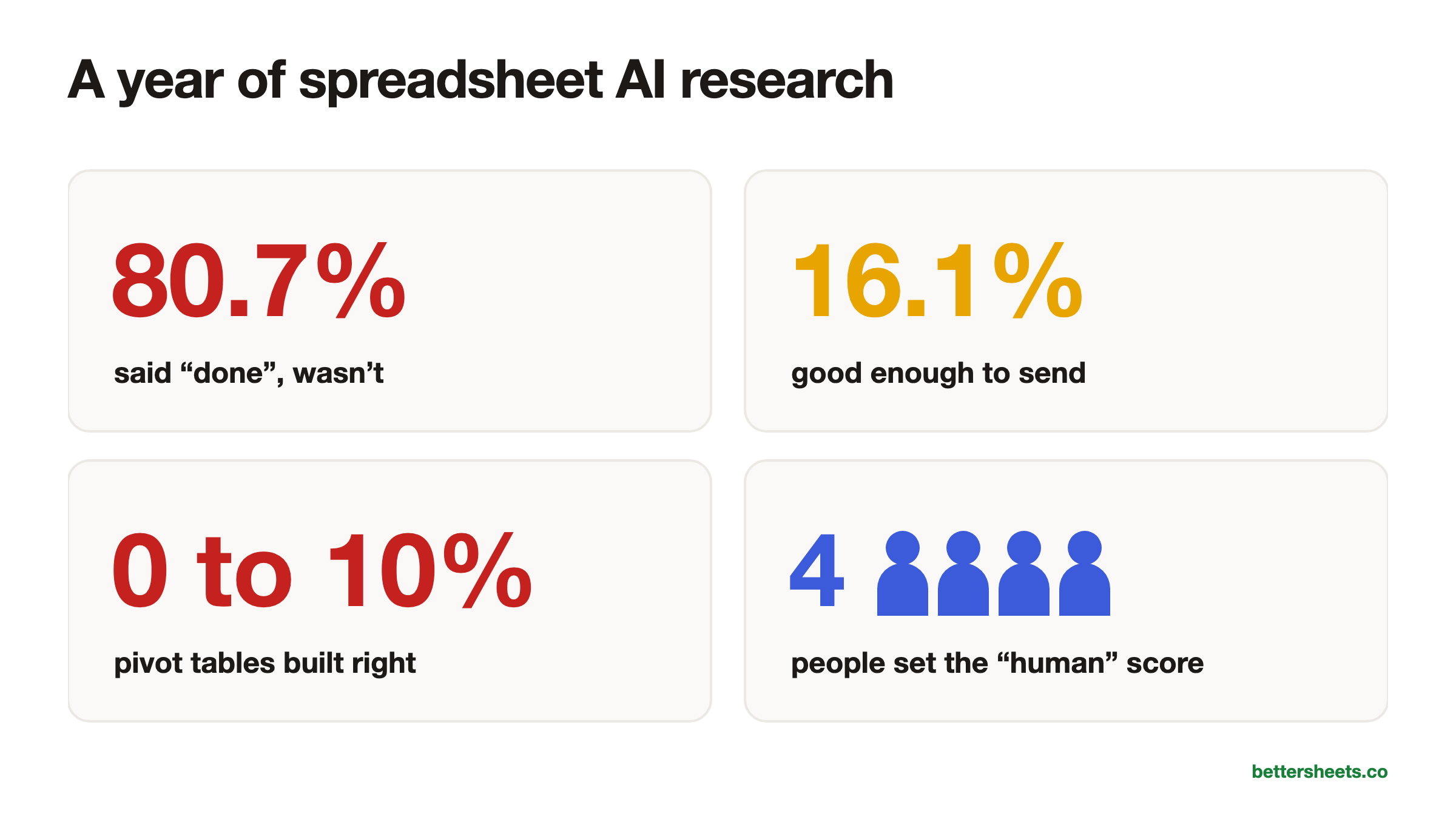
- The best AI now scores 83.11% on SpreadsheetBench, but on realistic multi-sheet workbooks the best bare model solves only 34.89%.
- Every benchmark I found tests Excel files, so nobody is publicly scoring Google Sheets formulas or Apps Script yet.
- The most common mistake is trusting the AI when it says it’s done: 80.7% of Claude’s WTMBench failures were exactly that.
Who this is for
- Google Sheets power user: You’ll see why a big SpreadsheetBench number says nothing yet about QUERY, ARRAYFORMULA or Apps Script.
- Financial analyst: The best AI-built finance sheets pass 89% of formula checks but only 64% of number checks, so you know what to recheck.
- Operations manager: You’ll learn which jobs AI handles well today and why pivot tables and conditional formatting still need a human.
- Excel consultant: You get the real scores behind the launch posts, so you can tell clients what Copilot, Claude and ChatGPT add-ins can and can’t do.
- Team lead choosing an AI tool: You’ll know why a one or two point gap between tools is noise and why the wrapper matters as much as the model.
Google Sheets has had AI since 2015
This race didn’t start last year. A quick timeline:
- 2013: Excel’s Flash Fill learns a pattern from two examples.
- 2015: Google Sheets gets Explore. By 2016 it answers plain English questions.
- 2020 to 2021: Smart Fill, Smart Cleanup and the formula suggestions you see when you type “=”.
- November 2022: people run GPT-3 in Sheets with an Apps Script custom function, two weeks before ChatGPT.
- 2023: GPT for Sheets and Claude for Sheets add-ons; Microsoft announces Copilot; Google’s Duet AI arrives.
- 2024: Duet AI becomes Gemini, with a side panel in Sheets. Copilot in Excel goes generally available.
-
2025: Google’s
=AI()function, Excel Agent Mode, Claude for Excel. -
2026: Gemini builds whole sheets, Microsoft removes
=COPILOT(), and Claude gets a full sidebar in Google Sheets.
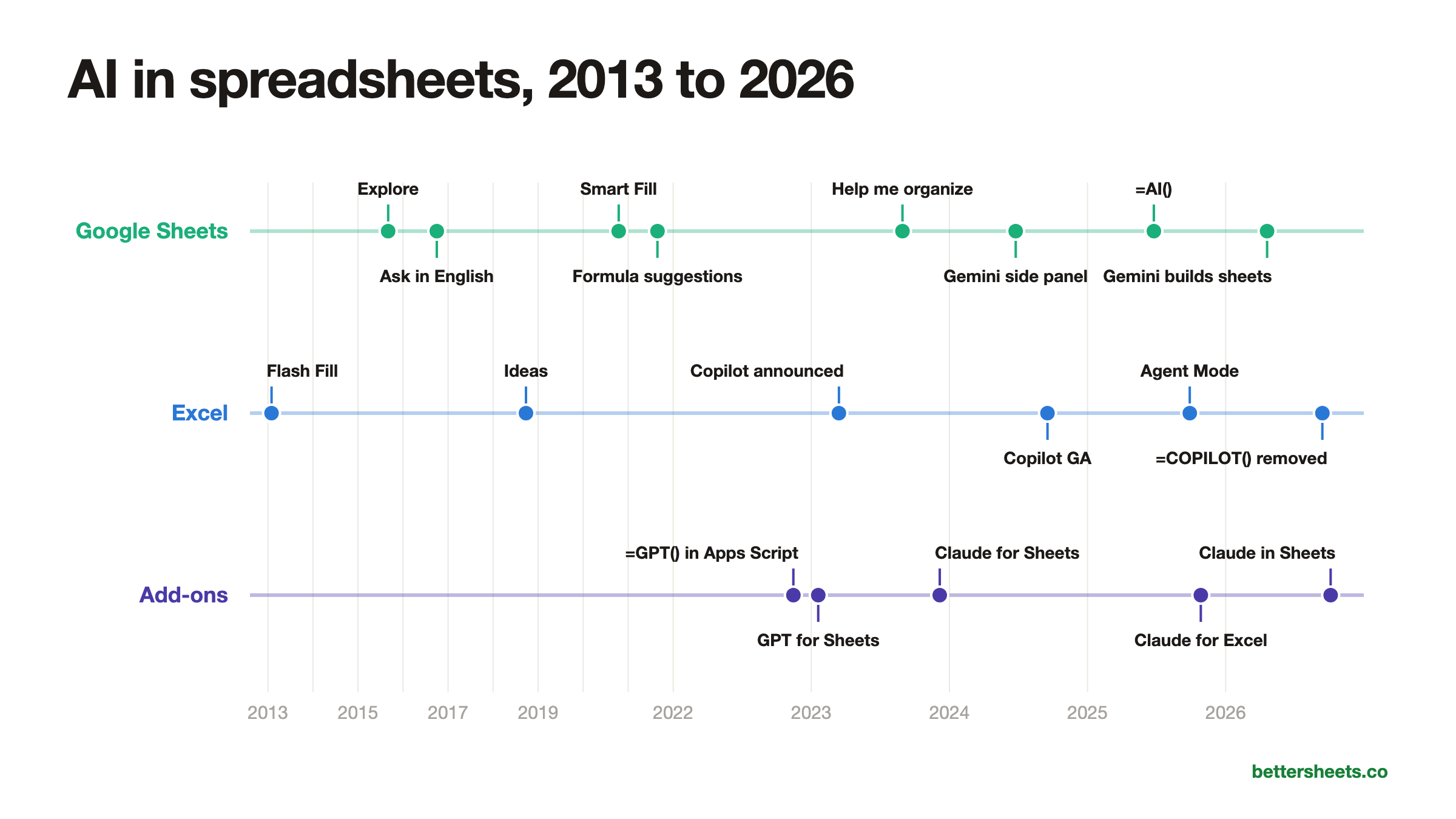
The full story, with every date linked to the original announcement, is in The History of AI in Google Sheets.
AI scores 99% on the easiest spreadsheet test and 0 to 10% on the hardest
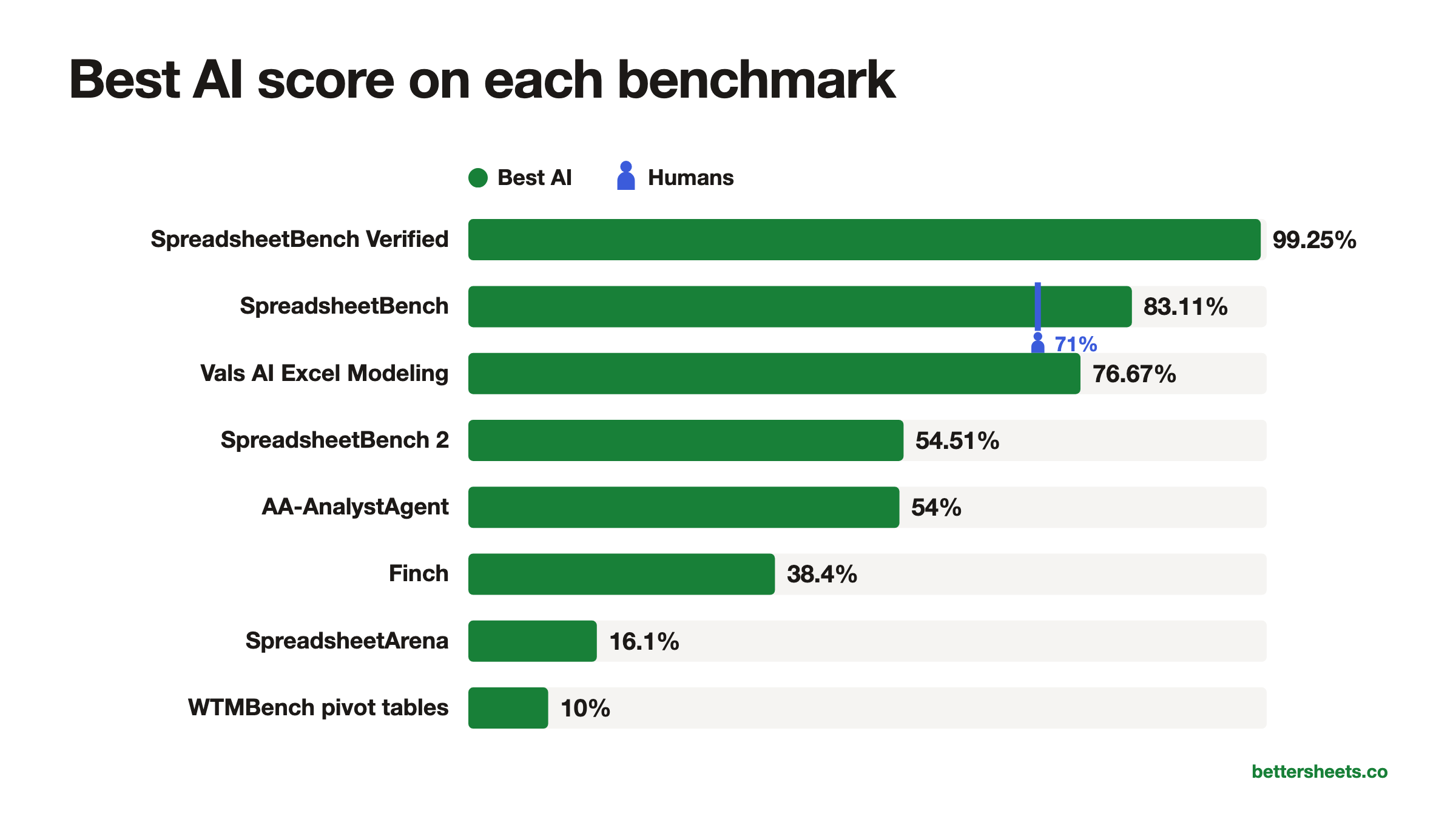
Here’s every spreadsheet benchmark I found, sorted by the best score anyone has posted. Watch the number fall as the test gets closer to real work.
99.25%: SpreadsheetBench Verified
The original SpreadsheetBench, cleaned up by its authors and Shortcut and cut down to 400 questions. Two agents tied at the top in September 2026, from ByteDance’s Lark and China Mobile. It’s so close to full that just re-running a model moves its score by a point or two.
83.11%: SpreadsheetBench
912 real questions from Excel forums, from Renmin University in 2024. Each answer is checked on about three copies of the sheet with different numbers, so a lucky typed-in answer fails. GPT-4o scored 18.35% when it launched. Now the leader is Kingsoft’s Qingqiu Agent, from the company behind WPS Office.
76.67%: Vals AI Excel Modeling
AI agents build the models bankers build: LBOs, DCFs, mergers. Claude Fable 5.1 leads, at $15.93 per test. A cheap model, MiMo V2.5 Pro, gets 55.23% for 22 cents.
54.51%: SpreadsheetBench 2
321 tasks built like real work: fill a template, build a financial model, fix someone else’s broken sheet, make a chart. arito’s agent leads. The best plain model, Claude Opus 4.6, got 34.89%. Debugging was the hardest part.
54%: AA-AnalystAgent
Artificial Analysis hands the AI a folder of spreadsheets and documents and asks 80 analyst questions. It only counts if the AI gets it right five times out of five. Claude Opus 5 leads. The most common mistake: deciding what the question meant too early, and being wrong.
Under 50%: BlueFin
131 professional finance tasks, graded against 3,225 separate checks. Even the strongest models average under half.
38.4%: Finch
172 real finance and accounting workflows, built partly from old Enron spreadsheets: 1,710 files and about 27 million cells. GPT-5.1 Pro finishes 38.4% of them, taking about 17 minutes each.
16.1%: SpreadsheetArena
People vote on which of two AI-built workbooks is better, like a taste test. Claude Opus 4.5 topped the paper’s snapshot of 4,357 votes. Then five finance pros rated 50 of the sheets, and only 16.1% were good enough to send to a client.
0 to 10%: WTMBench
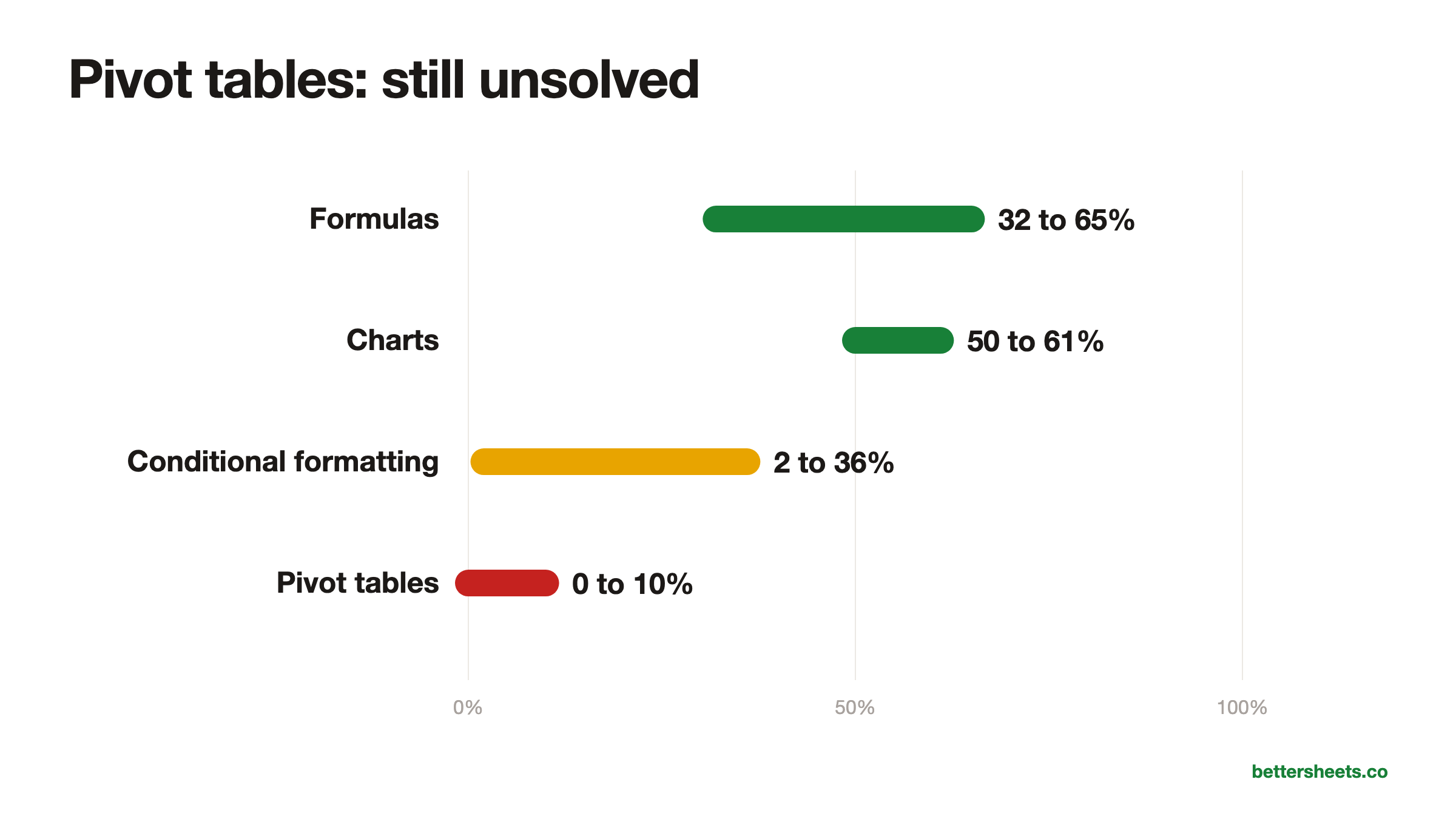
Microsoft’s research group behind Flash Fill asked AI to build the things you click around to make: formulas, charts, conditional formatting, pivot tables. Pivot tables succeeded 0 to 10% of the time, across every model.
That’s the whole story in one list. And only one of these benchmarks ever tested people: SpreadsheetBench, where 4 Excel experts scored 71%. None of the others published a human score at all. On the famous benchmark, AI looks superhuman. The closer a test gets to a real workbook someone would actually send to their boss, the lower the scores go.
The “human expert” score AI beat came from 4 people
When Google, Microsoft or a startup puts a spreadsheet number in a launch post, it’s almost always SpreadsheetBench. It came out of Renmin University in 2024: 912 real questions people asked on Excel forums, each with a spreadsheet, and a checker that compares the AI’s output cells to the right answer on about three versions of the sheet with different numbers. It’s open source, so anyone can run it.
Three things about it surprised me.
The “human expert” score that AI beat came from 4 people. The paper’s human baseline is 71.33%. That number is four Excel experts working through 50 of the tasks in one day (paper, Table 2). When it was published, the best AI, GPT-4o, scored 18.35%. Now Kingsoft’s Qingqiu Agent scores 83.11% on the full set, China Mobile’s JT AlphaData 77.85%, and Google’s own Gemini in Sheets 70.48%. Microsoft’s Agent Mode in Excel launched at 57.2%. The top of the board isn’t an American AI lab. It’s Chinese office suites.
More than half of it had to be fixed. When Shortcut and the benchmark authors built SpreadsheetBench Verified in December 2025, they removed 216 of the 912 tasks and modified 382 more. The reasons will sound familiar to anyone who answers spreadsheet questions: the question was unclear, there was more than one right answer, or the answer used RAND or TODAY and changed every time.
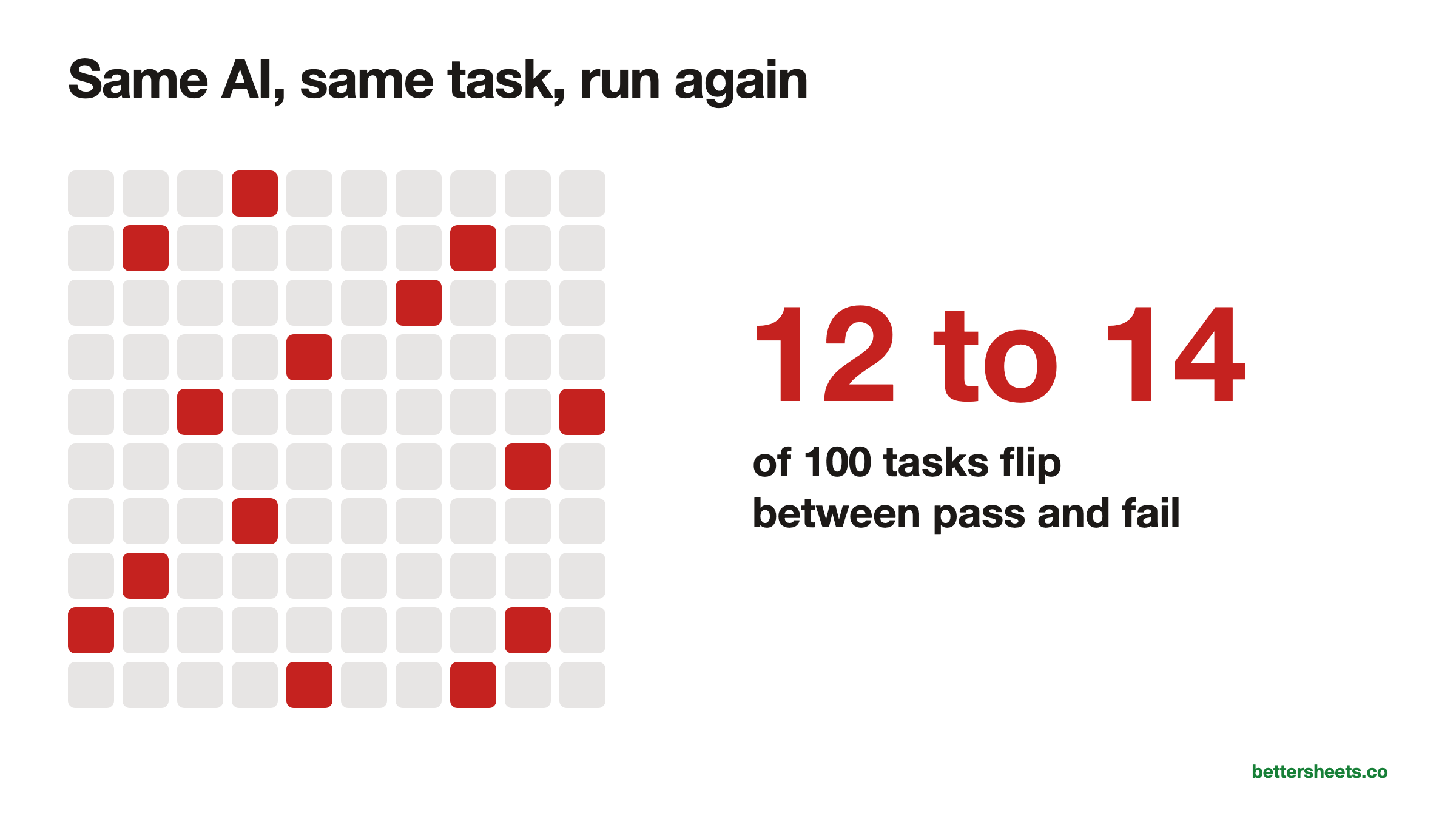
The cleaned-up version is already maxed out. Two agents hit 99.25% on Verified in September 2026. And the noise is as big as the gaps: GRID re-ran Claude models on it and found 12 to 14 tasks out of every 100 flipped between pass and fail from one run to the next, even with randomness turned all the way down. When two tools are one or two points apart, that’s a coin flip.
Is it in the training data? The questions are public forum posts, and the full dataset has been open since April 2025. The authors rewrote questions and changed the data to make memorizing harder, but I couldn’t find anyone who has checked whether today’s models have seen it. Keep that in mind when a launch post leads with it.
On real workbooks, the best AI solves about 1 in 3
Real workbooks: about 1 in 3. SpreadsheetBench 2 came out in June 2026 with 321 tasks built like real work: filling templates, financial models, debugging someone else’s sheet, charts. The best plain model, Claude Opus 4.6, solved 34.89%. Debugging tasks went as low as 12%. The authors also tested four of the add-ins you can install today on 30 of the tasks: Kimi Sheet, GLM in Excel, Claude for Excel and ChatGPT for Excel. The best one, Claude for Excel, scored 15.4%, and none of the products beat the raw models (paper). The most common mistakes had names I loved: “Insufficient Inspection” and “Wrong Target Selection.” The AI didn’t look at the sheet before changing it, or changed the wrong part.
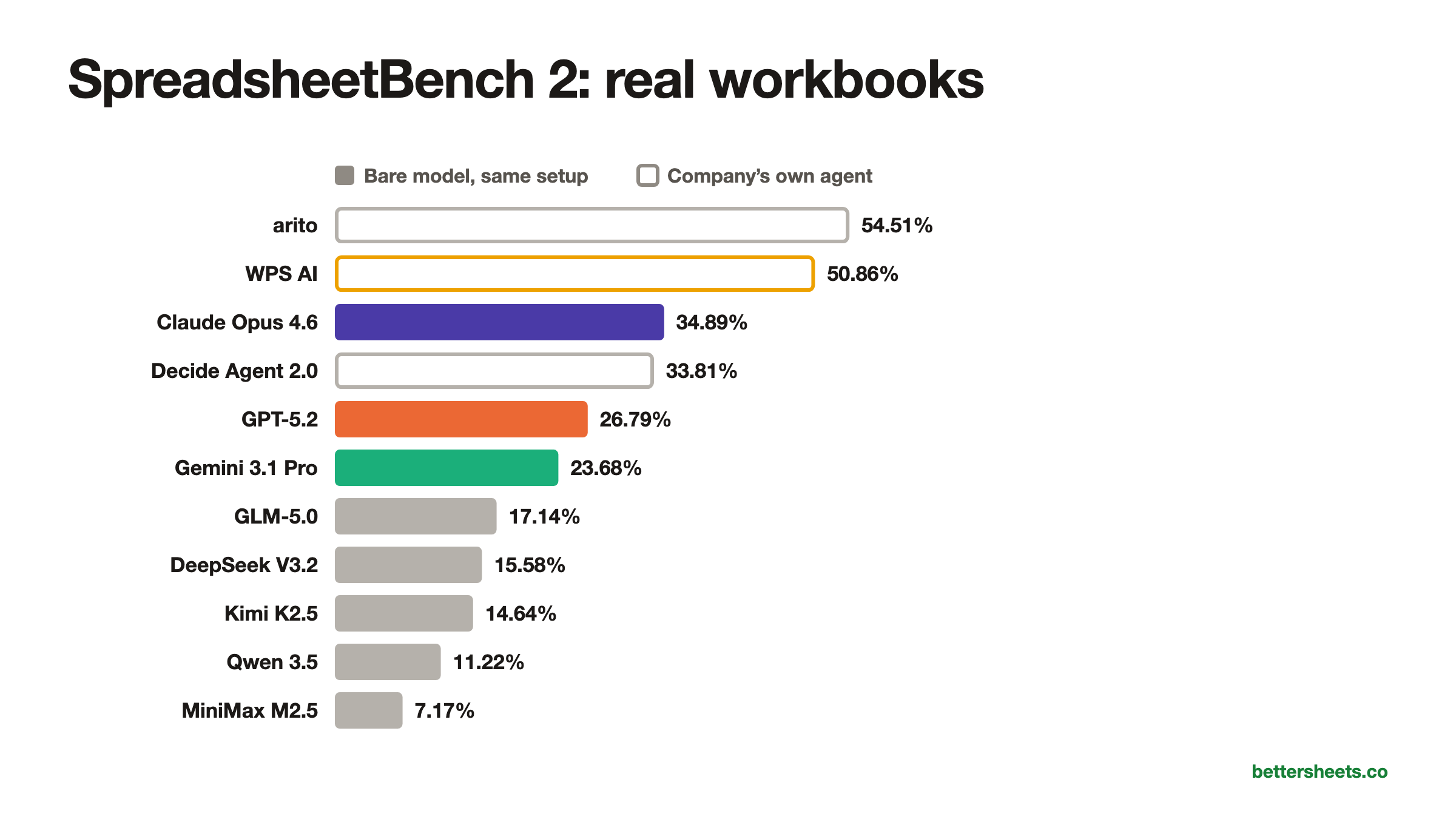
This is also the only board where you can compare the big labs’ own models head to head, in the same setup: Claude Opus 4.6 at 34.89%, GPT-5.2 at 26.79% and Gemini 3.1 Pro at 23.68%.
Pivot tables are still almost unsolved. Microsoft’s own research group (the people behind Flash Fill) built WTMBench to test the things people actually click around to make. Pivot tables: 0 to 10% success. Conditional formatting: 2 to 36%. Charts about 50 to 61%, formulas about 32 to 65%.
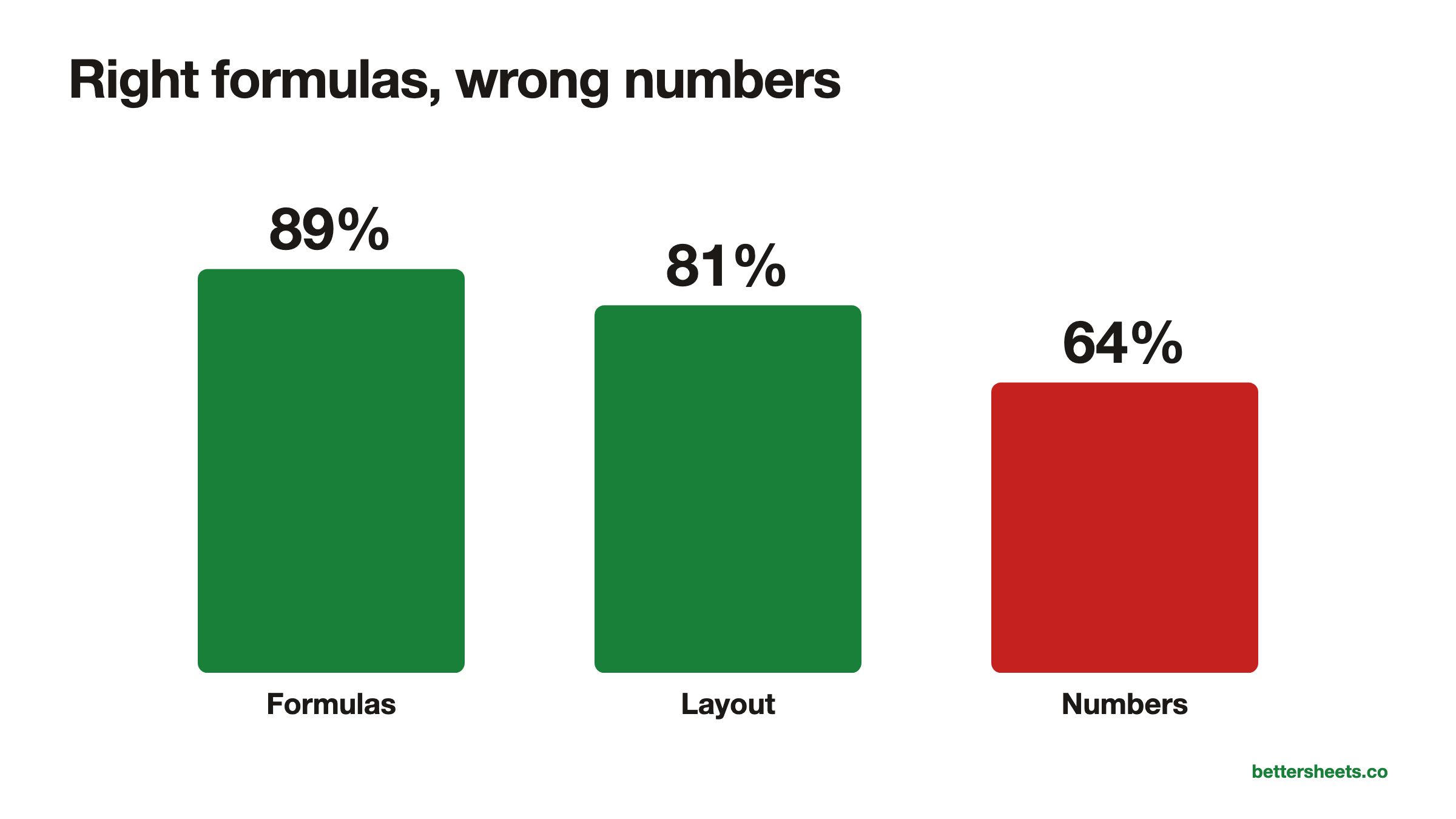
The formulas look right more often than the numbers are right. Vals AI’s Excel Modeling Benchmark has AI agents build LBOs, DCFs and operating models. The top model, Claude Fable 5.1, passes 89% of the checks on formulas but only 64% of the checks on the actual numbers (updated October 16, 2026). The structure is there. The answer is off.
Only 1 in 6 AI-built finance sheets was good enough to send. In SpreadsheetArena, five finance experts rated 50 AI-built workbooks. They averaged 2.86 out of 5, and only 16.1% were rated good enough to send to a client or colleague. Formatting and color coding was the weakest part. The experts agreed with the crowd’s votes only 56% of the time, which says a lot about “people liked it” as a measure.
AI says “done” when it isn’t, and 4 other ways it gets spreadsheets wrong
- It says it’s done when it isn’t. In WTMBench, 80.7% of Claude’s failures and 43.2% of GPT’s were what the researchers call hallucinated successes: the model reported the task finished, and it wasn’t.
- It types the answer instead of a formula. In MBABench, GPT-5.4 hard-coded 24.7% of the answer cells. The sheet looks right today and is wrong the moment an input changes. Rows found the same thing in its own test: only 6% of Gemini in Sheets’ answers updated when the data changed.
- It gives a different answer each time. On Artificial Analysis’ test, Gemini 3.1 Pro solved 81% of tasks at least once but only 41% on all five tries.
- It doesn’t read the sheet first. That’s the “Insufficient Inspection” failure that topped SpreadsheetBench 2.
- It’s only as good as the wrapper around it. The same base model went from 80.25% to 91.25% on SpreadsheetBench Verified once Leni wrapped its own tools, checks and routing around it (Leni paper). When a launch post compares “our product” to “Claude” or “GPT”, it’s often comparing a whole system to a bare model.
“If there’s a shortcut to be taken, an AI agent will take it.” (Ian Schnoor, Financial Modeling Institute, ICAEW)
He was describing an agent that wrote 1,000 formulas in a second, full of hard-coded numbers. That matches the research above.
Microsoft killed its AI formula, and Google’s stops at 350 cells
Both big spreadsheet apps tried putting AI straight into a formula.
Google’s =AI() function launched in June 2025. It’s useful for text: summarizing, sorting into categories, pulling sentiment out of reviews. Per Google’s help page it fills at most 350 cells per run (it launched at 200), can’t see the rest of your spreadsheet, can’t be undone, and can’t be nested inside IF.
Microsoft’s =COPILOT() function arrived in Excel’s beta in August 2025. Microsoft’s own support page told people not to use it for numerical calculations. It never left preview, and Microsoft removed it on September 14, 2026.
My take: an AI formula is fine for messy text. For numbers, have the AI write a real formula you can read.
Nobody has tested the same AI on Excel and Google Sheets
I went looking for this and found almost nothing. No study I could find gives the same AI the same task in Excel and in Google Sheets and compares the two.
The closest is Rows’ benchmark from September 2025. On the same 53 questions, Gemini in Google Sheets got 57% right on the first try and Copilot in Excel got 53%. But that’s two different AIs in two different apps, so it can’t tell you whether the app made the difference. It’s also a vendor test: Rows scored its own product at 89%.
So is Gemini better at Google Sheets than at Excel? Nobody knows yet. Its 70.48% on SpreadsheetBench was Gemini working on Excel files, and Google hasn’t said how it ran them. No one has published Gemini, or any other model, on both.
What the research does show is that the tools around the AI matter more than you’d think. In Microsoft’s WTMBench, the same Claude model scored about 15 points higher when it worked through Excel’s own tools (VBA and Office.js) than when it edited the file through a Python library. And Leni’s wrapper took one model from 80.25% to 91.25%. So Claude inside Excel and Claude inside Google Sheets could score quite differently with the same brain underneath. Nobody has measured it.
Does AI just see “a spreadsheet”? Partly. But the two apps differ in ways that trip it up:
-
Functions only one side has. Google Sheets has QUERY, IMPORTRANGE, IMPORTXML, GOOGLEFINANCE and ARRAYFORMULA. Excel has Power Query, table references like
Table1[Amount]and FILTERXML. Regex is old news in Sheets and only arrived in Excel in 2024. - Different automation. Apps Script in Google Sheets, VBA and Office Scripts in Excel. Different languages, different everything.
-
Commas or semicolons. Depending on your locale, formula arguments are separated by
,or;. AI doesn’t always know which one you use.
My guess, and it’s only a guess: AI leans Excel. Most of the spreadsheet questions and answers on the internet are about Excel. SpreadsheetBench itself was built from Excel forums. The mistake I’d expect most is an Excel-only answer pasted into Google Sheets, and that’s one of the things the Better Sheets benchmark can check.
Six mistakes people make trusting AI with a spreadsheet
- Trusting the score in a launch post: Check which benchmark it is. The cleaned-up SpreadsheetBench is maxed out at 99.25%, and realistic workbooks still sit around 1 in 3.
- Accepting hard-coded values: Click a few answer cells and make sure there’s a formula, not a typed number. Then change an input and see if the answer moves.
- Not checking pivot tables and conditional formatting: These scored 0 to 10% and 2 to 36% in WTMBench, so build or at least review them yourself.
- Believing “done”: Open the sheet and look before you move on. Most of Claude’s failures in WTMBench were tasks it said it had finished.
- Judging an AI on one run: Run the same task a few times. Gemini 3.1 Pro solved 81% of tasks at least once but only 41% on all five tries.
- Using =AI() for numbers: Keep in-cell AI for messy text. For numbers, ask the AI to write a real formula you can read and check.
No public benchmark tests Google Sheets formulas or Apps Script
Every academic benchmark above is Excel. The tasks are .xlsx files, and SpreadsheetBench’s checker recalculates them in Excel or LibreOffice. Gemini in Sheets’ 70.48% was measured on those same Excel tasks.
So nobody is publicly testing:
- Google Sheets formulas. QUERY, ARRAYFORMULA, FILTER and SORT that spill, IMPORTRANGE, REGEXEXTRACT, LAMBDA. The formulas Sheets people actually use.
- Apps Script. Writing it, fixing it, triggers, custom menus, quotas. Claude for Google Workspace, which launched October 6, 2026, can’t create triggers or custom menus at all (Anthropic’s help page).
- The three sidebars head to head. Gemini, ChatGPT for Sheets and Claude now all run inside Google Sheets. The only comparisons are vendors testing their own product.
- The same AI on Excel and on Google Sheets. Same model, same task, two apps. Nobody has published it.
- How often the same AI gets the same answer twice. GRID and Artificial Analysis showed that matters, and almost nobody reports it.
That’s why I started the Better Sheets AI Benchmark. Every model gets the same frozen Google Sheets prompts, word for word: formulas, Apps Script, and tasks for computer use agents and browser extensions. You can run a task in whatever AI you already use and paste the answer back, and grade other people’s answers without knowing which AI wrote them. A few tasks are kept secret so no model can learn the answers. Right now the leaderboard shows sample numbers so you can see how it’ll look. Real scores replace them as soon as the first results are checked.
Tutorials for checking the formulas AI writes
- 3 Ways to Count in Google Sheets: count rows yourself so you can check the totals an AI gives you.
- How to Find Duplicates: catch the repeated rows an AI cleanup can quietly leave behind.
- How To Sort A Filter: understand the FILTER and SORT formulas AI likes to write in Google Sheets, so you can read them.
- Most Common Errors and How To Handle Them in Google Sheets: fix the #N/A and #REF errors that show up when an AI formula points at the wrong place.
- 200 REGEXMATCH Examples in Google Sheets: check and tweak the REGEX formulas an AI writes for messy text.
Better Sheets has hundreds more tutorials like these. If you want to get better at Google Sheets, join Better Sheets.
FAQ
What is the best AI for spreadsheets right now?
It depends on the test. On the full SpreadsheetBench, Kingsoft’s Qingqiu Agent leads at 83.11%, and on the harder SpreadsheetBench 2 the best product, arito, scores 54.51%. Nobody has a public answer for Google Sheets yet.
Is SpreadsheetBench reliable?
It’s useful but limited. More than half of the original tasks had to be fixed or removed, the cleaned-up version is maxed out at 99.25%, and 12 to 14 tasks out of every 100 flip between pass and fail from one run to the next.
Can ChatGPT, Claude or Gemini write Google Sheets formulas?
All three now run in a sidebar inside Google Sheets. But no public benchmark tests Google Sheets formulas, so there’s no independent score yet. That’s what the Better Sheets AI Benchmark is for.
Is Gemini better at Google Sheets than Excel?
Nobody has measured it. Gemini in Sheets’ 70.48% was measured on Excel files, and no one has published the same model on both apps. The only cross-app test, by Rows, put Gemini in Sheets at 57% and Copilot in Excel at 53%, but those are different AIs.
Does AI treat Excel and Google Sheets the same?
Mostly, which is the problem. The apps have different functions (QUERY and IMPORTRANGE only exist in Sheets), different scripting (Apps Script vs VBA) and different formula separators by country, and it’s easy for an AI to hand you an Excel answer to a Sheets question.
What happened to the COPILOT function in Excel?
Microsoft’s =COPILOT() arrived in Excel’s beta in August 2025, never left preview, and was removed on September 14, 2026. Microsoft’s own support page had told people not to use it for numerical calculations.
How many cells can =AI() fill in Google Sheets?
At most 350 cells per run, up from 200 at launch. It can’t see the rest of your spreadsheet and can’t be undone.
Is there a Google Sheets AI benchmark?
I couldn’t find a public one for Google Sheets formulas or Apps Script. Gemini in Sheets’ 70.48% was measured on SpreadsheetBench’s Excel tasks. The Better Sheets AI Benchmark is my attempt to fill that gap, and right now it shows sample numbers until the first real results are checked.

