Guest post by Jagoba. Jagoba makes RepartoJusto, a Google Sheets template for a personal budget and shared expenses. Want to write for Better Sheets too? Here's how guest posts work.
A budget answers one question: did we spend according to plan? A shared-expense ledger answers another: who paid, who consumed, and who still owes money? Confusing those two numbers is how an otherwise tidy household sheet becomes hard to trust.
The problem appears in an ordinary month. One person pays 42 EUR for groceries. The other pays 18 EUR for a taxi both people used. The budget can place 42 EUR under groceries and 18 EUR under transport. That is useful for planning. It still does not say that one person advanced 12 EUR more than their half of those shared costs. If the sheet only stores categories, the settlement has to happen in someone's head.
Google Sheets works well here because the budget and the settlement can be separate views over clean rows. The trick is not to add more categories. It is to give each shared expense three extra facts: who paid, how the cost was divided, and whether that debt has been settled.
Start with four plain tabs
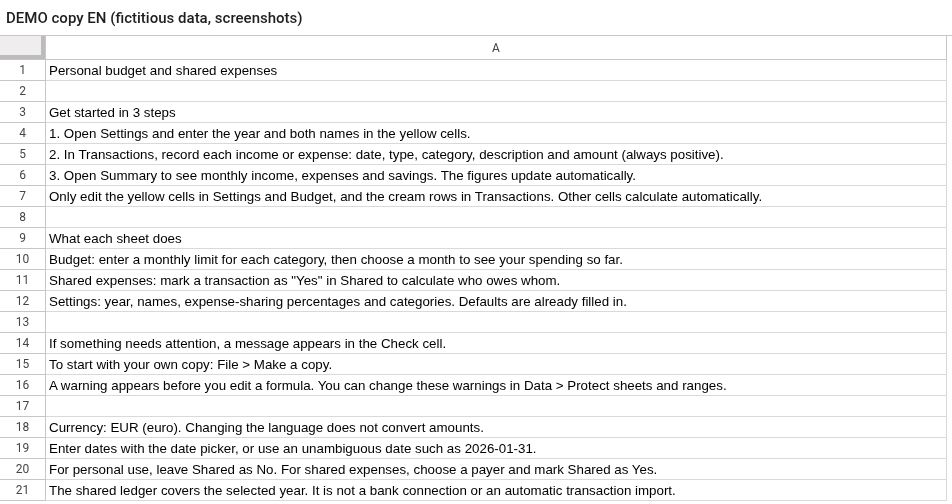
A simple workbook can use four working tabs and one guide tab. The names can change, but the jobs should not.
- Settings holds the people, the currency, the expense categories, and the default split. Keep it small. If a rule is not used by a formula, it does not need to live here.
- Transactions holds the actual income and expenses: date, description, category, amount, and an optional note. This is the record of what happened.
- Budget holds the plan: one row per category and period. The summary compares these planned amounts with the transactions.
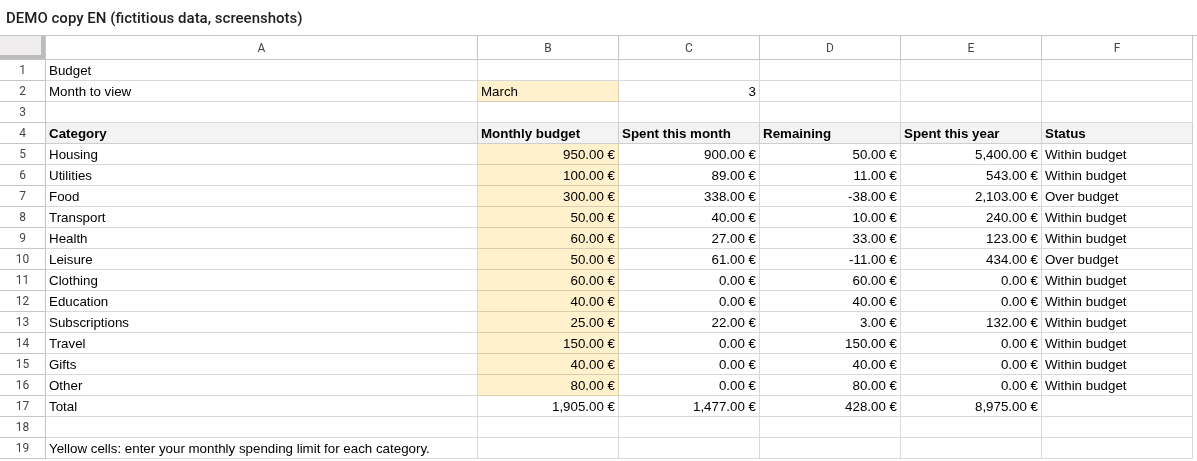
- Shared expenses holds only expenses that more than one person has to settle. Do not put every purchase here. A personal coffee does not need a payer and a split rule.
That last separation is the important one. A budget category describes the purpose of the spending. A shared-expense row describes the debt created by the spending. They are related, but they are not the same object.
A shared row needs its own columns
For a two-person household, a useful Shared expenses tab can start with these columns: Date, Item, Amount, Paid by, My share, Other share, Settled, and Balance for me.
The Amount column stores the full price paid. My share and Other share store the responsibility after the split. If I pay 42 EUR for groceries and we split evenly, Amount is 42, My share is 21, Other share is 21, and Paid by is Me. If the other person pays 18 EUR for a taxi, Paid by is Partner, My share is 9, and Other share is 9.
Balance for me turns that into one signed number. If I paid, the other person owes me their share, so the row is positive. If the other person paid, I owe my share, so the row is negative:
Shared expenses: H2
=IF(D2="Me",F2,-E2)
Here D is Paid by, E is My share, and F is Other share. Once that helper column exists, the unsettled balance is a normal SUMIFS:
Unsettled balance
=SUMIFS(H:H,G:G,FALSE)
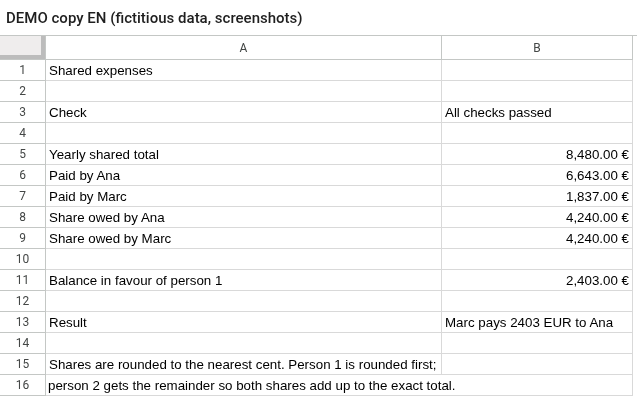
In that formula H is Balance for me and G is Settled. Positive means the other person owes me. Negative means I owe them. Zero does not necessarily mean nobody spent money. It means nobody currently owes the other person money.
Settle without rewriting history
The settlement should not erase the original expenses. Mark the shared rows as settled, or add a settlement transaction that is clearly separate from groceries, rent, transport, and the other real categories. Deleting the old rows makes the budget wrong. Editing them until the balance looks right makes the audit trail worse.
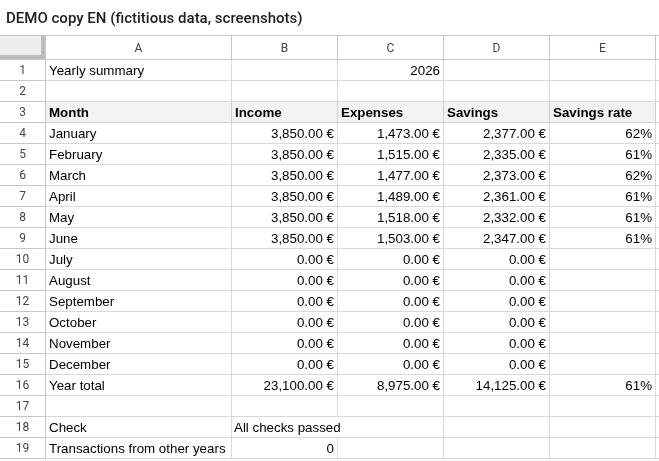
This also keeps the monthly review useful. First, compare Budget with Transactions: did spending follow the plan? Second, review Shared expenses: is there an unpaid balance, and in which direction? A month can be under budget and still leave one person owing money. It can also be over budget while the settlement is already clean.
Three mistakes to avoid
- The first mistake is treating a reimbursement as a new expense. If one person pays the other back 30 EUR, that is a settlement, not another 30 EUR of spending.
- The second mistake is changing old rows to force the current balance. Correct a wrong split, but do not silently move old expenses between people because the total would look nicer.
- The third mistake is adding complexity before the sheet answers the two basic questions. Start with plan versus actual and payer versus share. Percentages, multiple currencies, and groups can wait until the basic settlement is easy to read.
Why I built a sheet around this
I built RepartoJusto around this separation. It started as a Spanish-language Google Sheets template for a personal budget and shared expenses, and it now ships with a complete English version of the template, the built-in guide and the quick-start PDF, all included in the same purchase. The workbook has tabs for setup, transactions, budget, summary and shared expenses. The shared-expense tab keeps the payer, split, and settlement visible instead of hiding them inside a general budget category.
The broader lesson works even if you never use my template: give the budget and the debt ledger different jobs. Let the budget tell you whether the plan survived the month. Let the shared ledger tell you who owes whom. When both answers are visible, the sheet becomes much easier to trust.
Disclosure: I created RepartoJusto. You can see the English overview here: https://repartojusto.gumroad.com/personal-budget-template
About the author
Jagoba
Jagoba makes RepartoJusto, a Google Sheets template for a personal budget and shared expenses, in English and Spanish.
This is a guest post. Read about guest posts on Better Sheets.
