Sheets Wrapped
Spotify Wrapped for Google Sheets
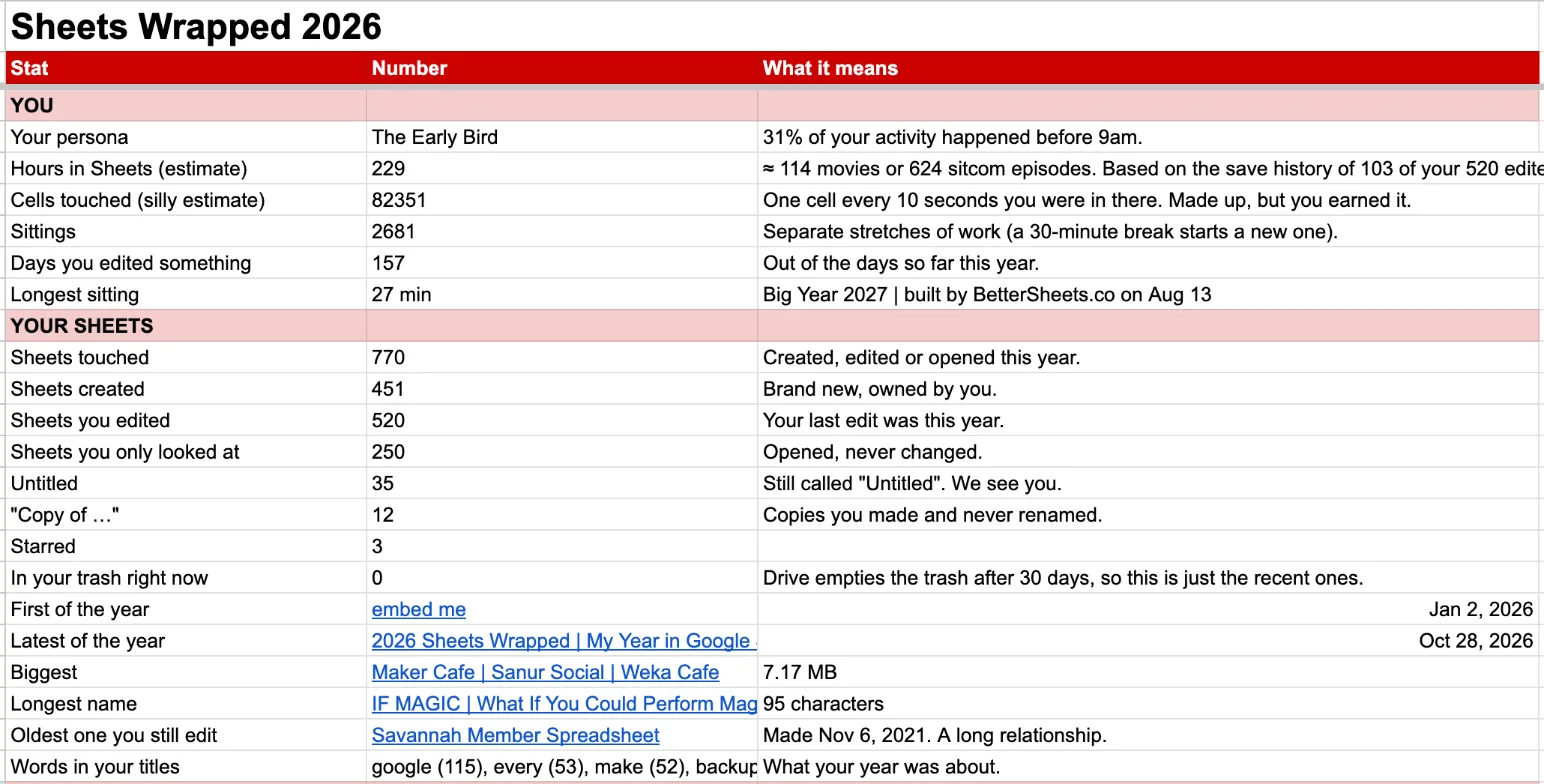
- How many hours you spent in Sheets.
- How many cells you edited.
- How many you left as "Untitled spreadsheet".
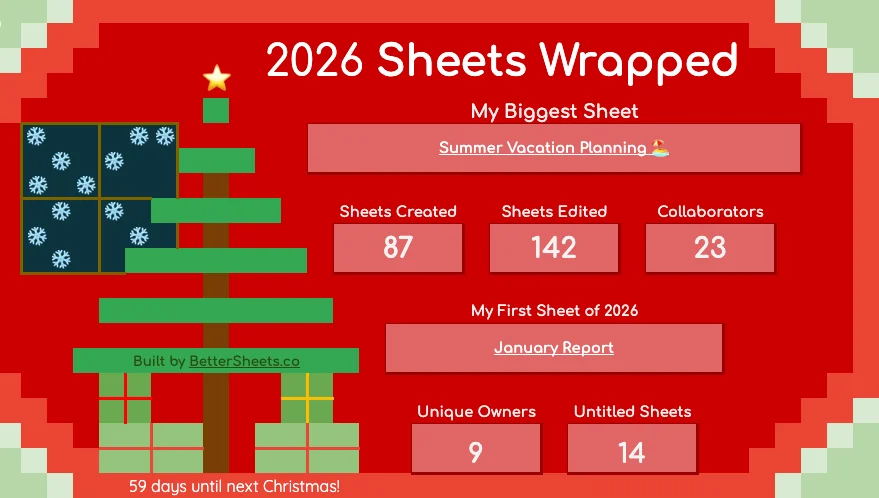 First sheet: "January Report"
14 untitled spreadsheets
Get it now. It's free.
It's a Google Sheet. Copy the template, run your own.
Get the free template
Free. No password, no card. The sheet link shows up right here.
🔒 No AI used in Sheets Wrapped. It works inside your own Google account only. More details
I built it to see my own data
I'm Andrew, your resident Google Sheets wizard. Here's my 2026 so far.
- hours in Google Sheets
- 229
- hours in Google Sheets
- new sheets created
- 451
- new sheets created
- still called "Untitled spreadsheet"
- 35
- still called "Untitled spreadsheet"
- open to anyone with the link
- 386
- open to anyone with the link
Wrap more than just Google Sheets
- Gmail
- Calendar
- Docs
- Slides
- Drive
 Gmail
 Calendar
 Docs
 Slides
 Drive
What it counts
- Hours in Sheets
- Cells you edited
- Sheets you created
- Sheets named "Untitled spreadsheet"
- "Copy of …" you never renamed
- Your biggest sheet
- The oldest sheet you still edit
- Collaborators
- Sheets open to anyone with the link
- Your Sheets buddy
- Your busiest day
- Your busiest hour
Which kind of sheet user are you?
- The Early Bird 30% or more of your activity happened before 9am.
- The Night Owl 35% or more happened after 9pm.
- The Template Collector Lots of your sheets still start with "Copy of".
- The Weekend Warrior 30% or more happened on weekends.
- The Helper You edited more of other people's sheets than you made.
- The Connector You shared sheets with 25 or more people.
- The Lone Wolf Most of your new sheets were never shared.
- The Builder You made 50 or more brand new sheets.
- The Steady Hand Not too much, not too little.
Wrap more than just Google Sheets
-
Gmail
- Emails sent and received
- Who you email most
- and more
-
Calendar
- Hours in meetings
- Who you met with most
- and more
-
Docs
- Docs you wrote
- Still "Untitled document"
- and more
-
Slides
- Decks you made
- Your biggest deck
- and more
-
Drive
- Every file you touched
- Storage you're using
- and more
Rewind to 2025, or further
Change the year and wrap any one you like: 2026, 2025, 2024, 2023, all the way back to 2006.
Get it now. Run it anytime.
Grab the sheet today, and schedule a day for it to run.
Any date you choose: December 1, New Year's Eve, January 1, or any date.
No AI. Nothing leaves your account.
- No AI, no outside services.It's plain Apps Script running inside your Google account.
- Read-only.Names, dates and sharing. It never opens your files or reads your emails.
- It only writes to your copy.Nothing changes in your Drive, Gmail or Calendar.
- Read the code first.Extensions, then Apps Script. Every line is there.
The first time you run it
-
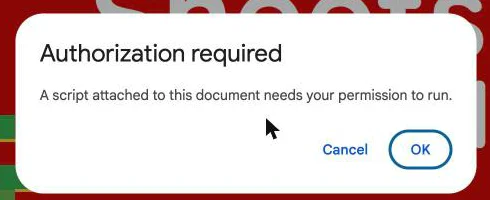
1. Authorization required
Click OK.
-
2. Google hasn't verified this app
Click Advanced, then Go to Sheets Wrapped. It's your own copy, so Google hasn't reviewed it.
-
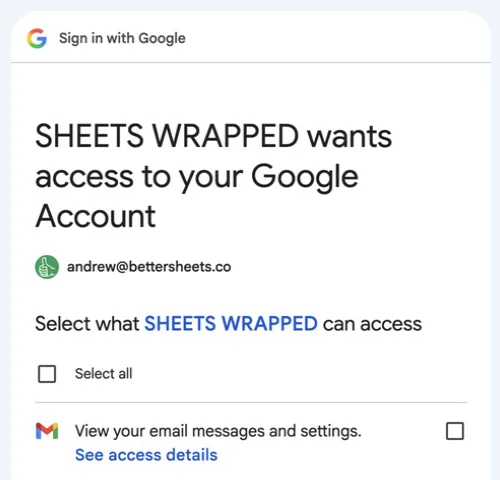
3. Sheets Wrapped wants access
Tick Select all, then scroll down and click Continue. Leave a box empty and that part can't run.
How it works
-
1. Make a copy
Copy the template into your own Google Drive. It's yours.
-
2. Open the menu
Click 🎁 Sheets Wrapped, then Wrap my 2026 Sheets. Or schedule it for December.
-
3. See your year
A new tab fills with your numbers. Screenshot it if you like.
Get it now. It's free.
It's a Google Sheet. Copy the template, run your own.
Get the free template
Free. No password, no card. The sheet link shows up right here.
Plan next year, now.
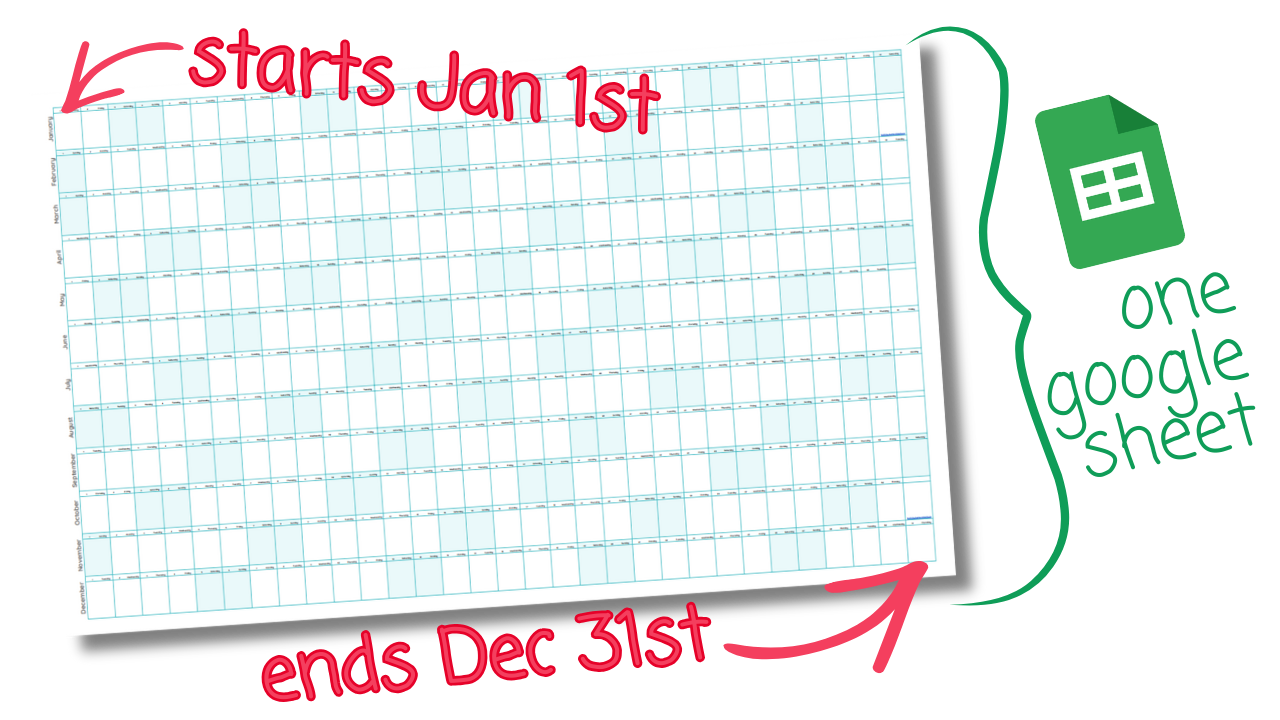
Big Year is a free yearly calendar template for Google Sheets. Your entire 2027 on one page, laid out in front of you.
- Every day of the year in one sheet.
- Color in trips, launches, birthdays and deadlines.
- Print it and put it on the wall.
FAQ
Can it change or delete anything?
No. Sheets Wrapped only looks. It never edits, moves, sends, deletes or archives anything in your Drive, Gmail or Calendar. The only thing it writes to is your own copy of the spreadsheet.
Does my data get sent anywhere?
No. The script runs inside your own Google account. Nothing is sent to Better Sheets or anyone else. The one email it can send goes to you, and only if you ask for it.
Why does Google's permission screen say "view your email"?
Gmail Wrapped needs to count emails by date, and Google's narrowest permission for that is read-only Gmail access. So the screen sounds bigger than what the script does. Every Gmail request in the code asks only for From, To, Cc and the date. It never opens the body of an email.
Can it open my files?
No. For Drive it uses Google's metadata-only permission: file names, dates, types, size and who a file is shared with. It can't see what's inside your sheets, docs or slides.
Can I read the code?
Yes. Open your copy, then Extensions, then Apps Script. It's all there, with comments. The permissions it uses are listed at the top.
How does it estimate my hours?
It reads the save history of your edited sheets. Saves close together count as one sitting, and a 30-minute break starts a new one. If you have a lot of sheets, it reads a sample for up to 90 seconds and scales up from there.
Is the cells-edited number real?
No, it's a fun one. It counts one cell for every 10 seconds you were in a sheet. The sheet says so too.
How long does it take?
Usually a few minutes. Google stops any script after six minutes, so if you have a huge Drive it covers your most recent files and tells you it did.
Can I schedule it?
Yes. Pick December 1, December 15, December 31, January 1, or your own date and time. On that day it runs on its own, fills in the sheet and emails you "Your Sheets Wrapped". You can check or cancel the schedule from the same menu.
Can I start over?
Yes. Reset clears all your results and cancels any schedule. Nothing outside the spreadsheet was changed, so there's nothing else to undo.
How do I share my Wrapped?
Take a screenshot. Sharing is up to you. Nothing is posted anywhere.
By Andrew Kamphey, Better Sheets