
Every link your sheet needs. One click.
Make a copy, template preview, view-only, CSV, Excel and PDF links for the Google Sheet you're on. No more editing URLs by hand.
Free Chrome extension. No account, no data collected.
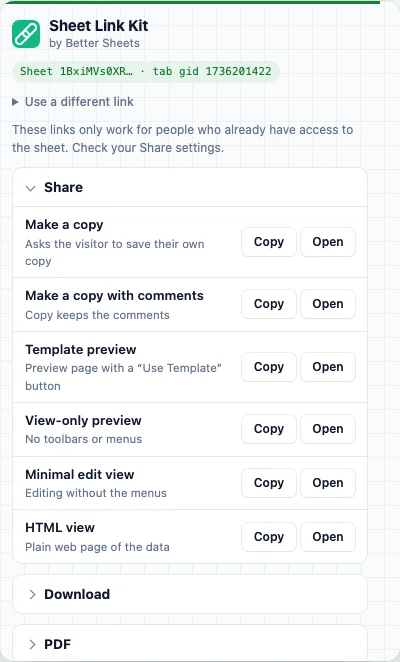
- links per sheet
- 11
- links per sheet
- to copy or open
- 1 click
- to copy or open
- URLs to edit
- 0
- URLs to edit
- data collected
- 0
- data collected
Google Sheets links can do a lot. If you know the URL.
Swap /edit for /copy and people get their own copy. Add /export?format=pdf and it downloads a PDF.
Nobody remembers the rest: the gid for the right tab, the PDF margin settings, the template preview path.
Sheet Link Kit reads the address of the sheet you're on and builds all of them for you.
What you have
docs.google.com/spreadsheets/d/1Bxi…/edit#gid=1736201422
Make a copy
…/d/1Bxi…/copy
Template preview
…/d/1Bxi…/template/preview
View-only
…/d/1Bxi…/preview
This tab as CSV
…/d/1Bxi…/export?format=csv&gid=1736201422
PDF, landscape, fit to width
…/d/1Bxi…/export?format=pdf&portrait=false&fitw=true…
Share it the right way
Selling or giving away a template? Send a copy link so nobody asks for edit access.
- Make a copy, with or without your comments
- Template preview with a "Use Template" button
- View-only preview with no toolbars or menus
- Minimal edit view and a plain HTML view
Download links that stay fresh
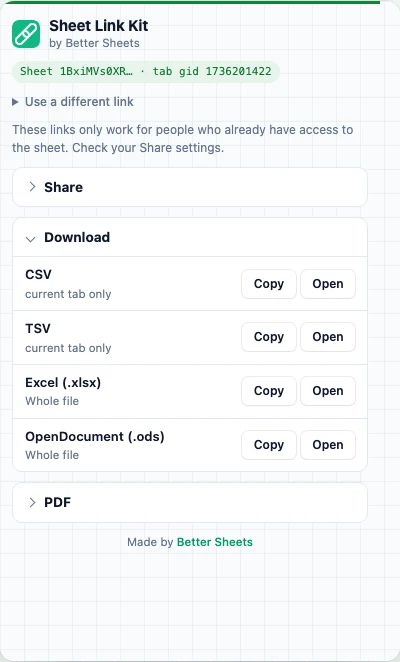
A download link always grabs the latest version of the sheet. Put it in a doc, an email or an import tool and it never goes stale.
CSV or TSV for the tab you're on. Excel (XLSX) or ODS for the whole file.
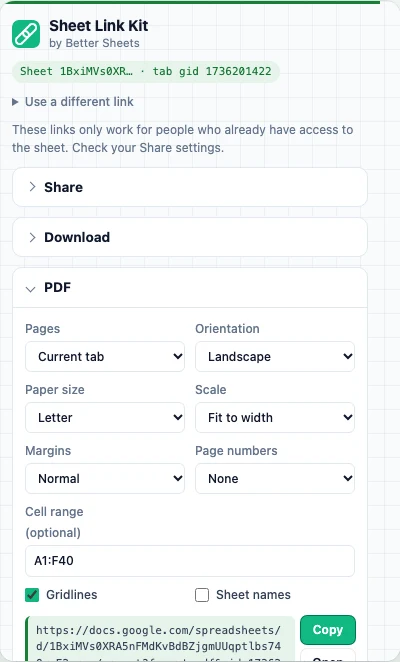
The exact PDF, as a link
Pick paper size, orientation, scale, margins, gridlines, sheet names, page numbers and a cell range. The link updates as you change them.
Send it to a client and they get a fresh, nicely laid out PDF every time they click. Your settings are saved for next time.
Got a link? Paste it
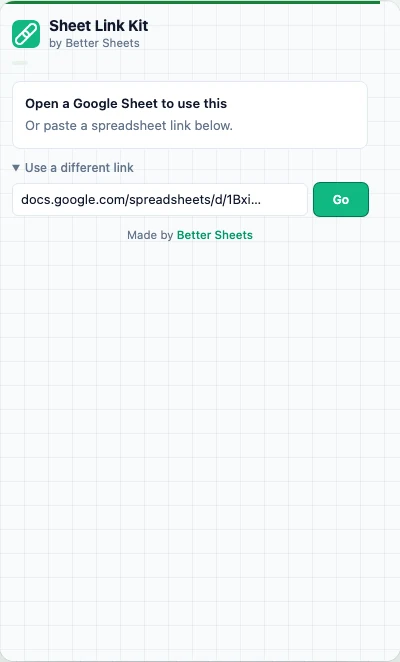
Someone sent you a sheet? Paste the link into the popup and get every version of it without opening the file.
It handles the odd ones too: work accounts, multiple signed-in accounts, and older files that need a resource key.
Who it's for
Template sellers
Copy and template preview links for every product, in one click.
Teachers
Give every student their own copy of the worksheet.
Consultants
Send clients a PDF link that's always up to date.
Ops and data folks
CSV links for imports, scripts and other tools.
Newsletter writers
Share a view-only sheet without the menus in the way.
Anyone who shares sheets
Stop asking "can you request access?"
Not on Chrome? Use the web versions
Paste a sheet link and get the same links on bettersheets.co.
Questions
Is it free?
Yes. No account, no email. Add it to Chrome, open any Google Sheet and click the icon.
Who can open the links it makes?
Only people who already have access to the sheet. The extension doesn't change your Share settings, so set the sheet to "Anyone with the link" first if you're sharing a copy or template link publicly.
What's the difference between a copy link and a template link?
A copy link (/copy) asks the visitor to save their own copy right away. A template link (/template/preview) shows a clean preview of the sheet with a "Use Template" button, so people can look before they copy.
Which tab does it download?
The tab you're on. CSV and TSV export that one tab. XLSX and ODS download the whole file. The PDF can be the current tab or the whole file, and you can set a cell range.
Does it read my spreadsheet?
No. It only reads the address of the tab you click it on, to find the sheet and tab ID. It never reads the cells, makes no network requests, and collects nothing.
Can I use it on a sheet I don't have open?
Yes. Paste any Google Sheets link into the popup and it builds the same links.
Why not just use the generators on this site?
You still can: /download, /pdf, /copy, /csv and /xlsx build the same links from a pasted URL. The extension saves the trip: the links are one click away on every sheet you open, and it remembers your PDF settings.
Which browsers?
Chrome, and Chromium browsers that install from the Chrome Web Store, like Edge, Brave and Arc.
Stop editing sheet URLs by hand
Open a sheet, click the icon, copy the link you need.
Free. Made by Better Sheets. Google Sheets is a trademark of Google LLC.