A free habit tracker template for Google Sheets
Click one box a day. Your year fills in square by square, like a GitHub contribution grid. Track anything: workouts, reading, meditation, medication.
Free with a free account. 163 people have copied it.
12 days tracked
Half a year, one column per week. In the sheet the box is cell A1, and each click adds a row to the LOG tab with the time.
Most habit trackers quit before you do
Apps want a subscription and a login and send you notifications. Printables end up in a drawer by February. A blank spreadsheet needs formulas you don't want to write.
Track Anything is one sheet that does one thing: you click, and today gets a square.
How the habit tracker works
-
1
Copy the sheet
Log in free and copy Track Anything to your Google Drive. Rename it after your habit.
-
2
Set your emoji and Day 1
Pick the emoji for a done day and type your start date. The weekdays line up on their own.
-
3
Click A1 once a day
Today's square fills in. Total trackings and days go up. Every click is logged with the time.
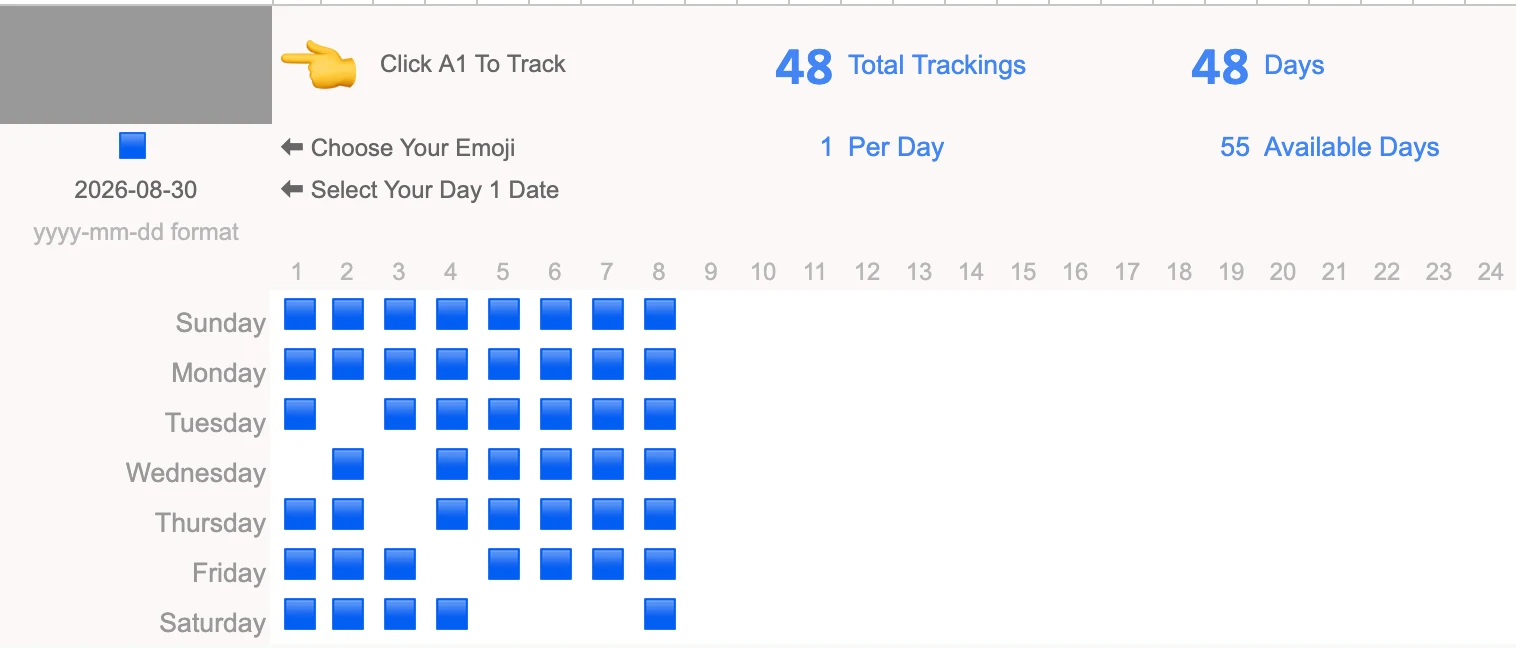
An example eight weeks in: 48 days tracked, a few missed. Each square is one formula: if the DATA tab has a 1 for that day, show your emoji.
One habit per sheet, any habit
If you can answer "did I do it today?", you can track it.
Work out or do yoga
See at a glance which weekdays you skip.
Meditate
Ten minutes counts. The square doesn't care how long.
Read or write every day
A writing streak is easier to keep when you can see it.
Take your medication
Did I take it today? Check the grid instead of guessing.
Stop eating fried food
Click on the days you didn't. Watch the gaps shrink.
Drink water, sleep by 11
Small habits, one copy each.
A habit tracker spreadsheet or an app?
| Track Anything | Habit apps | Printables | |
|---|---|---|---|
| Price | Free | Often a subscription | Free or a few dollars |
| Where your data lives | Your Google Drive | Their servers | Paper |
| Change how it looks | Anything: emoji, colors, columns | What the app allows | Start a new page |
| Exact time of each check | Yes, in the LOG tab | Sometimes | No |
| Works after a year | Yes, the grid keeps going | If you keep paying | New sheet each month |
Planning the year, not just today?
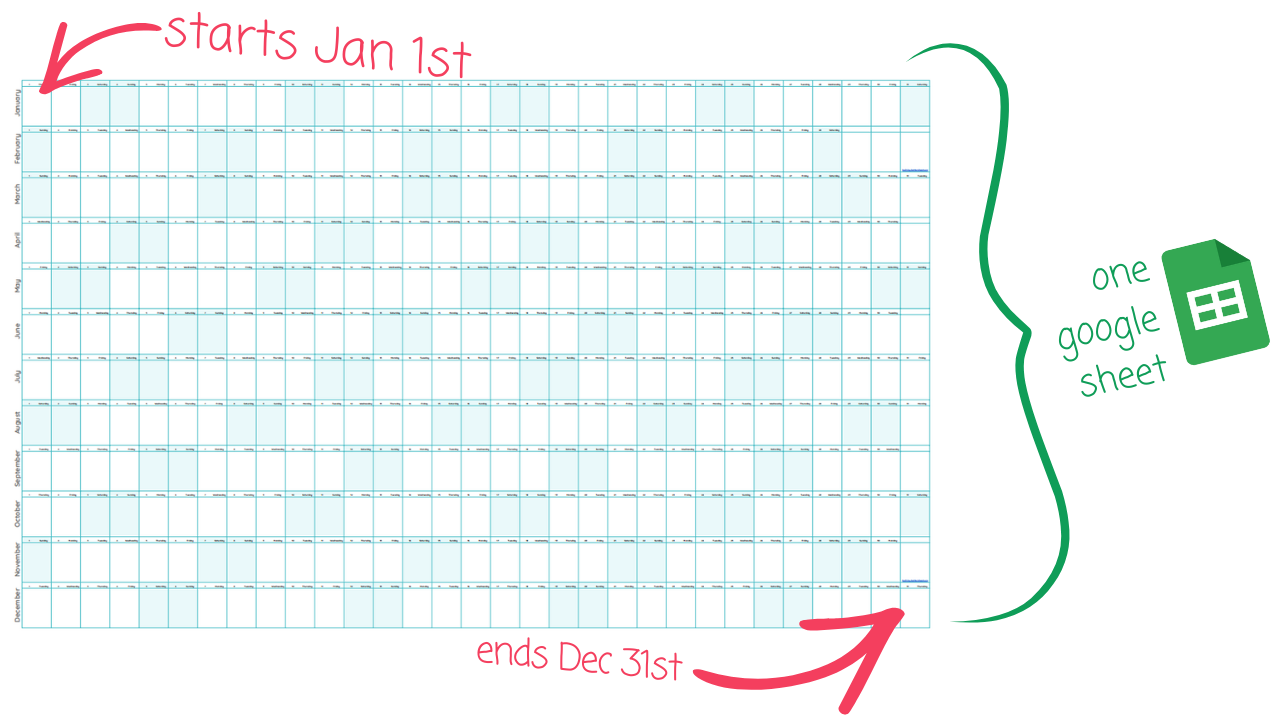
A habit tracker tells you what you did. A planner tells you what's coming. Big Year is my free yearly calendar for Google Sheets: January 1 to December 31 on one page, weekends highlighted, every cell yours to fill in.
Plan the week and the month without losing the rest of the year. Print it big for the wall.
Also free with a free account. More about Big Year
Breaking a habit instead? Dark Habits
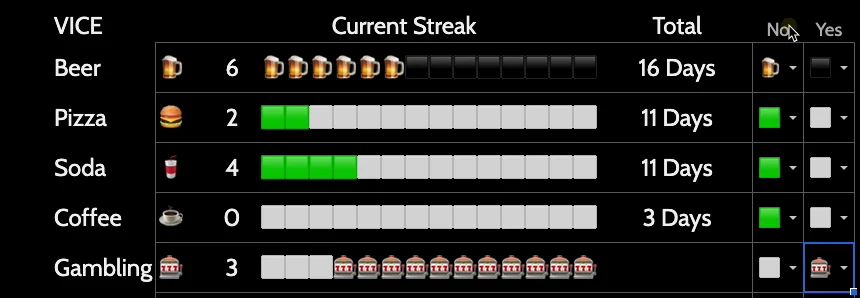
Track Anything counts the days you did something. Dark Habits counts the days you didn't.
List your vices, give each one an emoji and a goal, and tick a box on every day you stayed clean. The Streaks tab shows how far you are into each 14-day goal.
"In the first two weeks I felt completely different. I did not want to break the streak."Get Dark Habits for $10
Free for lifetime members.
Want a planner next to your tracker?
Atomic Sheets is 100 parts you can drop into any Google Sheet, including 9 weekly, monthly and yearly planners, priority matrices and emoji lists.
Build your own habit tracker
Every trick in these sheets has a video. Members get all of them, and the sheets that go with them.
Everything I know about checkboxes
How the big A1 box in Track Anything works, and other checkbox tricks.
Track every edit (almost)
Write a timestamp to a LOG tab every time a cell changes. The same idea logs your habit clicks.
Build a habit tracker in dark mode
Where Dark Habits came from, and how to pick dark colors that don't hurt your eyes.
Inside the Dark Habits script
The Apps Script that counts streaks, line by line.
The growing plant progress chart
Checkboxes that grow a flower pot as you tick off days.
Daily writer's word count tracker
A tracker that keeps a writer writing every day.
Questions
Is the habit tracker template free?
Yes. Make a free Better Sheets account and copy Track Anything to your Google Drive. No card.
How do I track a habit?
Click the big box in A1 once a day. The sheet fills in today's square and adds a row with the time to the LOG tab. Click it twice in one day and it still counts once.
Can I track more than one habit?
Make one copy per habit and name each one. Each copy has its own grid, its own emoji and its own Day 1. If you want several habits side by side with streaks, that's Dark Habits.
How long can I track for?
At least a year. The grid is one column per week and runs past week 52, and the top of the sheet shows how many days you have left from your Day 1 date.
Does it count streaks?
Track Anything shows every day you did it and your total, so gaps are easy to see. For a streak counter with a goal, like 14 days without a bad habit, use Dark Habits.
Does it work in Excel?
No. It's a Google Sheet, and the click-to-track part is Apps Script, which Excel doesn't run. You can download a copy as Excel, but clicking A1 won't fill anything in.
Why a spreadsheet and not an app?
The data is yours, in your Drive, with no subscription. You can change the emoji, the start date, the colors, or add a column for notes. An app decides all that for you.
Start today's square
One sheet, one click a day, your own copy in Google Drive.
Free with a free account. 163 people have copied it.