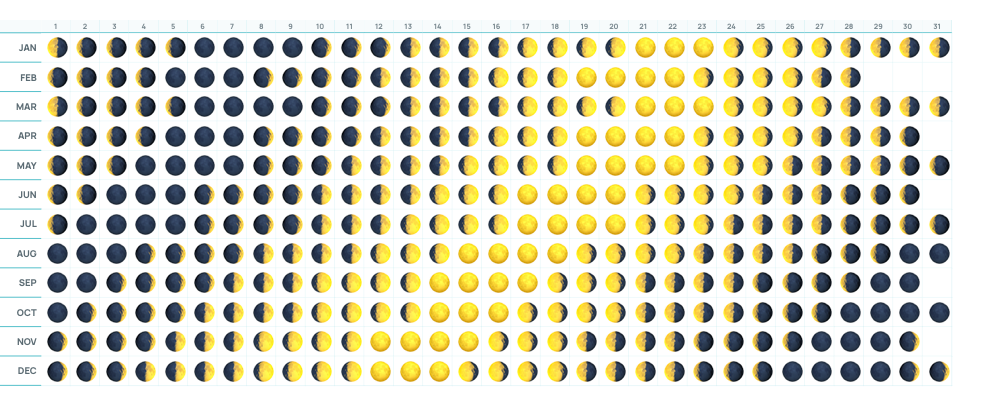
Moon phase formula for Google Sheets

Put in any date, get that day's moon: 🌑🌒🌓🌔🌕🌖🌗🌘
For today's moon, paste this into any cell. It works in Excel 365 too.
=IFS(MOD(TODAY()-DATE(2023,1,21),29.53059)<1.84566,"🌑",MOD(TODAY()-DATE(2023,1,21),29.53059)<5.53699,"🌒",MOD(TODAY()-DATE(2023,1,21),29.53059)<9.22831,"🌓",MOD(TODAY()-DATE(2023,1,21),29.53059)<12.91963,"🌔",MOD(TODAY()-DATE(2023,1,21),29.53059)<16.61096,"🌕",MOD(TODAY()-DATE(2023,1,21),29.53059)<20.30228,"🌖",MOD(TODAY()-DATE(2023,1,21),29.53059)<23.99361,"🌗",MOD(TODAY()-DATE(2023,1,21),29.53059)<27.68493,"🌘",TRUE,"🌑")
For any date, put the date in A2 and use this one instead. Fill it down a column of dates and you get a moon for every day, like the sheet above.
=IFS(MOD(A2-DATE(2023,1,21),29.53059)<1.84566,"🌑",MOD(A2-DATE(2023,1,21),29.53059)<5.53699,"🌒",MOD(A2-DATE(2023,1,21),29.53059)<9.22831,"🌓",MOD(A2-DATE(2023,1,21),29.53059)<12.91963,"🌔",MOD(A2-DATE(2023,1,21),29.53059)<16.61096,"🌕",MOD(A2-DATE(2023,1,21),29.53059)<20.30228,"🌖",MOD(A2-DATE(2023,1,21),29.53059)<23.99361,"🌗",MOD(A2-DATE(2023,1,21),29.53059)<27.68493,"🌘",TRUE,"🌑")
How it works
The formula counts how far into the moon's cycle a date falls, then picks the emoji for that point. Here it is one step at a time, with 1/22/2027 in A2.
1. Start from a known new moon
DATE(2023,1,21) is January 21, 2023, a new moon. Every later new moon is a whole number of cycles after it.
2. Count the days since
A2-DATE(2023,1,21) gives 1462. Dates in Sheets are just numbers of days, so subtracting one from another gives the days between them.
3. Keep only the leftover days
MOD(A2-DATE(2023,1,21),29.53059) gives 15.0. 29.53059 days is the average time from one new moon to the next (the synodic month). 1462 days is 49 full cycles plus 15.0 days, and MOD keeps only the 15.0. That number is the moon's age: how many days since the last new moon.
4. Turn the age into a phase
Split the cycle into 8 phases of about 3.69 days each. Each cutoff sits halfway between two phases, so the full moon owns the days on either side of day 14.77.
| Phase | Age (days) |
|---|---|
| 🌑New moon | 0 – 1.85 |
| 🌒Waxing crescent | 1.85 – 5.54 |
| 🌓First quarter | 5.54 – 9.23 |
| 🌔Waxing gibbous | 9.23 – 12.92 |
| 🌕Full moon | 12.92 – 16.61 |
| 🌖Waning gibbous | 16.61 – 20.30 |
| 🌗Last quarter | 20.30 – 23.99 |
| 🌘Waning crescent | 23.99 – 27.68 |
| 🌑New moon again | 27.68 – 29.53 |
15.0 falls between 12.92 and 16.61, so 1/22/2027 gets 🌕.
5. IFS picks the first match
IFS checks each test in order and returns the emoji of the first one that's true. Age 15.0 isn't under 1.85, 5.54, 9.23 or 12.92, but it is under 16.61, so the answer is 🌕. The last test, TRUE,"🌑", catches the final sliver of the cycle after 27.68 days and wraps it back to a new moon.
How accurate it is
The formula uses the average cycle, and the real moon runs a little fast or slow from month to month. For 2027, 11 of the 12 full moons land on the exact day (US Eastern time). August is the odd one out: the formula says the 16th and the real full moon is on the 17th. Each emoji also covers about 3.7 days, so it tells you the phase, not the hour. Good enough for any calendar; not for an eclipse.
What you can use it for
- A moon calendar for the whole year: a column of dates with the formula next to them.
- Planning around the moon: full moon gatherings, new moon intentions, dark-sky hikes and stargazing on the darkest nights.
- A garden calendar, if you plant by the moon.
- Teaching the moon's phases: students can change the date and watch the emoji change.
- A "tonight's moon" cell on a dashboard or a daily planner.
By the way
Big Year is free: the whole year on one Google Sheet tab. Get Big Year free.
This formula runs the MOON tab in Big Year Premium, a lunar calendar for the whole year: see the moon phase calendar.