Split Tabs
A free Google Sheets™ add-on
Built by Better Sheets · Free on the Google Workspace Marketplace · No account needed
What Split Tabs does
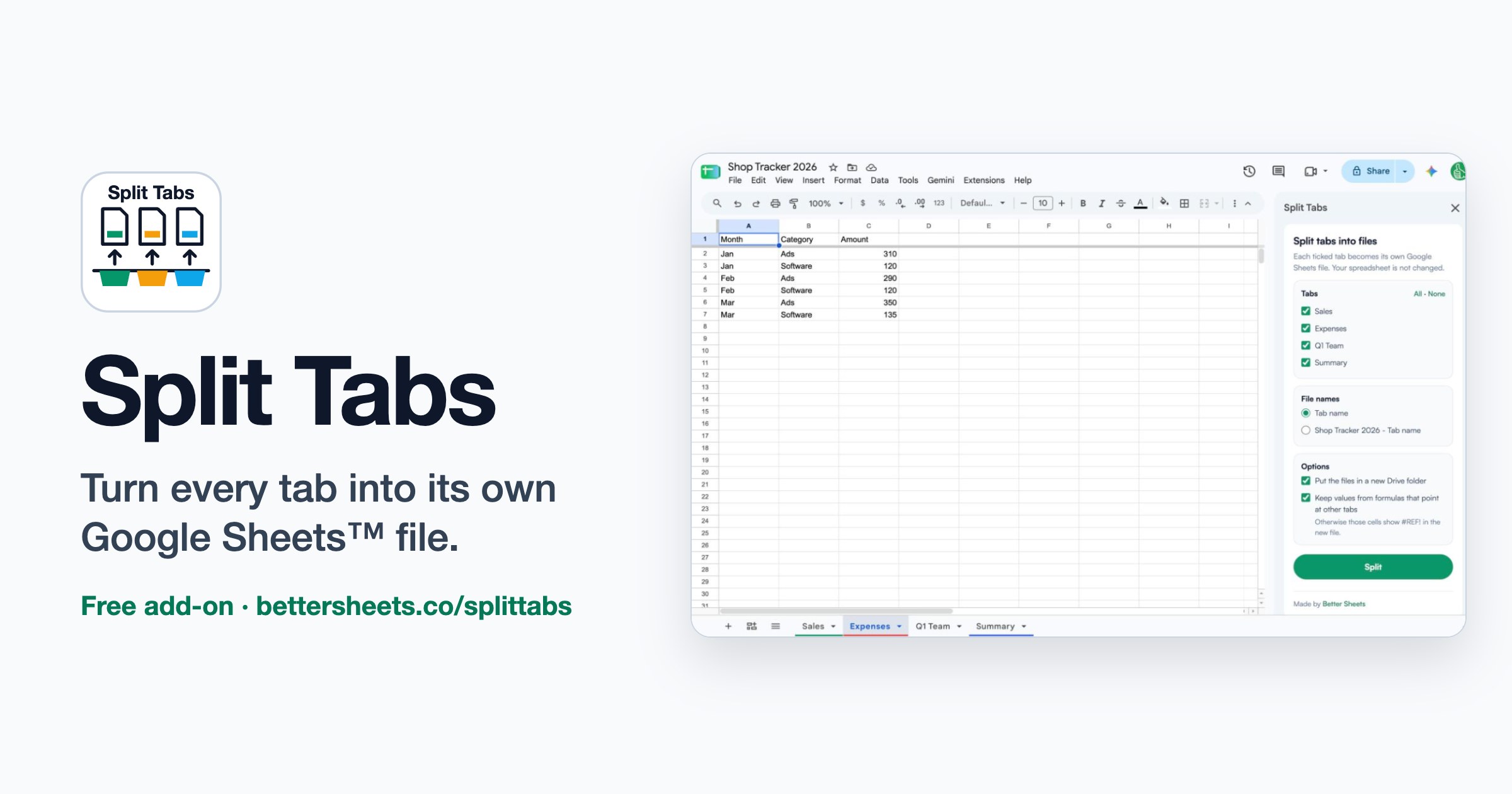
A free Google Sheets™ add-on that turns each tab of a spreadsheet into its own Google Sheets file. Pick the tabs, press Split, and get one file per tab in a new Drive folder.
- ✅ Pick any tabs, or all of them, from a checklist.
- ✅ Name the new files after the tab, or after the file and the tab.
- ✅ Formulas that point at other tabs keep their values instead of turning into #REF!.
- ✅ Formatting, column widths, frozen rows and charts come along with each tab.
How Split Tabs uses your Google data
- Lists the tabs of the spreadsheet you open it in, so you can pick which ones to split.
- Copies each tab you pick into a new Google Sheets file in your own Google Drive. It never changes your original spreadsheet.
- Can create one new Drive folder to hold those files. It can only see files and folders it created, not the rest of your Drive.
- Runs entirely inside Google Sheets. It does not send your spreadsheet data to Better Sheets or anyone else.
Google permissions it asks for
| Read the tabs you pick and create the new spreadsheets | https://www.googleapis.com/auth/spreadsheets |
| Create the folder and move the new files into it (only files it creates) | https://www.googleapis.com/auth/drive.file |
| Show its menu and sidebar inside Google Sheets | https://www.googleapis.com/auth/script.container.ui |
Full details: Split Tabs Privacy Policy · Terms of Service
Privacy Policy
Last updated: November 11, 2026
This policy explains what Split Tabs, a free Google Sheets™ add-on made by Better Sheets, does with your information. Split Tabs is published by Better Sheets (Andrew Kamphey), contact [email protected].
What Split Tabs does
Split Tabs copies the tabs you choose from the spreadsheet you are working in into new Google Sheets files in your own Google Drive, one file per tab. It can also create one new Drive folder to hold those files.
Google data it accesses
- The spreadsheet you open Split Tabs in. It reads the tab names so it can list them, and reads the contents of the tabs you choose so it can copy them. It never changes your original spreadsheet.
- Files and folders it creates in your Google Drive. It creates the new spreadsheets and, if you choose, one folder. It cannot see or change any other file in your Drive.
How that data is used
Your spreadsheet data is used only to make the copies you ask for, at the moment you press Split. All of the work runs inside Google's own servers (Google Apps Script) under your Google account.
What we store, share or sell
- Better Sheets does not collect, store, log or transmit your spreadsheet contents, file names or email address. Nothing is sent to Better Sheets' servers or to any other third party.
- We do not sell, rent or share your data, and we do not use it for advertising.
- We do not use your Google data to train or improve AI or machine-learning models.
- Split Tabs uses no cookies, analytics or tracking inside the add-on.
Google API Services User Data Policy
Split Tabs' use and transfer to any other app of information received from Google APIs will adhere to the Google API Services User Data Policy, including the Limited Use requirements.
Keeping and deleting your data
The files Split Tabs creates belong to you and live in your Google Drive. Delete them in Google Drive at any time. Because Better Sheets keeps no copy of your data, there is nothing for us to delete. To remove the add-on's access, uninstall it from Google Sheets (Extensions → Add-ons → Manage add-ons) or remove it at myaccount.google.com/permissions.
Children
Split Tabs is not directed at children under 13.
Changes
If this policy changes, the new version will be posted on this page with a new "Last updated" date.
Contact
Questions about privacy: [email protected]
Terms of Service
Last updated: November 11, 2026
These terms apply to Split Tabs, a free Google Sheets™ add-on made by Better Sheets (Andrew Kamphey). By installing or using Split Tabs you agree to them.
1. The service
Split Tabs copies tabs from a Google Sheets spreadsheet into new Google Sheets files in your Google Drive. It is free. There is no account to create.
2. Your content
You keep all rights to your spreadsheets and to the files Split Tabs creates. You are responsible for having the right to copy the data you split.
3. Acceptable use
Do not use Split Tabs to break the law, to break Google's terms, or to interfere with Google's services.
4. No warranty
Split Tabs is provided "as is", without warranties of any kind. Check the new files before you rely on them. Some features do not copy between files, for example named ranges, protected ranges, and formulas that point at other tabs (Split Tabs can keep those cells' current values instead).
5. Limitation of liability
To the fullest extent the law allows, Better Sheets is not liable for any indirect, incidental or consequential damages, or for lost data or profits, from using or not being able to use Split Tabs.
6. Changes and ending the service
We may update Split Tabs or these terms, or stop offering the add-on. Updated terms will be posted on this page with a new date. You can stop using Split Tabs at any time by uninstalling it.
7. Privacy
See the Split Tabs Privacy Policy.
8. Governing law
These terms are governed by the laws of the State of Florida, United States.
9. Contact
Support
Questions, bugs or ideas for Split Tabs: email the developer, Andrew, at [email protected]. Replies usually come within two business days.
Common questions
- Where are my new files? In a new Google Drive folder named after your spreadsheet, "(split tabs)", or in My Drive if you unticked the folder option. The sidebar also lists a link to each file.
- Why do some cells show values instead of formulas? Formulas that point at another tab cannot work in a file that only has one tab, so Split Tabs keeps the value they showed. Untick that option to keep the formulas instead.
- Does it change my original spreadsheet? No. It only reads it.